
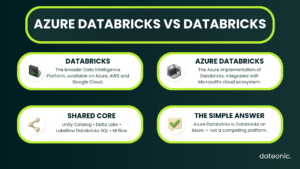
Azure Databricks is Databricks running as a first-party service on Microsoft Azure. It is not a separate analytics platform competing with a generic, cloud-agnostic or on-premises version of Databricks.
The phrase “Azure Databricks vs Databricks” is therefore slightly misleading. It usually compares:
-
Azure Databricks, the Azure-hosted service, with
-
the broader Databricks Data Intelligence Platform, or sometimes with Databricks deployed on another supported cloud.
The platform’s core products remain recognizably Databricks. What changes is the surrounding cloud integration: identity, object storage, networking, private connectivity, available infrastructure, regional feature coverage, procurement, and billing.
For a detailed comparison with the AWS deployment, read Databricks on Azure vs AWS.
What does “Databricks” mean?
Depending on context, “Databricks” can refer to three different things:
-
Databricks the company, which develops and operates the platform.
-
The Databricks Data Intelligence Platform, including products and technologies such as Unity Catalog, Delta Lake, Lakeflow, Databricks SQL, MLflow, notebooks, and AI capabilities.
-
A cloud-specific Databricks deployment, such as Azure Databricks or Databricks on AWS.
This ambiguity causes many inaccurate comparisons. Azure Databricks should not be placed in one column and an undefined “Databricks” product in another.
A meaningful comparison needs a named alternative, such as Databricks on AWS, and a specific concern, such as identity or private networking.
What is Azure Databricks?
Microsoft defines Azure Databricks as a unified platform for building, deploying, sharing, and maintaining enterprise data, analytics, and AI solutions.
It integrates the Databricks platform with storage and security in the customer’s Azure environment.
As a Microsoft first-party service, Azure Databricks is:
-
provisioned and governed as part of an Azure environment;
-
integrated with Microsoft Entra ID;
-
commonly connected to Azure Data Lake Storage Gen2;
-
compatible with Azure networking constructs such as VNets and Azure Private Link;
-
billed and supported through Microsoft;
-
integrated with services across the Microsoft data and AI ecosystem.
These integrations affect deployment and operations. They do not turn Azure Databricks into a fundamentally different lakehouse engine.
What stays the same across Databricks clouds?
The common platform layer includes many of the concepts teams use every day:
| Platform area | Shared Databricks concept |
|---|---|
| Data storage format | Delta Lake |
| Governance | Unity Catalog |
| Data engineering and orchestration | Lakeflow and jobs |
| SQL analytics | Databricks SQL |
| Data science and machine learning | MLflow and Databricks ML capabilities |
| Development | Notebooks, Git integration, APIs, CLI, and deployment tooling |
| Compute optimization | Databricks Runtime and Photon |
| Collaboration and sharing | Platform sharing and collaboration features, subject to availability |
This common layer is why teams can reuse much of their Databricks knowledge, SQL, Python, governance concepts, and workload design across clouds.
However, “shared platform” does not mean every feature appears in every region on the same date. Databricks maintains separate regional availability documentation, and cloud-specific integrations can have different prerequisites.
What changes on Azure?
The largest differences sit below and around the Databricks workspace.
1. Identity
Azure Databricks integrates directly with Microsoft Entra ID (formerly Azure Active Directory). Users, groups, and service principals can be managed at the Databricks account level and assigned to workspaces.
Current guidance recommends automatic identity management for synchronizing supported Entra identities and group membership.
Inside the platform, Databricks permissions and Unity Catalog privileges still apply. An Azure role assignment alone does not grant access to a Unity Catalog table.
2. Cloud-resource authentication
Azure workloads often use managed identities to access Azure resources without storing client secrets. For Unity Catalog storage, Databricks recommends an Access Connector for Azure Databricks with a managed identity.
That identity receives access to the required ADLS container, while Unity Catalog governs use of the storage credential and external location.
This is an Azure-specific implementation of a common Databricks governance pattern. On another cloud, the storage credential references that cloud’s identity mechanism instead.
3. Storage
Azure Databricks commonly uses ADLS Gen2 for managed or external data.
Table semantics can remain consistent because Delta Lake and Unity Catalog sit above the object store, but storage paths, permissions, firewall rules, encryption integration, and private endpoints are Azure-specific.
4. Networking
Classic Azure Databricks compute runs on resources in the customer’s Azure subscription. When deeper network control is required, VNet injection can place those resources in a customer-managed VNet.
Serverless compute uses a different boundary: the compute runs in a Databricks-managed serverless compute plane, and connectivity to protected Azure resources is configured through supported serverless network controls.
This classic-versus-serverless distinction is more important than saying that one cloud version is “more managed” than another.
5. Private connectivity
Azure Private Link can address different paths, including private user access to the workspace, classic compute connectivity to control-plane services, and serverless connectivity to supported Azure resources. These paths require separate design decisions; enabling one private endpoint does not automatically privatize the entire platform.
6. Billing and support
Azure Databricks is billed as an Azure first-party service and supported through Microsoft. For classic compute, the bill also includes the Azure infrastructure used by the workload. Serverless pricing includes the managed compute component in the relevant serverless SKU, while storage, networking, data transfer, and connected services can still add cost.
Current prices should be checked on the official Azure Databricks pricing page. Copying a narrow DBU price range into an evergreen comparison is likely to create stale or misleading guidance.
Is Databricks cloud-agnostic?
The best answer is: the platform is multi-cloud, but every deployment is cloud-specific.
Databricks workspaces are hosted on supported cloud infrastructure. Databricks is not a separate on-premises distribution that can be installed next to Azure Databricks for a direct comparison.
A cloud-hosted workspace can connect privately to on-premises systems, but that is a hybrid network architecture, not an on-premises Databricks deployment.
Many workload assets are portable in principle:
-
SQL and Python transformation logic;
-
Delta table semantics;
-
Unity Catalog concepts;
-
notebook and job patterns;
-
MLflow-based lifecycle practices.
The surrounding infrastructure is not automatically portable:
-
abfss://,s3://, and other cloud paths; -
managed identities, service principals, and IAM roles;
-
private endpoints and routing;
-
cloud-specific Terraform or deployment resources;
-
encryption-key integrations;
-
regional feature and instance availability;
-
cloud billing and support contracts.
A move between clouds should therefore be treated as a platform migration, even if application code changes are limited.
Is Azure Databricks more managed than Databricks elsewhere?
Not as a general rule.
Databricks operates a managed control plane on its supported clouds. Classic compute places workload infrastructure in the customer’s cloud account or subscription, while serverless compute moves more infrastructure management into a Databricks-managed compute plane.
Azure’s first-party integration can reduce friction for an Azure-standardized organization, especially around Entra ID, Azure procurement, and native resource administration. That is different from saying that non-Azure Databricks is an unmanaged product.
Are Unity Catalog, Delta Lake, and MLflow Azure features?
No. They are Databricks platform technologies available across supported cloud deployments, subject to product, plan, and regional requirements.
Their integration with cloud resources is provider-specific. For example, Unity Catalog may use an Azure managed identity for ADLS access or an AWS IAM role for S3 access, but the Unity Catalog governance model remains recognizably the same.
When does Azure Databricks make the most sense?
Azure Databricks is usually the most natural choice when:
-
the organization is standardized on Azure;
-
Microsoft Entra ID is the authoritative identity system;
-
governed data already resides in ADLS Gen2;
-
the network team operates VNets, Azure Private Link, ExpressRoute, and Azure-native security controls;
-
Power BI and other Microsoft services are important downstream consumers;
-
Azure billing, support, and commercial commitments simplify procurement.
If the organization’s data, identity, networking, and commercial model already sit primarily on AWS, the more useful decision is not “Azure Databricks or Databricks.” It is a concrete Databricks on Azure vs AWS architecture assessment.
Frequently asked questions
Is Azure Databricks owned by Microsoft?
Azure Databricks is a Microsoft first-party Azure service developed and operated through the Microsoft–Databricks partnership. Databricks remains the company behind the Databricks Data Intelligence Platform.
Is Azure Databricks a separate product?
It is a cloud-specific service offering of the Databricks platform. The core platform is shared, while identity, storage, networking, regional infrastructure, procurement, and support are integrated with Azure.
Can Azure Databricks run on AWS?
No. “Azure Databricks” specifically refers to the Azure service. The corresponding AWS deployment is called Databricks on AWS.
Can Databricks run on-premises?
The managed Databricks workspace is cloud-hosted. It can connect to on-premises data sources and networks, but that does not make it an on-premises Databricks installation.
Are Azure Databricks features identical to Databricks on AWS?
The core platform is closely aligned, but feature rollout, regional availability, networking options, cloud integrations, infrastructure choices, plan names, and pricing can differ. Validate the exact workload and target region rather than relying on a generic feature list.
Conclusion
Azure Databricks is not an alternative to Databricks. It is the Azure implementation of the Databricks platform, with Microsoft-native identity, storage, networking, billing, and support.
The distinction matters because cloud integration determines how the platform is secured, connected, operated, and paid for. For day-to-day data engineering, analytics, governance, and AI work, the shared Databricks platform remains the more important layer.
Need help turning that distinction into a production architecture? Explore Dateonic’s Databricks consulting services or contact our team