
Moving machine learning models from the discovery phase into production requires more than capable algorithms; it demands a rigorous data engineering foundation. Legacy data warehouses often bottleneck this process due to fragmented pipelines, poor scalability, and a lack of strict governance.
The Medallion architecture on the Databricks Lakehouse solves this by providing a structured, multi-hop framework that progressively refines data quality, enabling scalable analytics and reliable MLOps.
What is the Medallion Architecture in Databricks?
The Medallion architecture is a data design pattern used to logically organize data in a Lakehouse environment. It relies on an ELT (Extract, Load, Transform) approach rather than traditional ETL. Data flows through distinct stages, progressively improving in structure and quality.
This architecture ensures that data pipelines are modular, making it easier to manage access controls, debug errors, and decouple raw data ingestion from downstream analytics.
The Three Layers: Bronze, Silver, and Gold Explained
Each layer in the Medallion architecture serves a specific purpose, catering to different users and constraints within an enterprise ecosystem.
| Layer | State | Primary Purpose | Key Users |
|---|---|---|---|
| Bronze | Raw / Immutable | Ingestion, historical preservation, audit trails | Data Engineers |
| Silver | Cleaned / Conformed | Data quality, standardization, joining sources | Data Scientists, Data Engineers |
| Gold | Curated / Aggregated | Business logic, BI dashboards, ML feature stores | Business Analysts, ML Models |
Bronze Layer (Raw Data Ingestion)
The Bronze layer is the landing zone for all external data. Data here maintains the exact state of the source systems (e.g., JSON files, Kafka streams, CRM exports). This layer is critical for establishing a verifiable audit trail and full data lineage.
Keeping Bronze unmodified allows data engineers to seamlessly replay pipelines and reprocess data if transformation logic in the Silver layer changes.
Note on Immutability: While Bronze is designed to be an append-only store, privacy regulations (e.g., GDPR “Right to be Forgotten” or CCPA) may require targeted hard-deletions using Delta Lake’s DELETE commands.
Silver Layer (Cleaned & Conformed Data)
The Silver layer acts as the enterprise’s single source of truth. Data ingested from the Bronze layer is cleansed, filtered, and transformed into a conformed schema. This stage handles data quality enforcement, schema drift detection, referential integrity, and deduplication.
Silver tables provide a reliable, general-purpose foundation for downstream predictive analytics, data science workflows, and ad-hoc querying.
Gold Layer (Curated Business & ML Data)
The Gold layer delivers highly specialized, aggregated, and denormalized data optimized for read-heavy workloads. This layer is structured around specific business use cases, feeding directly into BI dashboards, reporting tools, and machine learning feature stores.
By pre-calculating metrics and joining necessary dimensions, Gold tables ensure sub-second query responses and provide reliable inputs for production machine learning models.
Real-World Example: Implementing Medallion Architecture
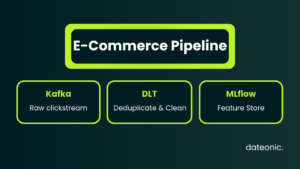
To illustrate this workflow, consider a practical Databricks Bronze, Silver, and Gold example. In this scenario, an enterprise e-commerce platform processes 40 million daily event messages.
- Bronze: Raw clickstream data streams from Apache Kafka. Using Spark Structured Streaming, the payload is written directly into Delta tables in its original JSON format, alongside metadata such as ingestion timestamps.
- Silver: A Delta Live Tables (DLT) pipeline unpacks the JSON payloads. It drops corrupt records, standardizes column names, converts timestamps to UTC, and joins the stream with a static customer dimensions table. Deduplication logic ensures each transaction is recorded only once.
- Gold: The conformed Silver data is aggregated to calculate daily revenue per product category and moving averages of user session lengths. These denormalized Gold tables serve as direct inputs for a recommendation engine feature store managed by MLflow, as well as a highly responsive executive dashboard.
To establish engineering standards, a Data Engineer might define the Silver pipeline declaratively using Python and DLT:
import dlt
from pyspark.sql.functions import col, current_timestamp
@dlt.table(
name=”silver_clickstream”,
comment=”Cleaned and conformed clickstream data filtered from Bronze.”
)
def clickstream_silver():
return (
dlt.read_stream(“bronze_clickstream”)
.filter(col(“payload”).isNotNull())
.withColumn(“processed_at”, current_timestamp())
.dropDuplicates([“transaction_id”])
)
Why Medallion Architecture is Essential for Production AI
“Magic” AI results do not exist without a rigorous data engineering foundation. As an Official Databricks Consulting Partner, Dateonic focuses on transitioning AI initiatives from isolated experiments into reliable, production-grade systems. The Medallion architecture is mandatory for this transition.
By structuring data into progressive layers, organizations can enforce strict data governance. Unity Catalog integration applies granular access controls across external data lakes (S3/ADLS) and managed Delta tables.
This allows data teams to implement explicit access policies – for instance, executing GRANT SELECT ON SCHEMA silver TO data_scientists; ensuring data science teams have access to the conformed data they need for training, while sensitive PII isolated in the Bronze layer remains locked down.
Ultimately, this architecture supports structured MLOps by providing the consistent, versioned data required for both model training and live inference.
Best Practices for Databricks Lakehouse Implementation
When building multi-hop architectures, consider these engineering best practices:
- Automate Pipeline Management: Use tools like Delta Live Tables (DLT) or Databricks Asset Bundles (DABs) to manage dependencies between layers, automate infrastructure scaling, and natively handle data quality expectations.
- Optimize Cluster Compute: Separate ingestion workloads from heavy Silver transformations. Use automated Databricks job clusters for scheduled pipelines rather than expensive, all-purpose interactive clusters.
- Manage Storage Costs: Storing data across three distinct layers multiplies overall storage footprints. Implement aggressive data retention policies on Bronze tables and use Delta Lake’s OPTIMIZE and ZORDER commands to keep query costs low in downstream layers. For more on this, review our Technical Blog for deep-dive tutorials on Delta Lake optimization.
- Avoid Over-Engineering: Not every pipeline requires a strict three-hop structure. If a simple dataset requires minimal transformation before reporting, a two-hop pipeline may suffice.
FAQ
Does Medallion architecture replace ETL?
It shifts the paradigm from traditional ETL to ELT. Data is loaded into the Lakehouse (Bronze) before significant transformations occur (Silver and Gold), leveraging the distributed compute power of Apache Spark.
Can Data Scientists access the Bronze layer?
Typically, no. Data scientists should query the Silver layer, which provides cleaned, joined, and reliable data. Bronze access is generally restricted to Data Engineers for auditing and pipeline debugging.
How does Unity Catalog work with the Medallion architecture?
Unity Catalog provides centralized governance, auditing, and fine-grained access control across all Delta tables in the Bronze, Silver, and Gold layers, unifying access across external data lakes and managed storage.
Ready to modernize your data infrastructure and build production-ready AI? Talk to a Databricks expert at Dateonic today.