
Change Data Capture (CDC) is a foundational pattern for building efficient, event-driven data pipelines. Instead of reprocessing entire datasets, CDC enables systems to respond precisely to inserts, updates, and deletes—often in real time.
In this guide, I demonstrate how to implement CDC using Databricks’ Delta Live Tables (DLT)—a declarative framework designed to simplify complex data engineering workflows.
You’ll see how to ingest change events, apply them reliably to target tables, validate data quality, and build derived views for real-time analytics.
What Is Change Data Capture (CDC)?
Change Data Capture (CDC) is a data integration pattern that:
- Identifies and captures changes made to data in a source system
- Delivers those changes to a target system in real time or near real time
- Processes only the modified records, not entire datasets
Instead of reprocessing everything, CDC focuses on changes such as:
- Insertions
- Updates
- Deletions
How does CDC work?
CDC mechanisms typically rely on:
- 🔹 Database transaction log monitoring
- 🔹 Timestamps or version tracking
- 🔹 Triggers that detect data modifications
When a change is detected, CDC systems capture:
- The type of operation (insert, update, delete)
- The timestamp of the change
- (Optionally) the user or process that made the change
- The before and after values of the changed data
In a retail system, when a customer updates their shipping address:
- CDC captures an update to the customer record
- It records which fields changed, when, and what the old and new values were
Why CDC Matters for Data Engineering
Change Data Capture has become increasingly crucial in modern data engineering for several compelling reasons:
- Real-time data synchronization: CDC enables near-instantaneous data replication between systems, keeping data warehouses and data lakes current without waiting for batch processing windows.
- Reduced processing load: By processing only changed data rather than entire datasets, CDC significantly decreases computational requirements and costs.
- Historical change tracking: CDC creates an audit trail of modifications, allowing organizations to understand how data has evolved over time—critical for compliance and analytics.
- Microservices support: In distributed architectures, CDC facilitates event-driven communication between services, enabling systems to react immediately to data changes.
- Stream processing integration: CDC feeds change events directly into stream processing frameworks, powering real-time analytics and decision-making.
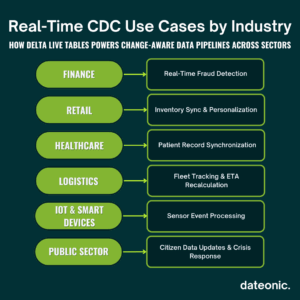
Common use cases include:
- Financial fraud detection systems that need immediate notification when unusual account activities occur
- E-commerce platforms updating inventory and fulfillment systems as orders are placed
- Healthcare systems synchronizing patient records across multiple applications
- IoT applications responding to sensor data changes in real-time
Implementing CDC with Delta Live Tables (DLT)
Delta Live Tables (DLT) represents Databricks’ solution for building reliable, maintainable data pipelines with declarative code. When it comes to CDC implementation, DLT offers powerful capabilities that simplify capturing and processing change data.
Let’s walk through implementing CDC with Delta Live Tables:
Step 1: Setting Up Your DLT Environment
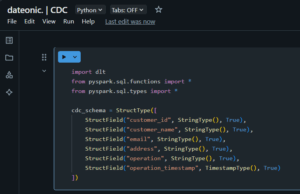
First, we need to create a DLT pipeline in Databricks. Here’s how we can initialize our pipeline:
import dlt
from pyspark.sql.functions import *
from pyspark.sql.types import *
# Define source schema for our CDC data
cdc_schema = StructType([
StructField(„customer_id”, StringType(), True),
StructField(„customer_name”, StringType(), True),
StructField(„email”, StringType(), True),
StructField(„address”, StringType(), True),
StructField(„operation”, StringType(), True),
StructField(„operation_timestamp”, TimestampType(), True)
])
Step 2: Reading CDC Source Data
In this example, we’ll assume CDC data is coming from a source system that provides change events in JSON format:
@dlt.table(
comment=”Raw CDC data from customer database”
)
def customer_cdc_raw():
return (
spark.readStream
.format(„cloudFiles”)
.option(„cloudFiles.format”, „json”)
.schema(cdc_schema)
.load(„/path/to/cdc/data”)
)

Step 3: Processing CDC Events
Now, let’s process the CDC events to apply changes to our target table:
@dlt.table(
comment=”Processed customer data with latest changes applied”
)
def customers_current():
# Read the CDC data
cdc_data = dlt.read(„customer_cdc_raw”)
# Apply CDC operations using APPLY CHANGES INTO pattern
return dlt.apply_changes(
target = „customers_current”,
source = cdc_data,
keys = [„customer_id”],
sequence_by = „operation_timestamp”,
apply_as_deletes = expr(„operation = 'DELETE'”),
except_column_list = [„operation”, „operation_timestamp”]
)

The apply_changes function is the magic behind CDC processing in DLT. It:
- Takes the CDC events from our source
- Uses customer_id as the unique key to identify records
- Orders changes by the operation_timestamp to ensure they’re applied in the correct sequence
- Identifies delete operations based on the „operation” field
- Excludes metadata columns from the final table
Step 4: Creating Aggregated Views from CDC Data
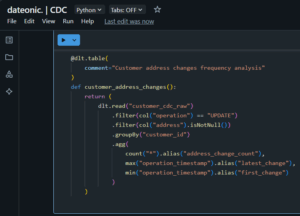
We can also create derived tables that aggregate or transform the CDC data:
@dlt.table(
comment=”Customer address changes frequency analysis”
)
def customer_address_changes():
return (
dlt.read(„customer_cdc_raw”)
.filter(col(„operation”) == „UPDATE”)
.filter(col(„address”).isNotNull())
.groupBy(„customer_id”)
.agg(
count(„*”).alias(„address_change_count”),
max(„operation_timestamp”).alias(„latest_change”),
min(„operation_timestamp”).alias(„first_change”)
)
)
Step 5: Monitoring CDC Pipeline Health
Finally, we’ll add data quality expectations to ensure our CDC pipeline remains healthy:
@dlt.table(
comment=”Validated customer data with quality checks”,
table_properties={
„delta.enableChangeDataFeed”: „true”
}
)
@dlt.expect_or_drop(„valid_email”, „email IS NULL OR email LIKE '%@%.%'”)
@dlt.expect(„valid_id”, „customer_id IS NOT NULL”)
def customers_validated():
return dlt.read(„customers_current”)
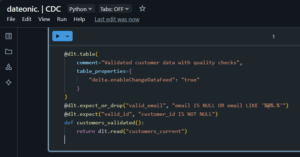
The delta.enableChangeDataFeed property enables Databricks’ native Change Data Feed feature on this table, allowing downstream processes to capture changes from this table as well, creating a cascading CDC pattern.
| Feature / Capability | Traditional CDC (e.g., ETL scripts, triggers) | Delta Live Tables (DLT) in Databricks |
|---|---|---|
| Implementation Complexity | High – requires custom logic and scripts | Low – uses declarative apply_changes function |
| Real-Time Processing Support | Limited or custom streaming needed | Built-in support with structured streaming |
| Schema Evolution Handling | Manual and error-prone | Automatic and seamless |
| Data Quality Enforcement | External tooling required | Native support via @dlt.expect and expectations |
| Operational Reliability | Depends on custom error handling | Built-in fault tolerance and recovery |
| Auditability & Lineage | Requires manual tracking/logging | Automatic metadata and lineage tracking |
| Integration with Medallion Architecture | Not inherently compatible | Natively designed for layered architecture |
| Scaling & Performance Optimization | Requires tuning and batch jobs | Automatically optimized for incremental updates |
| Governance & Security Integration | Manual configuration with limited visibility | Unity Catalog + Delta Lake + DLT = full coverage |
| Maintenance Overhead | High – frequent manual updates | Low – managed pipelines with version control |
Benefits of CDC with Delta Live Tables
Delta Live Tables offers several distinct advantages for implementing CDC compared to traditional approaches:
- Declarative syntax: DLT’s declarative approach simplifies CDC implementation through functions like apply_changes, hiding the complexity of merging and update logic.
- End-to-end data quality: Built-in data quality checks through expectations ensure that change data meets required standards before being applied.
- Automatic schema evolution: DLT handles schema changes gracefully, reducing maintenance overhead as source systems evolve.
- Integrated metadata tracking: Each change is tracked with rich metadata, providing complete lineage and auditability of data transformations.
- Incremental processing: DLT processes only new or changed data automatically, optimizing performance and reducing costs.
- Simplified error handling: The framework provides built-in mechanisms for handling errors in CDC streams, with options for quarantining problematic records.
- Native compatibility with Delta Lake: CDC operations leverage Delta Lake’s ACID transactions, ensuring consistency even during failures.
Unlike custom-built CDC solutions that often require complex code and manual optimization, DLT provides a production-ready framework that scales automatically with your data volume while maintaining performance and reliability.
What’s Next?
Now that you understand the fundamentals of implementing CDC with Delta Live Tables, consider exploring these related topics to deepen your knowledge:
- What is Medallion Architecture in Databricks and How to Implement It – Learn how CDC fits within the broader medallion architecture pattern
- What Are Workflows in Databricks and How Do They Work – Discover how to orchestrate CDC pipelines with Databricks Workflows
- What is Change Data Feed (CDF) and How Databricks Helps with Its Implementation – Explore Databricks’ native Change Data Feed capabilities
- Databricks Unity Catalog Governance: 3 Proven Techniques – Learn how to govern CDC data with Unity Catalog
Ready to Transform Your Data Engineering with CDC?
Implementing Change Data Capture with Delta Live Tables can dramatically improve your data architecture’s efficiency, reliability, and responsiveness. Our team of Databricks experts can help you design and implement CDC solutions tailored to your specific business needs.
Contact us today to discover how we can help you leverage the full power of Databricks’ CDC capabilities to drive real-time insights and applications for your organization.