
Change Data Capture (CDC) keeps analytical data synchronized with operational systems by processing inserts, updates, and deletes instead of repeatedly reloading entire tables.
In Databricks, the recommended declarative approach is now AUTO CDC in Lakeflow Spark Declarative Pipelines.
This terminology matters because the product and its APIs have changed:
- Delta Live Tables (DLT) is now Lakeflow Spark Declarative Pipelines, commonly shortened to Lakeflow pipelines in the current Databricks documentation.
- The SQL
APPLY CHANGES INTOAPI has been replaced byAUTO CDC INTO. - The Python
dlt.apply_changes()function has been replaced bydp.create_auto_cdc_flow().
The legacy names remain available, and existing DLT code does not require an immediate migration. However, Databricks recommends using the new names for new development and when modernizing existing pipelines.
In this guide, I use the current API throughout and explains the old terminology only where it helps with migration.
What Is Change Data Capture?
Change Data Capture is a data integration pattern that records row-level changes in a source system and delivers them to downstream systems. A typical change event contains:
- The business key identifying the affected record
- The operation type, such as
INSERT,UPDATE, orDELETE - The values associated with the change
- A sequence number, log position, or timestamp that determines the correct event order
For example, when a customer changes their address, the CDC feed emits an update event for that customer. Databricks can process that event without scanning and rewriting the complete customer table.
CDC is useful when teams need:
- Incremental replication from operational databases to a lakehouse
- Low-latency analytical tables
- Reduced compute and source-system load
- A current-state replica of operational data
- Historical tracking for audits and point-in-time analysis
The source can be a relational database CDC feed produced through tools such as Debezium, Oracle GoldenGate, AWS DMS, or another replication service. It can also be a Delta table with Change Data Feed enabled.
CDC, Change Data Feed, and AUTO CDC Are Not the Same Thing
These terms are related, but they describe different layers of the solution.
| Term | What it means | Typical role |
|---|---|---|
| Change Data Capture (CDC) | The general integration pattern for capturing inserts, updates, and deletes | Moves source-system changes downstream |
| Delta Change Data Feed (CDF) | A Delta Lake table feature that exposes row-level changes between table versions | Provides a change feed from a Delta table |
| AUTO CDC | A Lakeflow pipelines flow that applies an ordered change feed to a target streaming table | Builds and maintains SCD Type 1 or Type 2 tables |
In other words, CDF can be an input to AUTO CDC, but AUTO CDC is not another name for CDF. If you need a deeper explanation of Delta table change history, see our guide to Databricks Change Data Feed.
What Replaced Delta Live Tables?
Delta Live Tables was renamed and incorporated into the current Lakeflow pipeline experience. The modern Python interface is the pyspark.pipelines module, usually imported as dp.
| Earlier DLT terminology | Current Lakeflow pipelines terminology |
|---|---|
| Delta Live Tables (DLT) | Lakeflow Spark Declarative Pipelines / Lakeflow pipelines |
| import dlt | from pyspark import pipelines as dp |
| @dlt.table with a streaming DataFrame | @dp.table |
| @dlt.table with a batch DataFrame | @dp.materialized_view |
| @dlt.view | @dp.temporary_view |
| dlt.apply_changes() | dp.create_auto_cdc_flow() |
| APPLY CHANGES INTO | AUTO CDC INTO |
Lakeflow pipelines remain declarative: engineers define datasets, data-quality rules, and flows, while the platform resolves dependencies and execution order.
The Databricks implementation extends the open-source Apache Spark Declarative Pipelines framework with managed capabilities including AUTO CDC, expectations, and a queryable event log.
That last distinction is important. Although the pyspark.pipelines authoring model is shared with Apache Spark, AUTO CDC is a Databricks Lakeflow capability and is not available in open-source Apache Spark Declarative Pipelines.
How AUTO CDC Works
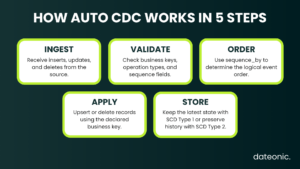
An AUTO CDC flow takes a stream of change events and applies them to a target streaming table. You declare:
- The source containing CDC events
- One or more keys that uniquely identify a record
- A sequencing column that defines the logical order of events
- Conditions that identify deletes or, when appropriate, truncates
- Whether the target should use SCD Type 1 or SCD Type 2 semantics
Lakeflow pipelines then handles the upserts, deletes, ordering, and state required to keep the target correct. This avoids hand-written MERGE, windowing, and deduplication logic for a common CDC pattern.
The sequencing column is critical. It must be sortable, non-null, and represent the correct source order. There should be only one event per key at a given sequence value. When a timestamp alone is not sufficiently unique, use a STRUCT, such as struct("operation_timestamp", "source_sequence"), to add a deterministic tie-breaker.
To use the CDC APIs, the pipeline must run on serverless Lakeflow pipelines or the Pro or Advanced pipeline edition. The target must be declared as a streaming table before the AUTO CDC flow is created.
Implementing AUTO CDC in Python
The following example ingests customer change events from JSON files, validates the stream, and maintains a current-state customer table.
Step 1: Define the CDC source schema
from pyspark import pipelines as dp
from pyspark.sql.functions import col, expr
from pyspark.sql.types import (
    LongType,
    StringType,
    StructField,
    StructType,
    TimestampType,
)

cdc_schema = StructType([
    StructField("customer_id", StringType(), False),
    StructField("customer_name", StringType(), True),
    StructField("email", StringType(), True),
    StructField("address", StringType(), True),
    StructField("operation", StringType(), False),
    StructField("operation_timestamp", TimestampType(), False),
    StructField("source_sequence", LongType(), False),
])
The example uses source_sequence as the authoritative ordering field. In a production pipeline, this might be a database log sequence number, transaction position, or another monotonically increasing value supplied by the source system.
Step 2: Ingest changes incrementally with Auto Loader
@dp.table(
    name="customer_cdc_raw",
    comment="Raw customer CDC events ingested from cloud storage",
)
def customer_cdc_raw():
    return (
        spark.readStream
        .format("cloudFiles")
        .option("cloudFiles.format", "json")
        .schema(cdc_schema)
        .load("/Volumes/main/cdc/raw/customer_changes")
    )
Auto Loader incrementally processes new files as they arrive. For Unity Catalog-enabled pipelines, use a Unity Catalog volume or a governed external location instead of an unmanaged workspace path.
Step 3: Validate the change stream
The business key, operation, and sequence fields control how changes are applied. Invalid values should not reach the target table.
@dp.table(
    name="customer_cdc_clean",
    comment="Validated customer CDC events",
)
@dp.expect_or_drop("valid_customer_id", "customer_id IS NOT NULL")
@dp.expect_or_drop(
    "valid_operation",
    "operation IN ('INSERT', 'UPDATE', 'DELETE')",
)
@dp.expect_or_drop("valid_sequence", "source_sequence IS NOT NULL")
def customer_cdc_clean():
    return spark.readStream.table("customer_cdc_raw")
Expectations make data-quality rules part of the pipeline definition and expose their results in pipeline monitoring. Depending on the business case, invalid events can be dropped, retained with metrics, or routed to a quarantine pattern for investigation.
Step 4: Create the target and apply AUTO CDC
dp.create_streaming_table(
    name="customers_current",
    comment="Latest valid state of every customer",
)

dp.create_auto_cdc_flow(
    target="customers_current",
    source="customer_cdc_clean",
    keys=["customer_id"],
    sequence_by=col("source_sequence"),
    apply_as_deletes=expr("operation = 'DELETE'"),
    except_column_list=["operation", "source_sequence"],
    stored_as_scd_type=1,
)
This flow:
- Matches incoming events to target rows using
customer_id - Applies events according to
source_sequence, even if they arrive out of order - Treats
INSERTandUPDATEevents as upserts - Removes a customer from the current-state result when the event is a
DELETE - Excludes operational metadata that is not needed in the target
- Stores only the latest version of each customer because it uses SCD Type 1
The target and the CDC flow are separate declarations. dp.create_auto_cdc_flow() does not return a DataFrame and should not be returned from a function decorated with @dp.table.
AUTO CDC in SQL
The same current-state flow can be expressed with AUTO CDC INTO:
CREATE OR REFRESH STREAMING TABLE customers_current;

CREATE FLOW customers_current_cdc AS AUTO CDC INTO
  customers_current
FROM
  stream(customer_cdc_clean)
KEYS
  (customer_id)
APPLY AS DELETE WHEN
  operation = 'DELETE'
SEQUENCE BY
  source_sequence
COLUMNS * EXCEPT
  (operation, source_sequence)
STORED AS
  SCD TYPE 1;
AUTO CDC INTO replaces the earlier APPLY CHANGES INTO name. The legacy syntax is still available, but new and updated code should use AUTO CDC.
SCD Type 1 vs SCD Type 2
AUTO CDC supports the two most common slowly changing dimension patterns.
| Mode | Result | Use it when |
|---|---|---|
| SCD Type 1 | Overwrites the previous state and keeps one current row per key | Only the latest state matters |
| SCD Type 2 | Creates successive versions and preserves history | Auditing, point-in-time analysis, or historical reporting is required |
To create a historical customer table in Python, declare another target and change stored_as_scd_type to 2:
dp.create_streaming_table(
    name="customers_history",
    comment="Historical customer records maintained as SCD Type 2",
)

dp.create_auto_cdc_flow(
    target="customers_history",
    source="customer_cdc_clean",
    keys=["customer_id"],
    sequence_by=col("source_sequence"),
    apply_as_deletes=expr("operation = 'DELETE'"),
    except_column_list=["operation", "source_sequence"],
    stored_as_scd_type=2,
)
For SCD Type 2 targets, Lakeflow pipelines adds __START_AT and __END_AT columns to describe when each version was valid. The current version has __END_AT = NULL.
You can also use track_history_column_list or track_history_except_column_list when only selected attributes should create a new historical version.
What If the Source Provides Only Snapshots?
Not every source system exposes a CDC feed. Some legacy applications provide only periodic full-table exports. In that case, use AUTO CDC FROM SNAPSHOT rather than pretending each snapshot is a stream of row-level changes.
dp.create_streaming_table("customers_from_snapshots")

dp.create_auto_cdc_from_snapshot_flow(
    target="customers_from_snapshots",
    source="latest_customer_snapshot",
    keys=["customer_id"],
    stored_as_scd_type=1,
)
The API compares consecutive snapshots, infers inserts, updates, and deletes, and then applies SCD Type 1 or Type 2 logic. It is available only in the Python pipeline interface.
For historical files, the source can also be a Python function that returns the next snapshot DataFrame together with its version.
Snapshot-based CDC has an unavoidable limitation: it can detect only the differences between snapshots. If a value changes several times between two daily exports, the intermediate states are not available.
Production Considerations for Databricks CDC
Use a deterministic sequence
Do not assume file arrival order is event order. Auto Loader does not guarantee that files are processed in the order in which the source created them. Use a source log position or another deterministic sequence, and add a tie-breaker with struct() if required.
Define partial-update semantics explicitly
By default, ignore_null_updates=False, so an incoming NULL overwrites the existing target value. If the source emits only changed columns and uses NULL to mean “not provided,” configure ignore_null_updates or the more granular column options deliberately.
Do not enable it automatically when an explicit NULL is a meaningful business update.
Retain delete tombstones long enough
To handle late or out-of-order events, AUTO CDC temporarily retains deleted rows as tombstones and filters them from the published result. The default tombstone retention is two days.
Set the pipelines.cdc.tombstoneGCThresholdInSeconds table property above the maximum expected delay between an event and its processing time.
Keep raw events for replay and audit
A bronze change-event table provides an immutable record that can be replayed when transformation logic changes or a target must be rebuilt. Retention should cover the organization’s recovery, audit, and compliance requirements.
Monitor both quality and change volume
Use expectations to monitor invalid keys, unsupported operation values, malformed records, and missing sequence fields.
AUTO CDC flows also expose num_upserted_rows and num_deleted_rows metrics for pipeline runs, which can help detect unusual source behavior.
Govern the complete path
Use Unity Catalog to control access to raw CDC data, curated target tables, external locations, and volumes. Raw events may contain historical personally identifiable information even after a record has been removed from the current-state table.
See our Databricks Unity Catalog governance guide for the wider governance model.
AUTO CDC vs Hand-Written MERGE Logic
Manual MERGE INTO remains useful for custom batch scenarios, but production CDC requires more than a single merge statement. Engineers must account for ordering, late events, deduplication, deletes, historical validity windows, retries, and incremental state.
AUTO CDC is a better fit when the workload follows a standard keyed change-feed pattern because the pipeline declares those semantics directly. It is especially useful when the same source must produce both a current-state SCD Type 1 table and a historical SCD Type 2 table.
For broader pipeline design, see our Databricks Medallion Architecture guide.
Frequently Asked Questions
Is Delta Live Tables deprecated?
Delta Live Tables has been renamed to Lakeflow pipelines. Existing DLT code continues to work, so there is no mandatory immediate migration.
Databricks nevertheless recommends moving from the dlt module to pyspark.pipelines and using the current API names when updating code.
What replaced APPLY CHANGES in Databricks?
In SQL, AUTO CDC INTO replaces APPLY CHANGES INTO. In Python, dp.create_auto_cdc_flow() replaces dlt.apply_changes(). The legacy APIs remain available and have the same core syntax, but the AUTO CDC names are recommended.
Does AUTO CDC support out-of-order events?
Yes. Lakeflow pipelines applies events according to the sequence_by field rather than ingestion order. The sequence must be deterministic, sortable, non-null, and unique for each update to a key at a given sequence value.
Is AUTO CDC the same as Delta Change Data Feed?
No. Delta Change Data Feed exposes row-level changes from a Delta table. AUTO CDC consumes a change feed and applies those events to a target streaming table using SCD Type 1 or Type 2 semantics.
Can AUTO CDC preserve full history?
Yes. Use stored_as_scd_type=2 in Python or STORED AS SCD TYPE 2 in SQL. The target then stores successive record versions with __START_AT and __END_AT validity fields.
Can Databricks create CDC when the source has no change feed?
Yes. AUTO CDC FROM SNAPSHOT compares consecutive full snapshots and infers inserts, updates, and deletes. It supports SCD Type 1 and Type 2, but it cannot recover intermediate changes that occurred between snapshots.
Build Reliable CDC Pipelines on Databricks
The current Databricks CDC pattern is straightforward: ingest and validate a streaming change feed, declare a target streaming table, and use AUTO CDC to apply changes in the correct order.
Choose SCD Type 1 for a current-state replica or SCD Type 2 when historical versions must be preserved.
For teams with older DLT implementations, the transition is mainly an API and terminology modernization rather than a forced platform migration.
Replacing import dlt, apply_changes(), and APPLY CHANGES INTO with the current Lakeflow pipelines names makes the implementation easier to understand and keeps it aligned with current Databricks guidance.
If you need help designing a production CDC architecture, modernizing DLT code, or implementing governed Lakeflow pipelines, explore Dateonic’s Databricks consulting services.