
Databricks is a unified platform for data engineering, machine learning, and analytics. As workloads grow in complexity, adopting DevOps practices becomes necessary for efficient collaboration and automation.
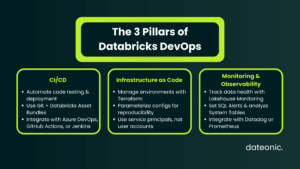
Implementing Continuous Integration/Continuous Deployment (CI/CD), Infrastructure as Code (IaC), and monitoring helps improve code quality and reduce deployment risks.
In this guide, I outline key Databricks DevOps best practices for building robust pipelines.
Understanding Databricks DevOps Fundamentals
In the context of Databricks, DevOps means combining development workflows with operational discipline for data engineering, machine learning, and analytics workloads. It moves teams away from manual notebook execution toward automated, version-controlled software delivery.
Key components of this approach include:
- Version Control: Using Git to manage all code, including notebooks and configurations.
- Automation: Implementing automated testing and deployment pipelines to reduce manual errors.
- Environment Isolation: strictly separating development, staging, and production environments.
For enterprises, the benefits are clear: faster release cycles, improved platform reliability, and cost optimization through better resource management. However, challenges remain, such as managing the differences between interactive notebooks and production jobs, or coordinating complex data pipelines across varied environments.
Databricks DevOps Best Practices for CI/CD
A robust CI/CD pipeline is the backbone of modern data operations. It ensures that changes to code and data pipelines are tested and deployed systematically.
One of the most significant recent advancements is Databricks Asset Bundles (DABs). DABs allow for the unified management of code, jobs, and infrastructure definitions using simple YAML files, streamlining the entire deployment process.
To implement effective CI/CD, consider these best practices:
- Implement Version Control: Store all notebooks, scripts, and job configurations in Git repositories. Use established branching strategies like Gitflow to manage changes effectively.
- Automate Testing: rigidly incorporate unit tests (using tools like pytest for Python or ScalaTest for Scala) and integration tests for all workflows before they reach production.
- Use Standard Tooling: Integrate with established CI/CD tools such as Azure DevOps, GitHub Actions, or Jenkins. Always use workload identity federation for secure, keyless authentication during these automated processes.
For workflows, larger teams should consider separate repositories for application code and infrastructure configurations to maintain granular access control, while smaller projects may benefit from a single-repo approach. Crucially, always maintain distinct workspaces for dev, staging, and prod to prevent untested changes from impacting production data.
Best Practices for Infrastructure as Code (IaC)
Infrastructure as Code (IaC) allows you to manage your Databricks environment with the same rigor as your application code. It is essential for reproducibility and disaster recovery.
The recommended approach is to define all resources programmatically. Tools like Terraform or AWS CloudFormation are standard for provisioning workspaces, clusters, and networking components.
- Utilize the Databricks Terraform Provider: This is the gold standard for managing Databricks resources alongside cloud-native resources like AWS S3 buckets, IAM roles, and VPCs.
- Parameterize Configurations: Never hardcode sensitive information or environment-specific settings. Use variables to manage differences (e.g., larger cluster sizes in production vs. development).
- Follow a Deployment Sequence: Start by provisioning the underlying cloud infrastructure (AWS/Azure/GCP), followed by Databricks Account API configurations (Unity Catalog, SSO), and finally Workspace API resources (clusters, jobs).
Best practices include modularizing your Terraform code into reusable components and always using service principals for execution to avoid tying infrastructure to individual user accounts.
Databricks Best Practices for Monitoring and Observability
Once pipelines are running, you need deep visibility into their performance and data health. Comprehensive monitoring goes beyond just checking if a job failed; it involves understanding data quality and system health.
Databricks provides powerful native tools for this:
- Lakehouse Monitoring: Use this to automatically profile data and track statistical properties, ensuring data quality and detecting drift over time.
- Alerting mechanisms: Implement Databricks SQL Alerts for condition-based notifications on varied metrics.
- System Tables: Leverage these for audit logging and tracking usage across the platform.
Key areas to monitor strictly include job performance (duration, failure rates), SQL warehouse utilization, and streaming query latency. For machine learning, monitoring inference tables is vital to detect model drift.
| Monitoring Area | Key Metric | What It Indicates | Recommended Tool |
|---|---|---|---|
| Jobs | Duration, Failure Rate | Pipeline stability | Databricks Jobs UI, System Tables |
| SQL Warehouses | Query latency, concurrency | Performance optimization | Databricks SQL Alerts |
| Streaming | Micro-batch duration, lag | Real-time data health | Structured Streaming Metrics |
| Data Quality | Null rates, schema drift | Data reliability | Lakehouse Monitoring |
| ML Models | Drift, prediction accuracy | Model performance | MLflow Model Registry |
For broader enterprise observability, integrate these Databricks metrics with external tools like Datadog, Prometheus, or AWS native services. This establishes a single pane of glass for your entire infrastructure.
Additional Databricks DevOps Best Practices
Beyond the core pillars of CI/CD, IaC, and monitoring, several other practices ensure a mature Databricks environment:
- Environment Management: strictly isolate dev, test, and production environments. This includes using separate storage accounts and leveraging the MLflow Model Registry to version and promote ML models safely across these stages.
- Security and Governance: Enforce secure configurations by validating your IaC templates before deployment. Continuously monitor access logs via system tables to ensure compliance.
- Cost Optimization: actively monitor quotas and cluster capacities. Automated deployments help reduce manual errors that often lead to resourcing waste (e.g., leaving interactive clusters running).
For those leveraging AI, integrating MLOps best practices ensures your models are as robust as your data pipelines.
Conclusion
Adopting these Databricks DevOps best practices for CI/CD, IaC, and monitoring is not just a technical upgrade – it is a strategic necessity for enterprises aiming for efficiency and reliability. By starting with official tooling like Databricks Asset Bundles and Terraform, your teams can build a solid foundation for scalable data operations.
For expert guidance on implementing these complex workflows and tailoring them to your specific enterprise needs, partner with Dateonic. Visit dateonic.com to learn more about our services.