
Databricks brings data engineering, analytics, machine learning, and AI workloads into one platform. However, for beginners, concepts such as workspaces, compute, Delta Lake, Unity Catalog, and Databricks Units can quickly become confusing.
You do not need to be a Spark expert to understand how the platform works. Before adopting Databricks, however, it is worth learning how its main components fit together, what the platform can be used for, and which decisions should be made before the first production workload is deployed.
This guide introduces the fundamentals of Databricks and explains how organizations can start using the platform without creating unnecessary technical debt.
What Is Databricks?
Databricks is a unified platform for building and managing data, analytics, and AI solutions. It integrates with cloud storage and infrastructure on Amazon Web Services, Microsoft Azure, and Google Cloud.
Organizations use Databricks to:
- ingest and transform large volumes of data;
- build ETL and streaming pipelines;
- create data warehouses and business intelligence solutions;
- develop and manage machine learning models;
- build generative AI applications and agents;
- govern access to data and AI assets.
Instead of maintaining separate platforms for data engineering, analytics, and machine learning, teams can work within a shared environment and use a common governance model.
What Is the Lakehouse Architecture?
Traditionally, enterprise data teams have relied on two types of systems.
Data warehouses provide structured, reliable data for reporting and business intelligence. Data lakes offer more flexible and scalable storage for raw, semi-structured, and unstructured data.
Using both often requires organizations to copy data between systems and maintain separate pipelines, permissions, and governance processes.
The Lakehouse architecture combines elements of both approaches. It provides the flexibility and scale of cloud object storage while adding capabilities normally associated with databases and data warehouses.
Delta Lake provides the storage foundation for many Databricks workloads. It extends Parquet files with a transaction log, enabling ACID transactions, scalable metadata handling, and more reliable batch and streaming operations.
How Does Databricks Work?
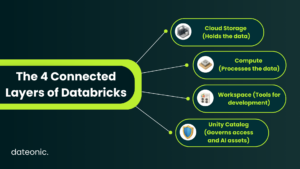
A Databricks environment can be understood as four connected layers:
- Cloud storage holds the organization’s data.
- Compute resources process that data.
- The Databricks workspace gives engineers, analysts, and data scientists tools for developing and managing workloads.
- Unity Catalog governs access to data and AI assets across the platform.
Separating storage from compute allows organizations to select different processing resources for different workloads. A scheduled ETL pipeline, an interactive notebook, and a business intelligence dashboard do not need to use the same compute configuration.
This flexibility is one of Databricks’ main advantages, but it also means that architecture and cost controls should be planned early.
Core Databricks Concepts for Beginners
| Concept | What it means |
|---|---|
| Workspace | The collaborative environment where teams access notebooks, jobs, pipelines, dashboards, data, and other Databricks resources. |
| Compute | The resources used to run data engineering, data science, machine learning, and analytics workloads. Databricks offers serverless compute, configurable classic compute, and SQL warehouses. |
| Notebook | An interactive document containing executable code, results, visualizations, and explanatory text. Databricks notebooks support Python, SQL, Scala, and R. |
| Delta Lake | An open-source storage layer that adds transactions, reliability, and scalable metadata management to data stored in Parquet files. |
| Unity Catalog | The governance layer used to manage permissions, auditing, data discovery, and lineage across data and AI assets. |
| SQL warehouse | Compute optimized for running SQL queries, dashboards, and data warehousing workloads. |
| Jobs and workflows | Tools for scheduling and orchestrating notebooks, scripts, pipelines, and other production tasks. |
| Databricks Unit | A normalized unit of processing capacity used to measure and price Databricks workloads. |
These terms describe different parts of the same system. A notebook contains the code, compute executes it, Delta Lake provides reliable tables, and Unity Catalog controls who can access the resulting assets.
A Simple Databricks Workflow
Consider a retailer that collects transactions from physical stores and an e-commerce platform.
A basic Databricks workflow could look like this:
- Raw transaction data is ingested from operational systems.
- The original records are stored in a Bronze layer.
- Invalid, duplicated, or incomplete records are cleaned in a Silver layer.
- Business-ready tables, such as daily revenue by store or product category, are created in a Gold layer.
- Analysts query the Gold tables through Databricks SQL.
- Data scientists use the same governed data to train forecasting models.
- Unity Catalog manages permissions and tracks how the data moves between tables, jobs, models, and dashboards.
This Bronze, Silver, and Gold structure is known as the Medallion Architecture. Each layer represents a higher level of data quality and business readiness.
The specific implementation will vary between organizations, but the general principle remains the same: ingest data once, improve its quality through controlled transformations, and make reliable datasets available for analytics and AI.
Why Do Organizations Adopt Databricks?
Companies usually start evaluating Databricks when their existing data platform becomes difficult to maintain or scale.
Legacy infrastructure requires too much maintenance
On-premise Hadoop environments and older data platforms often require substantial operational work. Infrastructure must be provisioned, upgraded, monitored, and scaled manually, even when workloads are inconsistent.
Databricks moves much of this infrastructure management to the cloud and allows teams to use compute when it is needed.
Data is fragmented between systems
Separate platforms for ingestion, warehousing, machine learning, and reporting create duplicated transformations and inconsistent security models.
A shared platform reduces unnecessary data movement and allows engineering, analytics, and AI teams to work with the same governed data.
Data pipelines are difficult to deploy reliably
A notebook that works during development is not automatically a production pipeline. Production workloads need testing, version control, monitoring, deployment automation, and clear ownership.
Databricks supports these engineering practices, but organizations still need to design and implement them correctly.
AI projects struggle to move beyond experimentation
Training a model or building a RAG prototype is only the beginning. Production systems require evaluation, monitoring, reproducibility, secure access to data, and reliable deployment processes.
For machine learning and generative AI workloads, MLflow provides tools for managing experiments, models, agents, evaluation, tracing, and monitoring.
How to Get Started with Databricks
A successful implementation should begin with a focused use case rather than a company-wide migration.
Step 1: Select the First Business Use Case
Start with a workload that has a clear owner and measurable outcome.
Good initial use cases might include:
- replacing a slow or unreliable ETL pipeline;
- consolidating data used across several reports;
- modernizing a legacy Hadoop workload;
- creating a governed analytics environment;
- deploying an existing machine learning model;
- building a controlled generative AI application.
The first project should be meaningful enough to demonstrate value but limited enough to deliver without redesigning the entire data estate.
Before selecting compute or writing pipelines, define:
- which data sources are involved;
- who will use the results;
- how frequently data must be updated;
- what security requirements apply;
- how success will be measured.
Without this information, architecture decisions are based on assumptions rather than workload requirements.
Step 2: Design the Cloud and Workspace Architecture
Databricks is available on AWS, Azure, and Google Cloud. The right setup depends on the organization’s existing infrastructure, identity provider, security requirements, and cloud strategy.
Teams must decide how development, testing, and production will be separated. In smaller implementations, this may involve separate catalogs and schemas. Larger or more regulated environments may require separate workspaces, accounts, network configurations, and deployment processes.
The architecture should also define whether workloads will use serverless or classic compute. Serverless simplifies infrastructure management for supported workloads, while classic compute provides more configuration options where specific networking, runtime, or compliance requirements apply.
Infrastructure as Code should be introduced early for environments that will be replicated or maintained over time. Managing platform configuration through code makes changes easier to review, test, and reproduce.
Step 3: Establish Governance with Unity Catalog
Unity Catalog provides centralized governance for data and AI assets in Databricks. It supports access control, auditing, discovery, and lineage across workspaces.
Governance should be designed before sensitive or business-critical data is ingested.
This includes establishing:
- how catalogs and schemas will be organized;
- which teams own specific data products;
- how users and groups receive permissions;
- how development and production access are separated;
- which activities must be audited;
- how personally identifiable or regulated data will be protected.
Adding governance after dozens of pipelines and tables have already been deployed usually creates unnecessary rework. Permissions become inconsistent, ownership is unclear, and teams often rely on broad access simply to keep workloads running.
Step 4: Build a Small Production-Style Pilot
The first implementation should be small, but it should not be disposable.
Build the pilot using the same basic practices that will be required later:
- store code in version control;
- separate configuration from application logic;
- define basic automated tests;
- establish naming and ownership standards;
- monitor pipeline failures and data quality;
- track compute usage and cost;
- document how the workload is deployed.
This provides a more realistic evaluation than experimenting only through manually managed notebooks.
Notebooks remain useful for exploration and development, but production workloads should have repeatable deployment and execution processes.
Step 5: Add Automation and Scale Incrementally
Once the pilot is stable, teams can introduce more advanced engineering practices and migrate additional workloads.
Declarative Automation Bundles, formerly known as Databricks Asset Bundles, allow teams to define jobs, pipelines, and other Databricks resources as source-controlled project files. They support code review, testing, and CI/CD practices for data and AI projects.
Depending on the workload, the next stage may also include:
- automated environment deployment;
- reusable CI/CD pipelines;
- centralized logging and monitoring;
- data quality expectations;
- cost dashboards and alerts;
- disaster recovery procedures;
- MLflow for machine learning or generative AI;
- gradual migration of legacy pipelines.
When migrating from Hadoop or another data platform, avoid copying every existing pipeline without review. A migration is an opportunity to remove redundant transformations, simplify dependencies, improve data quality, and assign clear ownership.
Managing Databricks Costs
Databricks costs depend on the type and amount of compute consumed. Databricks usage is commonly measured in Databricks Units, while the underlying cloud provider may also charge for infrastructure such as virtual machines, storage, and network traffic.
The exact billing model depends on the selected cloud, product, compute type, and commercial agreement.
Common cost controls include:
- using serverless or job compute for suitable automated workloads;
- automatically terminating inactive classic compute;
- selecting compute based on the workload rather than choosing the largest available configuration;
- using policies to restrict expensive configurations;
- monitoring usage through system billing tables and dashboards;
- assigning costs to teams, projects, or workloads;
- reviewing long-running and frequently failing jobs.
Cost optimization should not be treated as a one-time exercise. New pipelines, users, dashboards, and AI workloads can change the platform’s consumption pattern over time. Databricks provides system tables and dashboards that can be used to monitor billable usage and identify cost drivers.
Common Databricks Mistakes to Avoid
Starting with a company-wide migration
Migrating every pipeline at once increases delivery risk and makes it difficult to identify which architectural decisions are working.
Begin with a controlled workload, establish reusable patterns, and expand from there.
Treating notebooks as the entire production architecture
Notebooks are useful for collaboration and experimentation, but manually running notebooks is not a deployment strategy.
Production systems need scheduled execution, version control, tests, monitoring, and recovery procedures.
Implementing governance too late
Allowing each team to create its own permission model leads to fragmented access control and unclear data ownership.
Design Unity Catalog, identity integration, and resource ownership before the platform grows.
Using the same compute for every workload
Interactive analysis, scheduled transformations, streaming pipelines, SQL dashboards, and model training have different requirements.
Using one large, continuously running compute resource for everything is rarely the most efficient approach.
Recreating legacy pipelines without improving them
A direct lift-and-shift may transfer the same bottlenecks and unnecessary dependencies to a newer platform.
Evaluate whether each transformation, data copy, and dependency is still required before migrating it.
Building AI before fixing the data foundation
AI applications still depend on reliable data, controlled access, evaluation, and monitoring.
Deploying an LLM or machine learning model does not solve inconsistent data quality, missing ownership, or insecure permissions.
Can Beginners Use Databricks for Free?
Databricks Free Edition provides a no-cost workspace intended for learning, experimentation, and small prototypes. It allows users to explore datasets, create projects, and work with data and AI tools without configuring a full enterprise environment.
It is a useful option for individuals who want to understand notebooks, SQL, Python, Delta tables, and other basic Databricks concepts.
Free Edition does not provide the reliability guarantees, support, or complete feature set required for enterprise production systems. Organizations evaluating the full platform can instead use a free trial or work with their Databricks account team.
When Should You Work with a Databricks Partner?
Not every implementation requires external support. A small technical team can use Free Edition or a controlled pilot to learn the platform independently.
Specialist support becomes more valuable when the implementation involves:
- multiple environments or business units;
- complex networking and cloud infrastructure;
- regulated or sensitive data;
- migration from Hadoop or a legacy data warehouse;
- strict cost or performance requirements;
- production machine learning or generative AI;
- limited internal Databricks experience;
- a deadline for delivering the first production workloads.
An experienced partner can help establish the architecture, governance model, deployment standards, and cost controls that internal teams can continue using after the initial implementation.
Start Your Databricks Journey with Dateonic
Learning the basic features of Databricks is relatively straightforward. Building a secure and maintainable enterprise platform requires more than creating a workspace and connecting a data source.
Architecture, identity management, governance, compute selection, deployment automation, data quality, and cost monitoring must work together.
Dateonic is an Official Databricks Consulting Partner focused on building and improving enterprise data and AI platforms. We support organizations through architecture design, platform implementation, legacy migration, cost optimization, MLOps, and specialist staff augmentation.
Whether you are planning your first Databricks pilot or trying to stabilize an existing environment, our engineers can help you identify the right starting point and build a platform your internal teams can operate confidently.
Talk to a Databricks expert to discuss your use case, review your current architecture, or plan your first production workload.
Frequently Asked Questions
Is Databricks a database?
Not exactly. Databricks is a broader data, analytics, and AI platform.
It includes data warehousing capabilities through Databricks SQL and supports reliable tables through Delta Lake, but it also provides tools for data engineering, streaming, machine learning, AI development, orchestration, and governance.
Do I need to know Apache Spark before using Databricks?
No. Spark knowledge is useful for advanced data engineering and performance optimization, but it is not required to begin using Databricks.
Beginners can work with SQL, Python, notebooks, visual interfaces, and serverless compute before learning lower-level Spark concepts.
Which programming languages does Databricks support?
Databricks supports Python, SQL, Scala, and R across its development tools. The exact language and available features may depend on the workload and interface being used.
How much does Databricks cost?
The cost depends on the selected cloud provider, product, workload type, compute configuration, and usage.
Databricks charges are commonly based on DBU consumption. Depending on the deployment model, organizations may also pay their cloud provider for the underlying compute, storage, and network resources.
Can Databricks replace a Hadoop cluster?
Yes, Databricks is frequently used as part of a Hadoop modernization strategy.
However, replacing Hadoop should involve more than moving existing Spark jobs to cloud compute. Teams should review storage formats, pipeline dependencies, governance, orchestration, and performance before deciding how each workload should be migrated.
What is Unity Catalog used for?
Unity Catalog is used to govern data and AI assets across Databricks. It provides centralized permissions, auditing, discovery, and lineage.
It helps organizations define who can access specific assets, understand how data flows through the platform, and maintain consistent governance across teams and workspaces.
Is Databricks only for machine learning?
No. Machine learning and AI are only part of the platform.
Databricks is also commonly used for data ingestion, ETL, streaming, data warehousing, SQL analytics, business intelligence, data governance, and application development.