
The core Databricks experience is similar on Azure and AWS. Both provide Unity Catalog, Delta Lake, Lakeflow, Databricks SQL, MLflow, notebooks, workflows, Photon, and classic and serverless compute options.
The important differences appear around the platform: how identities enter Databricks, how compute reaches data, where private endpoints are placed, which cloud credentials Unity Catalog uses, and how consumption appears on the bill.
That makes Databricks on Azure vs AWS primarily an architecture and operating-model decision, not a simple feature checklist.
Short answer: Azure Databricks usually creates less integration work for organizations standardized on Microsoft Entra ID, Azure Data Lake Storage, Azure networking, and Azure procurement.
Databricks on AWS usually fits more naturally where S3, IAM, VPC networking, and AWS commercial commitments are already the standard. Neither deployment is automatically cheaper or more secure.
If the terminology itself is unclear, first read our explanation of Azure Databricks vs Databricks.
Databricks on Azure vs AWS at a glance
| Decision area | Azure Databricks | Databricks on AWS | Why it matters |
|---|---|---|---|
| Workforce identity | Native Microsoft Entra ID integration and automatic identity management | Databricks account identities connected to an enterprise identity provider through SSO and provisioning | Existing identity ownership and group lifecycle usually matter more than login-screen differences |
| Cloud identity | Azure managed identities or service principals; managed identities are recommended for Unity Catalog storage access | AWS IAM roles for S3 and other AWS resources | This changes credential design, trust policies, and incident response |
| Classic compute network | Azure VNet constructs, with VNet injection when customer-managed networking is required | AWS VPC constructs, with a customer-managed VPC when deeper network control is required | The cloud networking team must operate different routing, DNS, and security controls |
| Primary object storage | Azure Data Lake Storage Gen2 | Amazon S3 | Delta Lake is common, but paths, permissions, firewalls, and private endpoints are cloud-specific |
| Private connectivity | Azure Private Link and Azure private endpoints | AWS PrivateLink and VPC endpoints | Both support private designs, but the endpoint topology and prerequisites differ |
| Serverless network access | Network connectivity configurations and Azure private endpoint rules | Network connectivity configurations and AWS PrivateLink connections or other supported egress controls | Serverless compute does not run inside the customer VNet or VPC |
| Billing | Azure Databricks is a first-party Azure service with Microsoft billing and support | Databricks can be purchased directly or through AWS Marketplace | Procurement, commitments, support ownership, and chargeback can influence total cost |
Do not use this table as a regional availability matrix. Databricks changes feature coverage frequently, and a region may support one serverless or private-connectivity feature without supporting every adjacent capability.
Validate the intended region against the current Azure feature availability and AWS feature availability pages before approving an architecture.
Start with the shared Databricks architecture
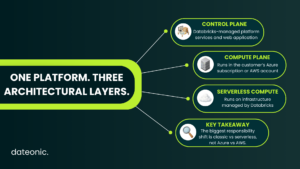
The high-level architecture is now broadly consistent across the two clouds:
- The control plane contains Databricks-managed backend services and the web application.
- The classic compute plane processes data on resources deployed in the customer’s Azure subscription or AWS account.
- The serverless compute plane processes data on infrastructure managed by Databricks in the selected cloud and region.
This distinction is more useful than describing Azure as managed and AWS as self-managed. Databricks is a managed platform on both clouds.
The customer’s infrastructure responsibility changes mainly with the selected compute model and network architecture.
The official Azure network reference architecture and AWS network reference architecture use the same three-part model.
1. Identity: Microsoft Entra ID vs an IdP plus AWS IAM
Identity comparisons often mix together two separate questions:
- Who can sign in to Databricks and receive permissions?
- Which cloud identity can access storage or another cloud service?
Keeping these layers separate prevents overprivileged designs.
Identity in Azure Databricks
Azure Databricks is integrated with Microsoft Entra ID (formerly Azure Active Directory). Users, groups, and service principals can be brought into the Databricks account and assigned to identity-federated workspaces.
Databricks currently recommends automatic identity management, which uses Microsoft Entra ID as the source of record and can resolve users, groups, nested group membership, and service principals without a separate SCIM provisioning application.
SCIM remains relevant in existing environments, but it should not be mixed casually with automatic identity management because duplicate identities and inconsistent group membership can create access problems. See the current Azure Databricks identity guidance.
For workload access to Azure resources, a different identity layer applies. Unity Catalog can use an Access Connector for Azure Databricks with a system-assigned or user-assigned managed identity.
Databricks recommends managed identities for storage because they avoid stored secrets and manual secret rotation.
The managed identity receives Azure RBAC permissions on the relevant ADLS container, while Unity Catalog controls which Databricks principals may use the corresponding storage credential and external location.
Identity in Databricks on AWS
Databricks on AWS uses account-level users, groups, and service principals. An organization can integrate its enterprise identity provider with Databricks through SSO and supported provisioning methods.
Microsoft Entra ID, Okta, and other identity providers can therefore remain the workforce identity source even when the data platform runs on AWS.
AWS IAM is not a replacement for Databricks users, groups, or Unity Catalog permissions. Its central role is authorizing access to AWS resources.
For S3 access through Unity Catalog, a storage credential references an AWS IAM role. An external location then combines that credential with a specific S3 path.
The role trust relationship, S3 permissions, and optional KMS permissions are managed in AWS; grants on the storage credential and external location are managed in Unity Catalog. See the official S3 external location architecture.
Practical identity difference
| Layer | Azure | AWS |
|---|---|---|
| Human and service access to Databricks | Microsoft Entra ID integration plus Databricks account identities | Enterprise IdP integration plus Databricks account identities |
| Data and AI authorization | Unity Catalog privileges | Unity Catalog privileges |
| Cloud storage identity | Azure managed identity or service principal | AWS IAM role |
| Secretless recommended pattern | Access Connector with managed identity | IAM role assumption |
Azure has the clearest advantage when Entra ID is already the organization-wide control point and the security team is experienced with managed identities.
AWS is the more natural fit when IAM roles, S3 bucket policies, and AWS Organizations controls are already standardized.
2. Classic networking: VNet injection vs a customer-managed VPC
With classic compute, data processing resources live in the customer’s cloud boundary. The implementation vocabulary differs:
| Network concern | Azure Databricks | Databricks on AWS |
|---|---|---|
| Customer-controlled network | VNet injection | Customer-managed VPC |
| Workload traffic controls | Network security groups and user-defined routes | Security groups, network ACLs, and route tables |
| Private DNS | Azure Private DNS | Amazon Route 53 private hosted zones and VPC DNS |
| Private service access | Azure private endpoints and service endpoints where supported | Interface or gateway VPC endpoints where supported |
| On-premises connectivity | ExpressRoute or VPN Gateway | Direct Connect or Site-to-Site VPN |
VNet injection places Azure Databricks classic compute resources in subnets delegated inside a customer-managed VNet. It is relevant when the organization needs custom routing, traffic inspection, private access to Azure services, on-premises reachability, or custom DNS.
A customer-managed VPC provides the analogous AWS control. It is used when the platform needs established VPC routing, custom security groups, VPC peering or Transit Gateway connectivity, private endpoints, or existing inspection and egress patterns.
Both clouds support secure cluster connectivity, where classic compute initiates the required control-plane connection rather than accepting unsolicited inbound connections from the control plane.
However, the surrounding NAT, firewall, DNS, endpoint, and IP-capacity design remains the customer’s responsibility.
The right question is not “Does Databricks support our cloud network?” It is:
Can the proposed workspace topology satisfy every required user-to-workspace, compute-to-control-plane, compute-to-storage, cross-region, and on-premises traffic path?
3. Private connectivity is not a single switch
“Private Link supported” is not enough detail for a production design. At least three connection paths may need separate controls:
Users and applications to the workspace
- Azure: inbound Azure Private Link can provide a private endpoint for workspace access.
- AWS: inbound AWS PrivateLink can provide private access through interface VPC endpoints.
Classic compute to the Databricks control plane
- Azure: classic compute plane Private Link provides a private path from the workspace VNet to control-plane services.
- AWS: back-end PrivateLink provides private connectivity from the classic compute VPC to the control plane.
Serverless compute to customer resources
- Azure: account administrators use network connectivity configurations and approved private endpoint rules to connect serverless compute to supported Azure resources.
- AWS: account administrators use network connectivity configurations and supported AWS PrivateLink patterns to reach AWS-managed services or resources exposed from a VPC.
The official Azure Private Link concepts and AWS PrivateLink concepts pages should be reviewed alongside the serverless networking documentation. Classic and serverless connectivity are separate designs.
Also remember that a private network path does not grant data access.
A private endpoint controls how traffic travels; an Azure managed identity or AWS IAM role controls what the workload can access; Unity Catalog controls which Databricks principal can use it.
4. Storage: ADLS Gen2 vs Amazon S3
Azure Databricks commonly uses Azure Data Lake Storage Gen2, while Databricks on AWS uses Amazon S3. Delta Lake, managed and external tables, and Unity Catalog provide a common logical layer, but the storage implementation is not cloud-neutral.
Azure storage pattern
A typical governed external-storage design uses:
- an ADLS Gen2 container,
- an Access Connector with a managed identity,
- Azure RBAC permissions for that identity,
- a Unity Catalog storage credential, and
- a Unity Catalog external location scoped to an
abfss://path.
Microsoft documents this pattern in Use Azure managed identities in Unity Catalog.
AWS storage pattern
A typical governed external-storage design uses:
- an S3 bucket or prefix,
- an IAM role with the required S3 and, where applicable, KMS permissions,
- a trust relationship that allows Databricks to assume the role,
- a Unity Catalog storage credential, and
- a Unity Catalog external location scoped to an
s3://path.
What remains portable, and what does not
Table definitions, Delta semantics, SQL, and much of the transformation code can remain similar. The following elements must be redesigned or parameterized for a cloud migration:
- storage URLs;
- cloud credential objects and trust relationships;
- storage firewalls, bucket policies, and private endpoints;
- encryption-key integrations;
- deployment templates and cloud resource identifiers;
- data-transfer and cross-region assumptions.
Calling Databricks “multi-cloud” therefore does not mean that an existing workspace can be moved between Azure and AWS without infrastructure work.
5. Serverless Databricks on Azure and AWS
Databricks serverless compute is not Azure Functions or AWS Lambda. It is Databricks-managed compute for supported workloads such as notebooks, jobs, Lakeflow pipelines, and SQL warehouses.
On both clouds, serverless changes the responsibility boundary:
- Databricks provisions, scales, upgrades, and optimizes the compute.
- The workload does not run on VM or EC2 instances provisioned in the customer subscription or account.
- Unity Catalog is part of the access model.
- Network access from serverless compute to protected customer resources must be configured through supported serverless networking controls.
- Runtime behavior and limitations can differ from classic compute, so representative workloads should be tested before migration.
The current Azure serverless compute documentation and AWS serverless compute documentation describe an increasingly similar product model.
The practical differences are primarily regional rollout, private-connectivity implementation, cloud resource integration, and commercial treatment.
Do not write a static statement such as “serverless is only available in a few AWS regions.” That can become incorrect quickly.
Check the precise feature, SQL warehouses, notebooks, jobs, pipelines, model serving, or another managed service – in the target region during architecture review.
6. Billing and cost structure
Exact DBU prices are a poor basis for an evergreen Azure-versus-AWS comparison. Prices vary by SKU, plan, region, workload, promotions, and commercial agreement.
The more durable distinction is which cost components exist and where they are billed.
Classic compute cost model
A simplified model for either cloud is:
Databricks platform usage + cloud VM/EC2 compute + object storage + networking and data transfer + adjacent cloud services
With classic compute:
- Azure VM infrastructure is billed in Azure alongside Azure Databricks consumption.
- AWS infrastructure such as EC2, S3, NAT gateways, endpoints, and data transfer is billed in the customer’s AWS account.
- Databricks platform consumption is measured using the applicable DBU SKU.
Serverless cost model
A simplified serverless model is:
Databricks serverless SKU + object storage + networking or data transfer where applicable + adjacent services
The underlying compute infrastructure is included in serverless pricing rather than appearing as customer-managed VM or EC2 instances. That makes serverless easier to operate, but not automatically cheaper for every steady-state workload.
Databricks recommends testing representative workloads and reviewing actual usage rather than extrapolating from a generic hourly cluster comparison.
Commercial and billing differences
Azure Databricks is a Microsoft first-party service and offers unified Azure billing and Microsoft support. Existing Azure commitments and procurement processes can therefore affect the commercial outcome.
On AWS, Databricks may be purchased directly or through AWS Marketplace. Marketplace billing can align Databricks procurement with an AWS commercial relationship, while classic AWS infrastructure remains visible as AWS resource consumption.
For current rates, use the official Azure Databricks pricing page and Databricks pricing page. Do not copy the current numbers into an architecture article unless they are dated, scoped to a specific SKU and region, and scheduled for regular review.
Cost controls common to both clouds
Both deployments should use:
system.billing.usagefor Databricks billable usage analysis;- workload and usage-policy tags for attribution;
- compute policies for classic cluster guardrails;
- auto-termination and appropriate autoscaling;
- cloud-native billing exports for classic infrastructure;
- explicit monitoring of NAT, private endpoint, inter-region, and egress charges;
- representative performance tests before committing to a compute model.
Which cloud should you choose for Databricks?
Azure Databricks is usually the lower-friction option when:
- Microsoft Entra ID is the authoritative identity platform;
- data is already concentrated in ADLS Gen2;
- Azure VNets, Private Link, ExpressRoute, and Azure Policy are established standards;
- Power BI and other Microsoft data services are central to the analytics estate;
- Azure billing, support, and commercial commitments simplify procurement.
Databricks on AWS is usually the lower-friction option when:
- the data lake is already built on S3;
- IAM roles and AWS Organizations controls are mature;
- workloads depend on VPC, Transit Gateway, Direct Connect, or AWS-native service patterns;
- AWS Marketplace or an AWS commercial agreement is the preferred procurement route;
- moving data to Azure would add unnecessary latency, egress, or governance complexity.
Do not choose based on these shortcuts
- “AWS is always cheaper.”
- “Azure is always more secure.”
- “AWS supports more useful instance types.”
- “Azure is managed, while AWS is self-managed.”
- “Databricks code is portable, so the cloud does not matter.”
Each statement ignores workload shape, contract pricing, regional features, storage locality, and the classic-versus-serverless boundary.
A practical Databricks cloud-selection checklist
Before selecting Azure or AWS, answer these questions:
- Where does the majority of governed source data already live?
- Which system is the authoritative source for users, groups, and service principals?
- Will workloads use classic compute, serverless compute, or both?
- Must users access the workspace through a private endpoint?
- Must classic compute reach the control plane without public endpoints?
- Which protected data sources must serverless compute reach?
- Are VNet/VPC address space, DNS, firewall, and endpoint capacity available?
- Which cloud team will own storage credentials, private endpoints, and incident response?
- How will Databricks usage and cloud infrastructure costs be attributed together?
- Are the required features and compliance controls available in the target region today?
If the answers point consistently toward one existing cloud operating model, that is usually more important than a small list-price difference.
Frequently asked questions
Is Azure Databricks the same as Databricks?
Azure Databricks is the Azure-hosted, Microsoft first-party version of the Databricks Data Intelligence Platform. It shares the platform’s core products and concepts, while using Azure identity, storage, networking, billing, and regional infrastructure.
Read the full Azure Databricks vs Databricks explanation.
Is Databricks cheaper on Azure or AWS?
There is no universal answer. Compare the applicable Databricks SKUs, negotiated discounts, classic or serverless compute model, storage, network architecture, data transfer, and operational effort using the same representative workload.
Can Microsoft Entra ID be used with Databricks on AWS?
Yes. Databricks on AWS can integrate with an enterprise identity provider for SSO and identity provisioning. AWS IAM still governs access to AWS resources, while Databricks account identities and Unity Catalog govern platform and data permissions.
Does serverless compute run in our VNet or VPC?
No. Serverless compute runs in a Databricks-managed serverless compute plane. Access to customer resources is configured with supported serverless networking controls, such as network connectivity configurations and private endpoint or PrivateLink patterns.
Do Azure and AWS support private Databricks deployments?
Both support private-connectivity patterns for workspace access, classic compute, and serverless-to-resource access. These are separate traffic paths with different prerequisites, so “Private Link enabled” should never be treated as a complete network design.
Final recommendation
For most organizations, the best cloud for Databricks is the cloud that already owns the data, identity model, network controls, and commercial relationship. The Databricks layer is intentionally consistent; the operational dependencies around it are not.
If the decision is still close, build a small proof of architecture rather than a feature demo. Test identity lifecycle, one governed storage path, required private connections, a representative classic or serverless workload, and end-to-end cost attribution.
Need help designing or validating the platform? Explore Dateonic’s Databricks consulting services or contact our team.