
The world of data and AI is expanding at an unprecedented rate, and with it, the complexity of managing the associated costs. For many organizations leveraging the power of Databricks, understanding and controlling spend can feel like navigating a labyrinth.
The flexibility of a pay-as-you-go model is a double-edged sword, without a clear understanding of the pricing structure, costs can quickly spiral out of control.
I aimed this article to be your guide, a comprehensive „Databricks pricing explained” resource to help you demystify the costs, forecast your spending accurately, and implement effective optimization strategies for better budgeting and a greater return on your investment.
Understanding the Databricks Pricing Model
Databricks operates on a pay-as-you-go model, which means you’re billed on a per-second basis for the compute resources you use, with no upfront costs. This model is designed for flexibility, allowing you to scale your resources up or down as your workloads change. The core of Databricks pricing revolves around the Databricks Unit (DBU), a unit of processing capability per hour.
Here’s a breakdown of the key components that make up your Databricks bill:
- Platform Tiers: Databricks offers three main pricing tiers: Standard, Premium, and Enterprise. Each tier provides a different level of features and capabilities, with corresponding price points. For example, on Azure, all-purpose compute might be priced around:
- Standard: ~$0.40/DBU
- Premium: ~$0.55/DBU
- Enterprise: ~$0.65/DBU
- Cloud Provider Variations: It’s crucial to remember that Databricks runs on top of your chosen cloud provider (AWS, Azure, or GCP). This means you’ll have separate costs for virtual machines (VMs) and storage from your cloud provider, in addition to the Databricks-specific charges.
- Serverless vs. Classic Compute: Databricks is increasingly moving towards a serverless architecture. With serverless compute, the pricing is more inclusive, bundling the cost of compute and management into a single DBU rate (e.g., ~$0.70/DBU in US regions). In the classic model, you pay for the Databricks software and the underlying cloud infrastructure separately.
Demystifying DBUs: The Heart of Databricks Pricing
So, what exactly is a DBU? A Databricks Unit (DBU) is a normalized unit of processing power on the Databricks Lakehouse Platform. The number of DBUs a workload consumes is determined by the processing metrics, which include the compute resources used and the amount of data processed. In simpler terms, a more powerful virtual machine will consume more DBUs per hour.
The DBU consumption is influenced by several factors:
- Instance Types: The size and type of the virtual machines in your clusters.
- Workload Intensity: The complexity and volume of the data being processed.
- Workload Type: Different workloads have different DBU rates. For instance, „Jobs Compute” (for automated jobs) is typically cheaper than „All-Purpose Compute” (for interactive analysis).
- Photon Engine: Using Databricks’ high-performance query engine, Photon, can accelerate workloads, which can lead to lower overall DBU consumption for the same task.
To illustrate, running a job on a small cluster for an hour will consume a certain number of DBUs. Running the same job on a larger, more powerful cluster will complete faster but consume more DBUs per hour. The key is to find the right balance between performance and cost.
How to Forecast Your Databricks Spend
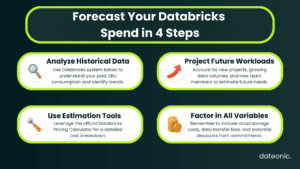
Accurate forecasting is essential for effective budget management. Here’s a step-by-step guide to help you estimate your Databricks spend:
- Analyze Historical Data: If you’re already using Databricks, your past usage is the best predictor of future spend. Use the built-in system tables and dashboards to analyze your DBU consumption over time.
- Project Future Workloads: Consider any new projects, increased data volumes, or changes in your data and AI strategy that might impact your future usage.
- Use Estimation Tools: Databricks provides an official pricing calculator that can help you estimate your costs. You can also leverage the system tables to track usage in near real-time.
- Factor in Key Variables: Remember to include all the variables that will affect your final bill:
- Compute hours
- Data volume and storage costs
- Potential discounts from committed use contracts (which can offer up to 37% savings on pre-purchased DBCUs)
Here is a sample monthly cost projection:
| Team Size | Estimated DBUs | Estimated Cloud Costs | Total Estimated Cost |
|---|---|---|---|
| Small | 5,000 | $2,000 | $4,500 |
| Medium | 20,000 | $8,000 | $18,000 |
| Large | 50,000 | $20,000 | $45,000 |
Strategies to Control and Optimize Databricks Costs
Once you have a handle on your spending, you can start to implement strategies to control and optimize your Databricks costs.
- Monitoring and Budgeting:
- Utilize the built-in dashboards and cost reports to track your spending in real time.
- Set up alerts to notify you when you’re approaching your budget limits.
- For more granular insights, explore third-party cost management tools.
- Cluster Optimization:
- Enable Autoscaling: This allows your clusters to automatically scale up or down based on the workload, ensuring you’re only paying for the resources you need.
- Set up Auto-Termination: Configure clusters to automatically terminate after a period of inactivity to avoid paying for idle resources.
- Right-Size Instances: Choose the most appropriate instance types for your workloads to avoid over-provisioning.
- Workload Best Practices:
- Prefer Job Clusters: For automated and scheduled tasks, use job clusters, which are significantly cheaper than all-purpose clusters.
- Optimize Data Formats: Use performance-optimized data formats like Delta Lake to speed up queries and reduce DBU consumption.
- Leverage SQL Warehouses: For your BI and SQL workloads, use Databricks SQL warehouses for better performance and cost-efficiency.
- Storage and Data Management:
- Efficient Data Formats: Use compressed and efficient data formats to reduce storage costs.
- Prune Unused Data: Regularly clean up and archive unused data to minimize storage costs.
Conclusion
Understanding and managing your Databricks costs doesn’t have to be a daunting task. By demystifying the DBU-based pricing model, implementing a robust forecasting process, and leveraging cost optimization strategies, you can take control of your spend and ensure you’re getting the most value out of your Databricks investment.
For expert help in optimizing your Databricks setup and unlocking greater efficiency and savings, contact the team at Dateonic.