
Databricks pricing is often summarized as “DBUs × hours.” That is a useful starting point, but it is not a reliable budget.
The final cost depends on the cloud where the platform runs, the selected region, the workload and SKU, the compute mode, and the storage and network services around it.
A forecast based on one universal DBU rate, or on team size, can be wrong before the first production workload starts. A defensible estimate must keep its assumptions visible and use live price sources instead of hard-coded rates that become outdated.
This guide explains a durable way to estimate Databricks spend. For current prices, use the official Databricks pricing page, the Databricks pricing calculator, the relevant cloud calculator, and the commercial terms in your own agreement.
How Databricks Pricing Works
Databricks offers pay-as-you-go pricing and committed-use arrangements. However, “Databricks cost” is not a single line item. The bill changes materially depending on whether a workload uses classic compute or a serverless service.
Classic compute
For classic compute, Databricks usage and the underlying cloud infrastructure are separate parts of the model:
Forecast formula: Databricks platform usage + cloud virtual machines + attached disks + object storage + network and connectivity + optional products or add-ons.
The Databricks portion is commonly measured in Databricks Units (DBUs). The cloud provider charges for the driver and worker instances, disks, storage requests and data movement according to its own regional rate card and purchase model.
Serverless compute
For serverless services, Databricks operates the compute layer. Databricks states that the DBU price for serverless services already includes the virtual machine cost, so adding a second VM estimate would double-count compute.
Storage, data transfer, connectivity and other product-specific charges can still remain.
Forecast formula: Serverless SKU usage + storage + data transfer and connectivity + optional products or add-ons. Do not add a separate VM line where managed compute is already included.
DBUs are important – but not universal
A DBU is a normalized unit used to measure and price Databricks processing. The amount consumed can depend on processing metrics such as compute resources and data processed. But modern Databricks billing covers more than DBUs.
The billable usage system table can record units including DBUs, storage space, network bytes or hours, API operations, tokens, GPU time and answers. The correct unit therefore comes from the SKU, not from a universal pricing formula.
Important tier note: Tier names are not identical across clouds. Databricks currently states that Azure Premium corresponds to Enterprise on AWS and Google Cloud.
Never copy a tier or rate from one cloud into another forecast without checking the current product page and contract.
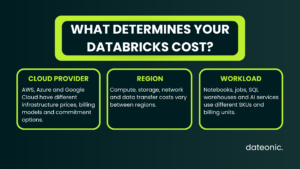
The Three Dimensions That Determine Databricks Cost
1. Cloud provider
Databricks runs on AWS, Microsoft Azure and Google Cloud, but the surrounding economics are not interchangeable. The Databricks rate card, tier mapping, billing route, instance families and commitment options can differ.
Classic compute also inherits the cloud provider’s prices for virtual machines, disks, object storage, IP addresses, NAT or private connectivity, and data transfer.
Model the same logical workload separately for every cloud under consideration. Use one currency and consistent assumptions for on-demand, spot or preemptible capacity, reservations and committed use.
Azure Databricks is a first-party Azure service with unified Microsoft billing and support, while commercial and marketplace arrangements can differ on AWS and Google Cloud.
2. Region
A cloud name is not specific enough for a budget. VM, disk, storage and network prices can change by region, and not every product or instance type is available everywhere.
Databricks also warns that a displayed price does not guarantee product availability in a selected region.
Data movement is one of the most commonly missed regional costs. Databricks notes that serverless customers may incur charges when data moves between regions or availability zones, leaves a cloud, or uses public or private connectivity.
Review the current data transfer and connectivity guidance and the chosen cloud’s regional price list.
Where architecture and regulatory requirements allow, keep the workspace, object storage, core data sources and major consumers in the same region. Price every unavoidable cross-region or cross-cloud route separately.
3. Workload and SKU
Interactive notebooks, scheduled pipelines, SQL analytics and AI services have different usage patterns and billing units. Forecast them independently rather than using one blended rate.
| Workload | Forecast drivers | Typical billing context | Primary controls |
|---|---|---|---|
| Interactive notebooks and data science | Active user hours, concurrency, cluster size, idle time | Classic all-purpose or serverless interactive compute | Auto-termination, right-sizing, policies and workload isolation |
| Lakeflow Jobs and pipelines | Runs per month, duration, parallelism, retries, streaming mode | Jobs compute, serverless jobs or pipeline SKUs | Job compute, autoscaling, fewer overlaps and trigger choice |
| SQL and BI | Query volume, concurrency, warehouse size, uptime and latency target | Serverless or classic SQL warehouse SKU | Autoscaling, query tuning, timeouts and measured warehouse sizing |
| ML and AI | Training hours, GPU profile, endpoint uptime, requests, tokens or index activity | Training, serving, AI Gateway, AI Search and related SKUs | Representative benchmarks and the exact product billing unit |
| Storage and data movement | Average GB-month, requests, copies, egress route and endpoint hours | Cloud-provider or Databricks storage/network SKUs | Lifecycle rules, co-location, retention and route monitoring |
How to Forecast Databricks Spend Step by Step
- Lock the commercial and deployment assumptions. Record cloud, region, platform tier, currency, classic or serverless mode, contract type, expected discounts, tax treatment and forecast period. A price without those dimensions is not reusable.
- Split the platform into workloads. Create separate lines for interactive compute, jobs and pipelines, SQL warehouses, model training, model serving, AI products, storage, network and add-ons. Map every line to a current SKU and billing unit.
- Choose measurable usage drivers. For classic compute, capture driver and worker types, minimum and maximum workers, expected runtime and scaling behavior. For serverless, benchmark a representative workload and use the resulting billing records; Databricks recommends this approach because the infrastructure is managed dynamically.
- Price every layer from a current source. Use the Databricks calculator for platform SKUs, the cloud calculator for classic infrastructure, and the relevant storage and network pages for regional services. Keep contract discounts and credits as separate reconciliation lines.
- Build at least three scenarios. A baseline should reflect expected operations, a growth case should include higher data volume and concurrency, and a peak case should account for spikes, retries, backfills or overlapping workloads. Make each assumption visible so finance and engineering can challenge it.
- Recalibrate with real usage. After representative workloads have run, compare forecast usage with system tables and cloud billing data. Update the model when runtime, concurrency, data volume, SKU mix or architecture changes.
A Price-Safe Forecasting Template
The following model avoids hard-coded rates. Insert current prices for the chosen cloud, region and contract at the time you prepare the estimate.
| Cost component | Monthly calculation |
|---|---|
| Classic platform | Sum of DBU usage by SKU × applicable Databricks price |
| Classic cloud compute | Driver instance hours × regional rate + worker instance hours × regional rate |
| Serverless service | Usage quantity by SKU × applicable product price; managed VM cost is already included where billed as serverless DBUs |
| Storage | Average GB-month × regional storage rate + request, operation, retention and temporary-disk charges |
| Network and connectivity | GB or endpoint hours by route × the applicable in-region, cross-region, internet, public or private-connectivity rate |
| Commercial adjustment | Apply negotiated rates, commitments, credits and add-ons according to the contract—not as a blanket percentage |
Avoid double counting: Classic compute usually needs both Databricks usage and cloud infrastructure. Serverless DBU pricing already includes the managed VM component, but storage and network costs can still apply.
Which Price Source Should You Use?
| Question | Source of truth |
|---|---|
| Current Databricks list price and product availability | Databricks pricing page and pricing calculator |
| Historical Databricks SKU list prices | system.billing.list_prices |
| Actual Databricks usage | system.billing.usage |
| Classic VM, disk and cloud network estimate | AWS, Azure or Google Cloud pricing calculator for the exact region |
| Negotiated rate, credits and commitment | Order form, contract, marketplace agreement and invoice |
| Final billed amount | Databricks and cloud-provider billing records or invoice |
Monitor Actual Databricks Cost with System Tables
Once a workspace is running, replace assumptions with observed usage. The system.billing.usage table contains the cloud, SKU, originating product, usage unit, usage quantity, metadata and custom tags.
The system.billing.list_prices table keeps a historical record of published SKU prices.
This example groups the previous calendar month by cloud, workload and SKU, then applies the list price effective at the time of usage:
SELECT
  date_trunc('month', u.usage_date) AS usage_month,
  u.cloud,
  u.billing_origin_product AS workload,
  u.sku_name,
  u.usage_unit,
  SUM(u.usage_quantity) AS usage_quantity,
  SUM(u.usage_quantity * p.pricing.effective_list.default)
    AS estimated_list_cost_usd
FROM system.billing.usage AS u
JOIN system.billing.list_prices AS p
  ON p.sku_name = u.sku_name
 AND p.cloud = u.cloud
 AND u.usage_end_time >= p.price_start_time
 AND (p.price_end_time IS NULL OR u.usage_end_time < p.price_end_time)
WHERE u.usage_date >= add_months(date_trunc('month', current_date()), -1)
  AND u.usage_date < date_trunc('month', current_date())
GROUP BY ALL
ORDER BY usage_month, cloud, workload, estimated_list_cost_usd DESC;
What this query does not show: It estimates published list cost. It may not reflect your negotiated prices, credits, taxes, contract-specific add-ons or separate classic cloud-infrastructure charges. Reconcile it with the applicable billing records.
Databricks provides additional examples for workload attribution, tags, jobs, serverless compute and model serving in its system-table cost monitoring guide.
How to Control Databricks Spend
1. Tag costs before workloads go live
Create a small mandatory tag set such as business_unit, project, environment, owner and cost_center. Tags applied to supported resources flow into billing data and make showback or chargeback possible.
Use compute policies to enforce tags for classic compute and serverless usage policies where available.
Start early: Tags affect future usage. Missing cost-allocation context cannot reliably be reconstructed after the spend has occurred.
2. Treat budgets as detection, not a universal hard stop
Databricks budgets can monitor account-wide spend or filter it by workspace, product and tags. They are useful for alerts and accountability, but standard budget thresholds do not shut down arbitrary compute.
Databricks also notes that notifications can lag usage by up to 24 hours and that budget calculations use SKU list prices rather than negotiated discounts or credits.
Blocking is currently available for certain Unity AI Gateway budgets, but enforcement is approximate and Databricks explicitly warns that it does not guarantee an absolute cap.
Combine budgets with preventive controls such as compute policies, permissions, timeouts and operational automation.
3. Restrict what users can create
Use compute policies to limit node types, worker counts, autoscaling ranges and auto-termination settings, and to require tags. Separate production policies from experimentation policies.
Give large clusters, GPUs and always-on resources a clear approval path.
4. Match compute to the workload
Use jobs compute for scheduled workloads instead of leaving interactive compute running. Evaluate serverless for bursty and operationally expensive workloads, but benchmark price-performance instead of assuming it is always cheaper.
For BI, size SQL warehouses from actual concurrency and query profiles. Test Photon and other performance features against total runtime and cost rather than comparing rate cards alone.
5. Remove idle time and avoid accidental overlap
Enable autoscaling and auto-termination with deliberate minimums. Review inactive interactive clusters, duplicate schedules, retry storms, long-running notebooks and jobs that overlap during peak windows.
For streaming, use an always-on design only when the freshness requirement justifies it; when it does not, triggered incremental processing can materially reduce runtime.
6. Design storage and network topology with the bill in mind
Keep compute and primary storage in the same region when possible. Track cross-region replication, Delta Sharing or OpenSharing egress, downloads to clients, private endpoints, NAT processing and data copied between environments.
Apply lifecycle and retention rules to old tables, checkpoints, logs and temporary data only after validating governance and recovery requirements.
7. Commit only after establishing a baseline
Committed-use agreements can reduce effective rates, but the value depends on utilization and contract terms. Establish a stable workload baseline, model likely growth and preserve headroom before committing.
Avoid presenting one public discount percentage as a universal saving.
Common Databricks Pricing Mistakes
- Using one DBU price for every cloud, tier and workload.
- Estimating spend from team size instead of runtime, concurrency, data volume and SKU usage.
- Including only DBUs for classic compute and forgetting VMs, disks, storage and networking.
- Adding cloud VM cost to a serverless DBU rate that already includes managed compute.
- Treating “AWS,” “Azure” or “Google Cloud” as a region-specific estimate.
- Ignoring cross-region, cross-cloud, public or private-connectivity charges.
- Comparing list-price estimates with discounted invoices without reconciling commercial terms.
- Assuming a budget threshold automatically stops all usage.
- Publishing fixed rate tables without a source, region, cloud, SKU, currency and verification date.
Databricks Cost Forecasting Checklist
- Cloud and exact region are recorded.
- Every workload maps to a current SKU and billing unit.
- Classic and serverless compute are modeled differently.
- Classic VM, disk and network costs are included where applicable.
- Storage, data transfer and connectivity are estimated by route and region.
- Discounts, credits, add-ons and taxes are separated from list price.
- Baseline, growth and peak scenarios use explicit assumptions.
- Tags, budgets, compute policies and owners are defined before production.
- Forecasts are recalibrated against system tables and cloud billing data.
Conclusion
A useful Databricks estimate is not a static rate table. It is a transparent model that connects cloud, region, workload, compute mode and data movement to measurable usage, then updates those assumptions with real billing data.
If you need help benchmarking workloads, building a cost baseline or putting FinOps guardrails around your platform, explore Dateonic’s Databricks consulting services or contact our team.
Frequently Asked Questions
What is a Databricks Unit (DBU)?
A DBU is a normalized unit of processing power used for measurement and pricing. Consumption depends on the workload and processing metrics, and the monetary price depends on the applicable cloud, product, tier and contract.
How much does Databricks cost per month?
There is no reliable universal amount. Monthly cost depends on cloud, region, workload and SKU mix, classic versus serverless compute, runtime, concurrency, storage, data transfer and commercial terms.
Build the estimate from workload drivers and current official prices.
Does Databricks serverless pricing include cloud compute?
For serverless services billed in DBUs, Databricks states that the virtual machine cost is included. Storage, data transfer, connectivity and other product-specific charges can still apply.
Which cloud is cheapest for Databricks?
No cloud is always cheapest. Compare the same workload, region, availability requirements and discount assumptions across AWS, Azure and Google Cloud.
Existing data location and egress can outweigh a small compute-rate difference.
Do Databricks budgets stop spending automatically?
Generally, budgets monitor usage and send alerts rather than stopping arbitrary compute. Some Unity AI Gateway budgets can block additional requests, but enforcement is approximate and is not an absolute billed-spend cap.