
Moving machine learning models and data pipelines from discovery into reliable, production-grade systems requires more than just powerful compute. It demands a rigorous approach to enterprise security and platform architecture. A structured Databricks RBAC (Role-Based Access Control) setup is the definitive foundation of this security.
As an Official Dateonic Databricks Consulting Partner, we structure our entire engineering philosophy around enterprise governance. We frequently see data teams struggle with fragmented access policies, resulting in deployment bottlenecks for data engineers and severe compliance risks for IT directors.
This guide provides a battle-tested blueprint for configuring RBAC in Databricks, ensuring strict data governance without sacrificing architectural scalability.
Understanding RBAC in the Databricks Lakehouse
Role-Based Access Control (RBAC) in Databricks dictates exactly what users, groups, and automated systems can see and execute within your environment.
Without a standardized RBAC framework, organizations often default to over-permissioning users simply to keep automated pipelines running. This creates a brittle environment where a single compromised credential or an accidental code execution can corrupt production data. A proper Databricks RBAC setup rigidly separates development from production, secures cluster costs, and acts as a strict prerequisite for deploying safe, production-ready AI.
Data Access vs. Workspace Access
A critical Lakehouse concept that enterprise teams must grasp is the strict separation between compute/workspace access and data access. Granting an engineer access to a Databricks Workspace (giving them the ability to spin up a notebook) does not inherently grant them access to the underlying data. These are governed by two distinct layers of access control, which is why a unified approach is mandatory.
Key Concepts: Account-Level vs. Workspace-Level Roles
Before provisioning users, it is critical to understand the Databricks architecture hierarchy. Permissions exist at both the account level and the workspace level. Note that core administrative roles are standardized across AWS, Azure, and GCP, though Azure deployments inherently rely on Microsoft Entra ID for identity management.
| Role / Concept | Scope of Authority | Primary Responsibilities |
|---|---|---|
| Account Admin | Entire Databricks Account | Manage billing, configure identity synchronization (SCIM), provision workspaces, and manage Unity Catalog metastores. |
| Workspace Admin | Specific Databricks Workspace | Manage local workspace settings, configure cluster policies, and oversee local compute/job Access Control Lists (ACLs). |
| Workspace Entitlements | Designated Workspaces / Objects | Rather than a global “Standard User” role, users receive specific entitlements (e.g., Databricks SQL access) and explicit Unity Catalog data privileges based on group membership. |
Step-by-Step Databricks RBAC Setup
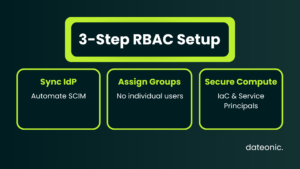
Step 1: Syncing Identity Providers (IdP)
Manual user creation is not a scalable enterprise practice. The first step in a production-grade setup is automating lifecycle management by integrating your corporate Identity Provider (IdP), such as Microsoft Entra ID or Okta.
Databricks supports SCIM (System for Cross-domain Identity Management) provisioning. SCIM ensures that when an employee joins, transitions, or leaves a specific department, their Databricks access is automatically granted or revoked. Always configure SCIM at the account level to centralize identity management.
Note: Databricks imposes strict, platform-level limits. An account or workspace can support a maximum of 10,000 combined users and service principals, and 5,000 groups.
Step 2: Creating Groups and Assigning Roles
The strictest baseline practice for access control is assigning permissions exclusively to groups, never to individual users.
Establish practical group naming conventions that clearly define the environment and the persona. Standardized examples include:
- grp_data_engineers_dev
- grp_data_scientists_prod
- grp_platform_admins
Once these groups are synced via SCIM, map them to the appropriate workspace entitlements.
Step 3: Securing Clusters, Jobs, and Workspaces
A comprehensive Databricks RBAC setup goes beyond data access; it must control compute resources to enforce cost-efficiency. Utilize Access Control Lists (ACLs) to tightly manage who can view, attach to, or restart compute clusters and pools.
Expert Note: Never tie automated production pipelines to human user accounts. Instead, utilize Service Principals. Service Principals act as automated, non-human identities for CI/CD workflows and MLOps jobs, ensuring that a critical pipeline does not fail if the original author leaves the company.
Managing RBAC with Infrastructure as Code (IaC)
While users, groups, and Service Principals can technically be managed within the Databricks Workspace UI, true enterprise-grade platforms do not rely on manual clicks.
To ensure version control, reproducibility, and auditability, your data engineering team should manage all RBAC configurations and Service Principal ACLs via Infrastructure as Code (IaC). Utilizing the Databricks Terraform provider or Databricks Asset Bundles prevents configuration drift and allows your security team to review access changes via standard pull requests before they are applied to production.
Elevating RBAC with Unity Catalog
Historically, Databricks access was heavily dependent on fragmented workspace-level controls. Unity Catalog acts as the modern standard for centralizing and simplifying RBAC across the entire Lakehouse, bridging the gap between multiple isolated workspaces.
By implementing Unity Catalog, you shift your governance strategy from managing workspace compute to globally governing data assets (tables, views, models, and files). You can read more about our specific standardization approaches on our technical blog.
Unity Catalog utilizes standard ANSI SQL syntax for granting and revoking privileges. Crucially, it uses a downward inheritance model. This means privileges granted on a parent object (like a schema) automatically apply to all child objects (like tables) within it.
Below is an example of securely granting a production data engineering group access to a specific schema:
— Grant USE CATALOG on the catalog
GRANT USE CATALOG ON CATALOG prod_enterprise_data TO `grp_data_engineers_prod`;
— Grant USE SCHEMA and data manipulation on the schema (inherits downward to all tables)
GRANT USE SCHEMA, SELECT, MODIFY ON SCHEMA prod_enterprise_data.finance_ops TO `grp_data_engineers_prod`;
Common Pitfalls in Databricks Access Control
Even with a strong architectural plan, enterprise data teams often fall into a few predictable traps:
- Over-permissioning: Granting blanket “Workspace Admin” status to senior developers to bypass immediate friction, creating massive security vulnerabilities.
- Ignoring Service Principals: Running production MLOps clusters or scheduled jobs under individual user credentials.
- Manual UI Configurations: Failing to implement Terraform/IaC for access control, leading to untrackable state changes.
- Failing to Audit: Neglecting to actively monitor access logs. Automated auditing is mandatory for strict enterprise compliance and security reviews.
Need Help Securing Your Databricks Environment?
Designing, migrating, and implementing secure Data & AI platforms requires deep specialization. Resolving fragmented pipelines and securing legacy architectures is what we do best at Dateonic. With our extensive Databricks implementation expertise, we ensure your MLOps and GenAI solutions are rigorously governed, cost-optimized, and built for scale.
Talk to a Databricks expert today to discuss an architecture audit for your platform.
Frequently Asked Questions
What is the difference between Account Admins and Workspace Admins?
Account Admins manage billing, identity synchronization (SCIM), and Unity Catalog metastores across the entire organization. Workspace Admins manage permissions, cluster policies, and compute resources within a single, specific workspace.
Why should I use groups instead of individual users for permissions?
Assigning permissions to groups allows for scalable governance. When a user changes roles or leaves the company, you simply update their group membership in your IdP rather than tracking down dozens of individual workspace and data ACLs across the Lakehouse.
What is a Service Principal in Databricks?
A Service Principal is a non-human identity used for automated tools, jobs, and applications (like CI/CD pipelines). Using them prevents production workflows from failing when an individual user’s account is deactivated or modified.
How does Unity Catalog change Databricks RBAC?
Unity Catalog centralizes data-level access control. Instead of managing complex table access within individual workspaces, Unity Catalog allows you to define strict data governance rules once (using an inherited privilege model) and apply them globally across all connected Databricks workspaces.