
For enterprise data teams, managing cloud compute costs while maintaining strict service-level agreements (SLAs) is a constant balancing act.
As your data volume grows and machine learning models move into production, the infrastructure bill scales right alongside them. To control these costs, many organizations turn to cloud provider spot instances.
When implemented correctly, Databricks spot instances offer a highly effective way to optimize infrastructure spend. However, naive configurations introduce massive job failure risks, shuffle data loss, and missed business SLAs.
As an Official Databricks Consulting Partner, Dateonic designs secure, production-ready Data & AI platforms.
This guide breaks down the strict architectural blueprints required to utilize spot instances without compromising enterprise reliability.
The Financial Allure of Spot Instances in Databricks
Spot instances – often branded as AWS Spot Instances, Azure Spot VMs, or GCP Preemptible/Spot VMs – are spare computing capacity offered by cloud providers at a steep discount. By utilizing this unused capacity, enterprises can reduce cloud provider compute costs by up to 90%.
However, it is crucial to separate cloud infrastructure costs from software costs. Using spot instances lowers the infrastructure bill you receive from AWS, Azure, or GCP. It does not reduce your Databricks Data Processing Unit (DBU) costs. Optimizing DBU spend requires a different set of strategies, such as utilizing specific compute types (e.g., Jobs compute vs. All-Purpose compute) or optimizing code execution.
The Hidden Risks: How Spot Evictions Threaten Pipeline Reliability
The steep discounts of spot instances introduce a critical operational risk: the cloud provider can reclaim this capacity at any moment to fulfill on-demand requests. The notice period for these evictions is exceptionally short – typically 30 seconds for Azure and up to two minutes for AWS.
When an eviction occurs on a Databricks cluster without proper guardrails, the technical consequences are severe:
- Shuffle Fetch Failures: When a spot worker node is terminated, the intermediate shuffle data stored on that node is lost. Surviving nodes attempting to read that data will fail, forcing Apache Spark to recompute the lost tasks from the beginning of the stage.
- RDD Data Loss: Cached Resilient Distributed Datasets (RDDs) residing in the memory of the evicted node are wiped out, triggering expensive recomputations.
- Cascading Cluster Breakdowns: If too many nodes are evicted simultaneously, the remaining nodes can become overwhelmed by the redistributed workload, leading to Out of Memory (OOM) errors and total job failure.
Evaluating Workload Suitability: When to Go Spot vs. On-Demand
Not all workloads are suited for the volatility of spot pricing. Deploying spot instances requires a strategic evaluation of the workload’s fault tolerance and time sensitivity.
| Workload Type | Recommended Compute | Rationale |
|---|---|---|
| Interactive Data Exploration | Spot / Hybrid | Ad-hoc queries by data scientists are highly fault-tolerant. A minor delay due to a node loss is acceptable. |
| Non-Critical Batch ETL | Spot / Hybrid | Nightly batch jobs with flexible SLAs can afford the extra time it might take to recompute lost partitions. |
| Critical Production ETL | On-Demand / Serverless | Pipelines tied to strict executive reporting or downstream operational systems cannot risk spot eviction delays. |
| Structured Streaming | On-Demand / Serverless | Continuous streaming pipelines require maximum stability to maintain low latency and state management. |
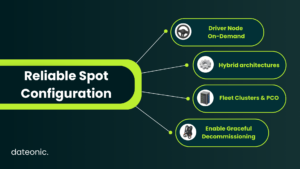
Architectural Blueprints for Reliable Spot Configurations
To harness cost savings without breaking pipelines, data engineering teams must implement strict architectural guardrails. If you are struggling to configure these environments, professional Databricks Consulting & Staff Augmentation can help audit and optimize your cluster deployments.
Rule #1: Always Keep the Driver Node On-Demand
The most critical rule in Databricks cluster configuration is to never assign the driver node to a spot instance. The driver maintains the SparkContext and coordinates the execution of all tasks across the worker nodes. If a spot driver is evicted, the entire cluster terminates instantly. All running jobs fail immediately, and the cluster must undergo a full cold start.
To ensure stability, explicitly define your driver as On-Demand in your cluster API configurations, even if workers are utilizing spot instances:
{
“num_workers”: 8,
“node_type_id”: “i3.xlarge”,
“driver_node_type_id”: “i3.xlarge”,
“aws_attributes”: {
“first_on_demand”: 2,
“availability”: “SPOT_WITH_FALLBACK”,
“spot_bid_price_percent”: 100
}
}
Rule #2: Implement Hybrid Architectures for Worker Nodes
Relying entirely on spot instances for worker nodes is a gamble. Instead, configure a hybrid architecture. A hybrid setup utilizes On-Demand instances for the “base” worker nodes (ensuring a stable baseline of compute power) and scales horizontally using spot instances to handle peak processing loads.
Architecture Contrast: Brittle vs. Resilient
- Brittle Setup (Pure Spot on Azure): A production batch ETL running on entirely Azure Spot VMs. When localized capacity constraints occur, the 30-second eviction notice gives Spark insufficient time to react. The spot driver is terminated, the entire cluster fails, and the pipeline misses its strict SLA.
- Resilient Setup (AWS Hybrid Fleet): The same ETL runs on a hybrid AWS Fleet cluster. The driver and two base worker nodes are explicitly On-Demand. The remaining worker nodes scale using Spot instances via the Price Capacity Optimized (PCO) strategy. If a specific instance pool faces a 2-minute eviction warning, Databricks gracefully decommissions the nodes, transferring shuffle data to the stable base workers while automatically provisioning replacements from a deeper spot pool. The pipeline finishes without interruption.
Rule #3: Leverage Databricks Fleet Clusters & Allocation Strategies
When requesting spot capacity, asking for a single, specific VM type (e.g., exclusively Standard_D8s_v5 on Azure) increases the risk of eviction if that specific pool runs dry.
Databricks Fleet instances solve this by automatically mapping your compute request to multiple underlying cloud VM options. This allows Databricks to source from the deepest, cheapest spot pools available at that exact moment. When configuring Fleet clusters, utilize the Price Capacity Optimized (PCO) allocation strategy. PCO intelligently balances the lowest infrastructure cost with the lowest probability of unexpected evictions.
Rule #4: Enable Graceful Decommissioning & Fallback Strategies
To mitigate shuffle data loss when an eviction notice is received, enable Databricks node decommissioning.
When the cloud provider sends the brief eviction warning, node decommissioning triggers Spark to stop scheduling new tasks on the doomed node. More importantly, it proactively migrates shuffle files and cached data out of that node and onto stable, surviving workers before the hardware is physically reclaimed.
Engineering Note: Avoid combining Databricks Instance Pools with Spot instances for critical workloads. The interaction between pool behavior and sudden spot evictions can compound startup delays and cause severe cluster instability.
Advanced Cloud-Specific Considerations (AWS vs. Azure)
While the core principles of Spark architecture remain the same, cloud-specific tooling can further optimize your spot strategy:
- AWS: Leverage tools like the AWS Spot Instance Advisor to determine the historical frequency of interruption for specific instance types in your deployment region. Consider Graviton processor integrations for improved price-to-performance ratios.
- Azure: Monitor Azure Spot VM eviction metrics closely. Azure’s exceptionally short warning window (30 seconds) makes enabling node decommissioning absolutely critical for data survival.
Regardless of the cloud provider, all spot configurations should be managed under a unified data governance layer like Unity Catalog to ensure secure data access, regardless of which transient node executes the query.
Beyond Infrastructure: Strategic Databricks Governance
Providing data scientists and engineers with unrestricted access to cluster configuration leads to two outcomes: expensive, over-provisioned On-Demand clusters, or fragile, purely Spot-based clusters running mission-critical workloads.
Enterprise organizations must implement Databricks Compute Policies. These policies allow platform administrators to enforce the architectural rules discussed above. You can create a policy that forces the driver to be On-Demand, mandates a specific ratio of Spot-to-On-Demand workers, and automatically enables node decommissioning, preventing rogue configurations from hitting production.
Dateonic’s core philosophy revolves around building platforms that enforce this exact kind of enterprise governance, ensuring AI and analytics systems are genuinely production-ready.
FAQ
Do spot instances lower my Databricks DBU costs?
No. Spot instances only reduce the underlying infrastructure costs billed by your cloud provider (AWS, Azure, or GCP). Your Databricks software (DBU) consumption remains based on the workload tier and compute duration.
Can I use Databricks Fleet clusters with spot instances?
Yes, this is highly recommended. Fleet clusters paired with the Price Capacity Optimized (PCO) allocation strategy automatically diversify your VM types to source the most stable and cost-effective spot capacity available.
Should I use spot instances for Structured Streaming?
Generally, no. Streaming pipelines require low latency, continuous processing, and stable state management. The disruption caused by node evictions makes spot compute unsuitable for most critical streaming workloads.
Conclusion
Databricks spot instances are a powerful mechanism for slashing cloud compute costs, but they require rigorous, expert-level configuration. By keeping your driver nodes on-demand, utilizing Fleet clusters, enabling node decommissioning, and enforcing compute policies, you can achieve deep financial savings without sacrificing pipeline stability.
If your organization is struggling to stabilize its Data & AI platforms, or if you are looking to optimize your Databricks deployment for maximum cost-efficiency and security, we can help.
Ready to modernize your infrastructure? Talk to a Databricks expert at Dateonic today.