
For any large organization, the promise of data-driven decision-making can quickly dissolve into a nightmare of data chaos. Disconnected data lakes, inconsistent access policies, and a lack of clear data lineage create a landscape where data teams spend more time searching for trustworthy data than actually using it.
This is the governance gap that stifles innovation and invites compliance risks. Databricks Unity Catalog is engineered to bridge this gap, providing a single, unified layer for all your data and AI assets. But simply implementing it isn’t enough.
In this technical guide, I cut through the complexity to deliver the essential databricks unity catalog best practices your organization needs to build a truly scalable and secure data foundation.
Understanding Unity Catalog Key Features
| Component | Purpose | Best Practice |
|---|---|---|
| Metastore | Top-level container | 1 per region |
| Catalogs | Group schemas logically | Separate by environment or business unit |
| Schemas | Contain tables, views, models | Structure for data teams |
| Managed Storage | Governed + audited | Prefer for security |
| External Storage | Flexible access | Limit to trusted roles |
Databricks Unity Catalog provides a centralized metadata and governance layer that simplifies data management. Its core components work in concert to deliver a unified and secure data environment.
- Metastores: The top-level container for all data objects in Unity Catalog. It’s recommended to have one metastore per region to avoid egress costs.
- Catalogs: A logical grouping of schemas, often used to separate data by environment (e.g., development, testing, production) or business unit.
- Schemas (Databases): A collection of tables, views, volumes, functions, and models.
- Managed vs. External Storage: Unity Catalog supports both managed and external tables and volumes.
- Managed: Data is stored in a location managed by Unity Catalog, providing end-to-end governance.
- External: Data is stored in your own cloud storage, allowing for flexibility but requiring careful management of permissions.
- Securable Objects: Unity Catalog’s security model is based on standard ANSI SQL and allows for fine-grained access control on all objects, including external data sources.
- Built-in Auditing: All activities within Unity Catalog are logged, providing a complete audit trail for compliance and security purposes.
Best Practices for Governance in Large Organizations
For large organizations, establishing a scalable and efficient governance model is paramount. The following best practices can help you achieve this with Databricks Unity Catalog:
- Centralized Identity Management: Use account-level identities and SCIM provisioning from your Identity Provider (IdP) for consistent user and group management.
- Group-Based Privileges: Assign admin roles and privileges to groups rather than individual users to simplify administration and leverage hierarchical inheritance.
- Structured Catalogs: Organize catalogs by environments or business units to ensure data isolation and logical separation of data assets.
- Self-Service Access: Implement access request and self-service mechanisms through integrations with tools like email or Slack to streamline data access for users.
- Regional Metastores: To avoid unnecessary data transfer costs, it is best to have one metastore per region and use catalog-level isolation for multi-workspace setups.
For more on data governance, check out our blog on Databricks Unity Catalog Governance: 3 Proven Techniques.
Security Best Practices
Security is a cornerstone of data governance. These best practices will help you secure your data in Databricks Unity Catalog:
- Prefer Managed Storage: Use managed storage with dedicated buckets to prevent unauthorized access and ensure comprehensive auditing.
- Limit External Locations: Grant the CREATE EXTERNAL LOCATION permission only to trusted roles to maintain control over external data sources.
- Leverage Delta Sharing: Utilize Delta Sharing for secure cross-region or cross-platform data sharing without duplicating data.
- Workspace Binding: Bind catalogs and storage to specific workspaces for enhanced control and isolation.
- Principle of Least Privilege: Follow the principle of least privilege by granting users and service principals only the necessary permissions for their roles and tasks.
Performance and Integration Best Practices
To maximize the performance of your Databricks environment and ensure seamless integration with other systems, consider these best practices:
- Prioritize Managed Tables and Volumes: Managed tables and volumes benefit from performance optimizations such as auto-compaction and metadata caching.
- Strategic Use of External Tables/Volumes: Use external tables and volumes judiciously, primarily for raw data ingestion or for unstructured data that needs to be accessed by other tools.
- Enforce Unity Catalog-Enabled Compute: Use compute policies to enforce the use of Unity Catalog-enabled clusters in standard access mode.
- Seamless Integration: Integrate with your IdP and other external systems while maintaining strong governance and access controls.
- Scalability Considerations: To scale effectively, avoid multi-metastore registrations and carefully manage egress costs by keeping data and compute in the same region.
To learn more about Databricks, read our article on What Databricks Is.
Common Challenges and Solutions for Large-Scale Implementations
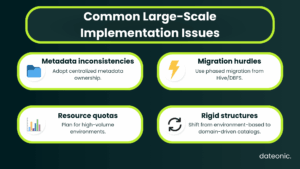
Large-scale implementations of Databricks Unity Catalog can present unique challenges. Here are some common issues and their solutions:
- Metadata Inconsistencies: Address metadata inconsistencies and path overlaps by establishing clear data ownership and a centralized metadata management strategy.
- Migration from Legacy Systems: When migrating from systems like Hive metastore or DBFS, adopt a phased approach to minimize disruption and ensure a smooth transition.
- Resource Quotas and Limitations: Be mindful of resource quotas and limitations in high-volume environments and plan your architecture accordingly.
- Evolving from Environment-Based to Domain-Driven Structures: As your organization grows, consider evolving from an environment-based catalog structure to a domain-driven one to better align with your business needs.
Conclusion and Next Steps
By adopting these databricks unity catalog best practices, large organizations can build a robust and scalable data governance framework. This will not only ensure data quality, security, and compliance but also empower your teams to innovate and drive business value with data.
To get started with your Databricks Unity Catalog deployment and build a strong foundation for data governance, contact Dateonic for expert consulting and support.