
Traditional compliance policies fall short in today’s AI-driven data environments. Unity Catalog solves this by embedding governance directly into the Databricks Lakehouse, enabling enterprise-grade access control, lineage tracking, and auditability.
In this article, I detail three field-tested techniques to secure and scale your data operations with Unity Catalog.
1. Architecting Scalable Access Controls
Unity Catalog implements a sophisticated entitlement system that transcends simple role-based security. By combining role-based access control (RBAC) with attribute-based controls (ABAC), organizations can implement precise data security policies that adapt to changing business requirements.
The hierarchical permission model follows a metastore → catalog → schema → table → column → row structure, allowing security teams to design access patterns that match organizational boundaries while maintaining principle of least privilege.
Implementation Strategy
For optimal security posture, implement this recommended access hierarchy across your medallion architecture:
- Bronze layer: Restrict to data engineering roles with broad catalog-level permissions
- Silver layer: Grant schema-level access to domain teams (marketing, finance)
- Gold layer: Implement granular table and column-level entitlements for specific use cases
This progressive refinement ensures raw data remains protected while curated datasets receive appropriate controls based on sensitivity and usage patterns.
— Example: Implementing domain-based access control
— Create catalog for finance domain
CREATE CATALOG IF NOT EXISTS finance;
— Grant catalog admin rights to finance data stewards
GRANT CREATE, USAGE ON CATALOG finance TO ROLE finance_stewards;
— Grant read access to specific tables for analysts
GRANT SELECT ON TABLE finance.core.revenue_facts TO ROLE financial_analysts;
— Column-level security for PII in customer dimension
GRANT SELECT ON TABLE finance.core.customer_dim (customer_id, region, segment)
TO ROLE marketing_analysts;
Common Pitfalls and Solutions
| Pitfall | Recommended Solution |
|---|---|
| Permission explosion from individual grants | Use group-based access control with synchronized identity providers |
| Inconsistent masking of sensitive columns | Create secure views at the Gold layer with standardized masking functions |
| Dynamic access requirements for time-limited projects | Implement temporary access patterns with scheduled revocation |
| Access control blind spots in external tables | Register all data sources with Unity Catalog, including external storage |
Feature Maturity Note
As of Databricks Runtime 14.x, row-level security remains in Public Preview for most deployment types, while column-level security is Generally Available. For production environments requiring row filtering, consider implementing this at the view level until RLS reaches full GA status.
2. Engineering Robust Data Lineage Systems
Data lineage in Unity Catalog goes beyond simple documentation—it creates a comprehensive system of record for data transformations that supports compliance, troubleshooting, and impact analysis. Properly implemented lineage becomes a critical infrastructure component for trustworthy data systems.
Implementation Strategy
To build effective lineage tracking:
- Standardize transformation patterns: Use Delta Live Tables or structured workflows to ensure consistent lineage capture
- Enforce lineage documentation: Require explicit documentation of external data sources using the COMMENT functionality
- Implement quality checkpoints: Add data quality rules at key lineage points
- Connect to enterprise metadata systems: Integrate Unity Catalog lineage with broader metadata platforms using the Lineage API
The lineage graph becomes particularly valuable during data incident response, allowing teams to quickly identify affected downstream assets and determine remediation steps.
— Diagnosing lineage gaps using INFORMATION_SCHEMA
SELECT
upstream_name,
downstream_name,
lineage_type,
lineage_timestamp
FROM system.information_schema.lineage_graph
WHERE upstream_name LIKE '%customer%’
AND lineage_timestamp > current_timestamp() – INTERVAL 7 DAY
ORDER BY lineage_timestamp DESC;
Integration with MLflow and Delta Sharing
Unity Catalog lineage extends into the machine learning lifecycle through MLflow integration, tracking which datasets were used to train specific models. However, note that lineage tracking for models served through MLflow has limited granularity in current releases.
For Delta Sharing implementations, lineage tracking extends to share creation but does not currently capture recipient usage patterns outside the organization. When sharing sensitive data, supplement Unity Catalog controls with recipient usage agreements.
3. Building Comprehensive Audit and Monitoring Systems
Unity Catalog audit capabilities create the foundation for a security intelligence system when properly implemented. Rather than treating logs as a compliance checkbox, forward-thinking organizations build active monitoring that detects anomalies and potential security issues.
Implementation Strategy
Develop a multi-layer audit architecture:
- Real-time alerting: Configure alerts for critical events like privilege escalation or sensitive data access
- Log aggregation: Export Unity Catalog logs to centralized storage with appropriate retention policies
- Enrichment pipeline: Process logs to add context such as business unit or data classification
- SIEM integration: Forward enriched logs to security monitoring platforms
- Trend analysis: Implement regular audit reviews to identify usage patterns and permission optimization opportunities
— Example audit monitoring query for unusual access patterns
SELECT
user_identity.email,
COUNT(*) as access_count,
resource_name
FROM system.audit_log.access_events
WHERE timestamp > current_timestamp() – INTERVAL 24 HOUR
AND resource_name LIKE '%.pii.%’
GROUP BY user_identity.email, resource_name
HAVING COUNT(*) > 100
ORDER BY access_count DESC;
Addressing Audit Blind Spots
While Unity Catalog provides comprehensive coverage, several scenarios require additional monitoring:
- Notebook execution: Monitor notebook execution events separately through the workspace events API
- Query results: Unity Catalog logs access but doesn’t track how data is used after query execution
- External tool access: Monitor partner integrations like BI tools separately
- Compute access patterns: Supplement with cluster access logs for complete visibility
When to Use What
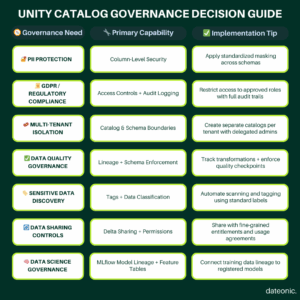
Architecting Your Governance Journey
Successful governance implementation with Unity Catalog follows this recommended progression:
- Foundation: Establish metastore and identity integration
- Organization: Create catalog and schema hierarchy with ownership
- Protection: Implement access controls for sensitive data
- Monitoring: Configure audit logs and alerts
- Lineage: Ensure transformation workflows capture lineage
- Optimization: Refine permissions based on actual usage patterns
This phased approach allows organizations to build capability maturity while delivering immediate security benefits for critical data assets.
Governance as Competitive Advantage
The three critical techniques—scalable access controls, robust lineage systems, and comprehensive audit capabilities—work together to create a governance foundation that supports both compliance and innovation. By implementing these approaches within your lakehouse architecture, you can accelerate safe data usage across the organization.
Ready to strengthen your data governance strategy?
Partner with Dateonic to implement Unity Catalog best practices, streamline compliance, and unlock enterprise-scale analytics—securely and confidently.
Contact our Unity Catalog experts to get started.