
Databricks and Azure Fabric are two of the most capable enterprise data platforms in 2025—each excelling in different areas.
Whether you’re optimizing for AI, governance, or seamless Microsoft integration, understanding their core strengths is key to choosing the right solution for your data strategy.
How to Navigate This Comparison
This guide offers a focused, enterprise-grade comparison across performance, governance maturity, integration depth, cost structures, and AI/ML readiness.
Whether you’re evaluating a full platform migration or fine-tuning a hybrid architecture, this breakdown will help you align technical choices with long-term business objectives and regulatory realities.
| Component | Databricks Lakehouse Architecture | Azure Fabric Architecture |
|---|---|---|
| Core Storage | Delta Lake (ACID transactions, reliability) | OneLake (Unified data lake storage) |
| Data Governance | Unity Catalog (Row/column-level security) | Microsoft Purview (Table-level controls) |
| Data Engineering | Databricks Runtime (Optimized Spark) | Data Factory + Spark (Basic orchestration) |
| Analytics | Databricks SQL (Lakehouse SQL queries) | Synapse Data Warehouse (SQL analytics) |
| Machine Learning | MLflow (End-to-end MLOps) | Azure ML integration (Requires setup) |
| Ecosystem | Multi-cloud, open-source friendly | Microsoft 365/Power BI native integration |
Platform Overview
Databricks: The Lakehouse Pioneer
Databricks has firmly established itself as the creator and leader of the lakehouse paradigm, combining the best elements of data lakes and data warehouses.
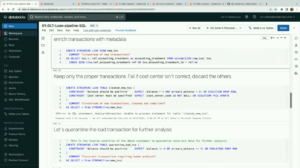
Founded by the original creators of Apache Spark, Databricks continues to be the primary contributor to the Spark ecosystem, ensuring that their implementation remains cutting-edge.
Key components of the Databricks platform include:
- Delta Lake for ACID transactions and data reliability
- Unity Catalog for governance and discovery
- MLflow for end-to-end machine learning lifecycle management
- Databricks SQL for warehouse-like analytics performance
- Databricks Runtime for optimized Spark processing
Azure Fabric: Microsoft’s Integrated Data Platform
Azure Fabric represents Microsoft’s vision for a unified data analytics platform, bringing together previously separate services into a cohesive whole.
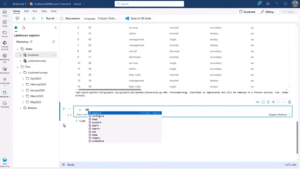
Released as a general availability product in 2023, Fabric has rapidly matured into a comprehensive offering tightly integrated with the broader Microsoft cloud ecosystem.
Key components of the Azure Fabric platform include:
- OneLake as the foundational data lake storage
- Data Engineering with Spark
- Data Factory for ETL/ELT workflows
- Data Warehouse for analytics
- Power BI for visualization
- Microsoft Purview for governance
Databricks Unity Catalog vs Azure OneLake
Unity Catalog has been Databricks’ governance solution since 2021, providing a unified approach to managing data assets. OneLake, introduced with Azure Fabric, aims to provide similar capabilities within the Microsoft ecosystem.
Unity Catalog offers:
- Unified governance across all Databricks workspaces
- Fine-grained access controls down to the row and column level
- Lineage tracking across the entire data lifecycle
- Automated discovery and classification of sensitive data
- Native integration with Delta Lake for ACID transactions
OneLake provides:
- Seamless integration with other Microsoft services
- Shortcut functionality for data sharing without duplication
- Automatic synchronization with Azure Data Lake Storage Gen2
- Native Power BI integration
- Connection to Microsoft Purview for compliance and governance
For organizations heavily invested in the Microsoft stack, OneLake’s integration advantages are significant.
However, Unity Catalog’s maturity in handling complex governance scenarios and its deep integration with Databricks’ Lakehouse architecture give it an edge for organizations with demanding governance requirements or multi-cloud strategies.
A data governance trends article highlights how unified governance solutions like Databricks Unity Catalog can significantly improve compliance readiness and reduce complexity for enterprises managing sensitive data.
Cost Comparison: Databricks DBUs vs Azure Fabric Capacity
Understanding the cost structures of both platforms is crucial for budget planning and optimization.
Databricks uses a consumption-based model based on Databricks Units (DBUs), which vary based on:
- Compute instance types (Standard, Premium, Enterprise)
- Workload type (Jobs, All-Purpose, SQL)
- Regional pricing differences
- Additional costs for premium features and storage
Azure Fabric employs a capacity-based pricing model with:
- Capacity units purchased in advance
- Different rates for reserved capacity vs. pay-as-you-go
- Bundled storage with capacity units
- Discounts for Azure commit contracts
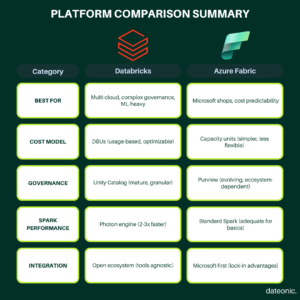
For smaller organizations or those just starting their data journey, Azure Fabric often presents a more predictable and potentially lower entry cost. Databricks, while potentially more expensive initially, offers opportunities for significant optimization through features like automated cluster scaling and workload-specific tuning.
According to Databricks’ official cost optimization best practices, businesses can achieve 30–40% cost savings by applying workload-specific tuning, autoscaling, and intelligent cluster sizing.
Spark Performance Benchmark
Performance remains a critical differentiator, particularly for large-scale data processing.
Databricks holds several advantages in Spark performance:
- Photon engine for vectorized query execution
- Delta Lake optimizations for data skipping and Z-ordering
- Proprietary Databricks Runtime optimizations
- Advanced auto-scaling capabilities
- Deep integration with cloud storage for optimal I/O
Azure Fabric’s Spark implementation offers:
- Growing set of performance optimizations
- Integration with OneLake for storage efficiency
- Native integration with other Fabric services
- Simplified management through the Microsoft platform
In large-scale benchmark testing scenarios, Databricks with the Photon engine has demonstrated substantial performance gains, achieving query execution speeds several times faster than standard Spark environments.
These improvements are particularly evident in complex analytics workloads, where Databricks’ combination of runtime optimizations and vectorized processing contributes to faster results and greater efficiency at scale.
However, for many common data engineering tasks and moderately sized datasets, Azure Fabric’s performance is entirely sufficient, especially when the workloads integrate with other Microsoft services.
End-to-end Analytics
Both platforms aim to provide comprehensive end-to-end analytics capabilities, but with different approaches.
Databricks workflows include:
- Delta Live Tables for declarative pipeline development
- Jobs orchestration for reliable task scheduling
- Notebooks for collaborative development
- Seamless transition between SQL, Python, and Scala
- Auto Loader for efficient CDC processing
Azure Fabric workflows include:
- Data Factory for visual pipeline development
- Notebooks for development similar to Databricks
- Data pipelines for orchestration
- Direct integration with Power BI
- Pre-built connectors for common data sources
The integration advantage within the Microsoft ecosystem cannot be overstated for organizations already heavily invested in Azure. The ability to move seamlessly between Azure services with unified authentication creates a cohesive experience that Databricks cannot fully match in a Microsoft-centric environment.
Conversely, Databricks offers a more mature MLOps experience and deeper integration with open-source data tools, making it potentially more suitable for organizations with diverse technological requirements or sophisticated AI/ML needs.
Enterprise Governance
Enterprise governance capabilities are increasingly critical as data regulations tighten globally.
Unity Catalog provides:
- Unified metadata management across workspaces
- Fine-grained access controls at row and column level
- Automated data lineage and impact analysis
- Integration with external governance tools
- Centralized policy management
Microsoft Purview offers:
- Comprehensive data map across Azure services
- Data classification and sensitive data discovery
- Compliance reporting and monitoring
- Integration with Microsoft Information Protection
- Automated data discovery across the Microsoft ecosystem
Organizations adopting unified governance frameworks often report significantly faster compliance turnaround and reduced administrative overhead.
By centralizing policy management and streamlining metadata control, enterprises can accelerate regulatory readiness while cutting down on the operational costs typically associated with fragmented governance systems.
For mixed environments containing both Microsoft and non-Microsoft technologies, Unity Catalog often provides more flexibility. For Microsoft-focused enterprises, Purview’s deep integration delivers significant efficiency advantages.
Which Platform Is Right For Your Organization?
The decision between Databricks and Azure Fabric should be based on several key factors:
- Existing Technology Investments: Organizations heavily invested in Microsoft technologies may find Azure Fabric offers a more seamless experience.
- Performance Requirements: For the most demanding Spark workloads, Databricks still maintains performance advantages.
- Governance Needs: Complex governance requirements across diverse data assets may be better served by Unity Catalog’s maturity.
- Budget Considerations: Azure Fabric often provides a more accessible entry point for organizations beginning their modern data platform journey.
- AI/ML Sophistication: Organizations with advanced machine learning needs may benefit from Databricks’ more mature MLOps capabilities.
Consider exploring our detailed case studies on successful Databricks implementations for more specific guidance.
Key Takeaways
- Databricks leads with advanced performance, mature governance via Unity Catalog, and a robust Lakehouse architecture—ideal for organizations prioritizing scalable AI and complex data engineering workflows.
- Azure Fabric shines with deep Microsoft ecosystem integration, simplified pricing, and a unified experience across analytics, making it a strong fit for enterprises already invested in Azure.
- Strategic alignment matters: The best choice depends on your current tech stack, performance needs, governance complexity, and long-term data strategy.
- Future-ready platforms: Both solutions are rapidly evolving, and convergence in features is expected—yet their architectural foundations remain distinct.
Choosing the right platform is a strategic decision. Contact our team for a tailored assessment to help you unlock the full value of your data infrastructure.