
An enterprise AI platform decision rarely comes down to which model leads a public benchmark. The harder questions appear later. Can the platform reach the right company data?
Will it fit the existing identity and network setup? Can the team deploy, monitor and govern what it builds without creating a second platform around the first one?
This guide looks at five options that often reach enterprise shortlists: Databricks, Microsoft Foundry with Azure Machine Learning, Google Cloud’s Gemini Enterprise Agent Platform, Amazon SageMaker and Hugging Face Hub.
They are not identical products, so forcing them into a numbered ranking would create more confidence than the evidence allows.
Databricks starts with the data platform. Microsoft, Google and AWS extend their respective cloud environments. Hugging Face is primarily a model and collaboration layer.
The useful question is not which one is “best,” but which one fits the workload and operating model you actually have.
Enterprise AI platforms at a glance
| Option | Strongest fit | What it brings together | Main point to validate |
|---|---|---|---|
| Databricks | Organizations that want data engineering, analytics, machine learning and AI governance close to the same data foundation | Data preparation, model development, MLflow, feature engineering, model serving and Unity Catalog governance | Product availability, operating model and total cloud cost for the selected region and workload |
| Microsoft Foundry + Azure Machine Learning | Companies standardized on Azure, Microsoft Entra and the wider Microsoft ecosystem | Foundry for models, agents and AI application tooling; Azure Machine Learning for training, deployment and MLOps | Which tasks belong in Foundry, Azure Machine Learning and supporting Azure services |
| Gemini Enterprise Agent Platform, formerly Vertex AI | Google Cloud users building with Gemini, managed ML services or AI agents | Model access, managed training, AutoML, MLOps and agent development on Google Cloud | Feature-level security controls, regional availability and the impact of current product-name changes |
| Amazon SageMaker | AWS-centered organizations that want AI and analytics services within their existing AWS environment | SageMaker Unified Studio, SageMaker AI, data and analytics services, plus integrations with Amazon Bedrock | The number of AWS services involved and the current monitoring path for new customers |
| Hugging Face Hub | Teams that need an open-model ecosystem, private model and dataset repositories, and collaboration around AI assets | Model and dataset repositories, enterprise access controls and optional managed inference | It is usually a component of an enterprise AI stack, not a replacement for its data and MLOps platform |
What this comparison covers
We reviewed current product documentation across the areas that tend to matter after a proof of concept:
-
fit with enterprise data and the existing cloud estate;
-
support for traditional machine learning, generative AI and agents;
-
deployment, evaluation, monitoring and lifecycle management;
-
identity, network, access, lineage and audit controls;
-
pricing structure and the operational work required around the platform.
We did not run the same workload across every vendor, so this article does not make claims about a universal winner on speed, cost, security or scale. Any of those conclusions would require a defined workload, region, architecture and commercial agreement.
Databricks
Databricks is easiest to understand by starting with the data rather than the model. Its machine learning environment covers work from data preparation and experimentation through deployment and production monitoring.
Teams can use familiar frameworks, track work with MLflow, manage features and train models without moving the workflow to a separate ML product.
The closer connection between data and AI is the main reason Databricks makes enterprise shortlists. Unity Catalog applies access controls, lineage and audit activity to data and AI assets.
Model Serving then provides a common interface for real-time and batch inference.
Where it earns a place on the shortlist
Databricks makes the most sense when AI depends on governed business data and several technical teams need to work from the same foundation.
It is less about making one model call easier and more about keeping data engineering, analytics, machine learning and governance connected as the use case reaches production.
That connection can remove handoffs, but it does not make architecture work disappear. Environments, identity, networking, deployment, ownership and cost controls still need explicit decisions. Feature availability also varies by cloud, region and release status.
The official pricing page is useful for understanding the billing model. A serious estimate should also include the underlying cloud infrastructure, storage and networking, then test the total against a representative workload.
Microsoft Foundry and Azure Machine Learning
Calling this option simply “Azure Machine Learning” now leaves out a large part of Microsoft’s AI stack.
Microsoft Foundry is the current environment for models, agents and AI application tooling. Its documentation covers shared access control, networking and policy management, alongside development, evaluation, tracing and monitoring.
Microsoft also identifies Azure AI Studio and Azure AI Foundry as earlier names, which explains why all three still appear in articles and architecture decks.
Azure Machine Learning has not disappeared. It remains focused on the machine learning lifecycle, including training, pipelines, managed online and batch deployment, MLflow integration and MLOps.
One ecosystem, two different jobs
For an Azure-centered company, the combination is a sensible starting point. Foundry is the more direct route for model and agent applications.
Azure Machine Learning is still relevant when data science teams need to train, register, deploy and operate traditional or custom models.
The distinction matters when a diagram or proposal refers vaguely to “Azure AI.” Ask which service owns each stage of the workflow and which supporting Azure resources it needs.
That answer affects permissions, networking, support ownership and the final bill.
Microsoft’s Azure Machine Learning pricing guidance says the service itself does not add a separate charge, while consumed compute and supporting Azure services are billed. Comparing only training compute would therefore miss part of the production cost.
Google Cloud’s Gemini Enterprise Agent Platform, formerly Vertex AI
Google changed the name faster than many teams could update their diagrams. The company now presents Gemini Enterprise Agent Platform as the platform formerly known as Vertex AI.
The new positioning puts agents and Gemini closer to the center, but the established ML capabilities are still there. Google’s machine learning documentation covers managed datasets, AutoML, custom training with common frameworks, model management and deployment.
A natural fit for Google Cloud teams, with one important caveat
Organizations already using Google Cloud data services, security controls or Gemini models have an obvious reason to evaluate the platform.
It also offers managed training and model operations for teams that do not want to provision the underlying training infrastructure themselves.
The caveat is that platform-level language can hide feature-level differences. Google’s own security-control matrix shows that controls are not identical across machine learning and generative AI components.
Data residency, customer-managed encryption, private access and audit requirements need to be checked against the exact services and models in the design.
For now, using “formerly Vertex AI” in procurement documents and internal runbooks will prevent needless confusion. Costs should be estimated for the selected services and regions in the Google Cloud pricing calculator, not inferred from the platform label alone.
Amazon SageMaker
SageMaker now means more than the managed ML service many teams first used. AWS applies the name to a broader data, analytics and AI platform.
SageMaker Unified Studio brings several AWS services into one development experience, while SageMaker AI remains the service for building, training and deploying ML models.
SageMaker AI, Unified Studio and Amazon Bedrock are connected, but they are not interchangeable names for the same feature set. That distinction is easy to lose in a high-level comparison and expensive to discover halfway through implementation.
Useful breadth, but expect some assembly
For organizations already operating on AWS, SageMaker can keep model development close to the data, applications, identity and monitoring tools they already use. Unified Studio gives analytics and AI teams a more connected place to work across that environment.
The same breadth can also produce a design with several services, billing dimensions and permission boundaries. Before comparing it with a more consolidated platform, trace the full route from data access through training and deployment to monitoring and incident response.
One current limitation deserves a direct mention. AWS says SageMaker Model Monitor is no longer open to new customers.
Existing customers can keep using it, but a new buyer should confirm the alternative monitoring path with AWS instead of building a plan around the older feature. The AWS Pricing Calculator can then be used for the complete design rather than one isolated service.
Hugging Face Hub
Hugging Face is the odd one out in this comparison. That is not a criticism. Its main role is different: it provides an ecosystem for models, datasets and AI applications, with collaboration around both open and private assets.
The Team and Enterprise documentation lists single sign-on, audit logs, storage-region options, resource groups, token management and network-security features. Resource Groups add more granular access to repositories and selected organization features.
Teams can also deploy models through managed Inference Endpoints.
Treat it as a specialist layer, not an automatic foundation
Hugging Face is useful when teams need a shared source of models and datasets, private repositories or a practical way to work with open models. It often sits alongside Databricks or a cloud ML platform rather than replacing either one.
The boundary should be agreed before buying. The Hub can manage AI assets and access to them, and Inference Endpoints can host models. Data engineering, feature pipelines, wider orchestration and governance across the rest of the company may still belong elsewhere.
That is why ranking Hugging Face directly against the other four would be misleading. Its pricing also needs to be read together with the cost of the surrounding data, training and operational stack.
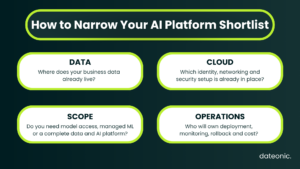
How to narrow the shortlist
The first cut should come from your constraints, not a vendor leaderboard.
Where do the data and identities already live?
An existing cloud setup can make its native platform easier to adopt because networking, identity and procurement are already in place. If the harder problem is keeping governed data, analytics and AI together, Databricks may be the more relevant starting point.
What does the platform actually need to own?
Calling a foundation model, training a custom model and operating an AI product are different jobs. A team that mainly needs open-model discovery may get more value from Hugging Face than from a full ML platform. Another team may need the surrounding data and governance layer from day one.
Which controls are non-negotiable?
Write down the required identity, network, encryption, audit and residency controls before the demo. Then verify them against the exact service, model and region. A platform-level security statement is not enough.
How much assembly can the team support?
A composable cloud stack gives architects more choice, but someone still has to own its permissions, integrations, monitoring and cost. A more consolidated platform reduces some of that work but may ask the organization to adopt a stronger platform opinion.
Turn the pilot into a production rehearsal
A polished notebook can make almost any platform look ready. The pilot becomes useful when it exposes the work required around the model.
Use a real data path
Test with representative data and a realistic deployment pattern. Include private connectivity, permissions, lineage, CI/CD, monitoring and rollback. If the pilot avoids those areas, it is testing the model rather than the platform.
Put the operators in the room
Ask the data scientist, platform engineer, security reviewer and application owner to work through the same scenario. This quickly reveals whether responsibilities are clear or merely hidden behind a managed-service label.
Governance that exists only in a slide deck will not survive production pressure.
Cost everything around the model
Include training or tuning, inference, API usage, storage, data processing, network transfer, observability, support and engineering time. Test different workload shapes because idle capacity, traffic spikes and batch processing do not affect every platform in the same way.
Record what may change
Before signing, confirm regional availability, quotas, release status, deprecations and support terms. Keep that evidence with the architecture decision.
This article already contains examples of why: product names change, and services that once looked like a safe default may stop accepting new customers.
Final take
The table at the top is enough to build a shortlist, but not enough to choose a platform.
Databricks deserves close attention when the AI roadmap depends on governed enterprise data and shared workflows across data engineering, analytics and machine learning.
A native Microsoft, Google or AWS platform may create less friction when the company already has a mature operating model in that cloud. Hugging Face often complements either route by giving teams a practical layer for open models and shared AI assets.
The decision becomes credible only after the preferred option has survived a representative workload with identity, networking, governance, deployment, monitoring and cost included.
If Databricks is on your shortlist, Dateonic can help assess the architecture, define a production scope and implement the platform around your data and AI workloads. Explore our Databricks implementation and consulting services.
Frequently asked questions
What is an enterprise AI platform?
It is a set of services used to develop, deploy, govern and operate machine learning or AI applications. Depending on the vendor, it may also include data engineering, model access, agent tooling, monitoring, security controls and collaboration features.
Which enterprise AI platform should a company evaluate first?
Begin with the current data location, cloud operating model and mandatory security controls. This usually removes several poor fits before a product demo begins. Use a representative pilot to make the final comparison.
Is Hugging Face Hub a full enterprise AI platform?
Not in the same sense as Databricks or the large cloud platforms. The Hub is strongest in model and dataset discovery, repositories, collaboration and open-model workflows. It also offers managed inference, but the wider data and MLOps environment may still live elsewhere.
Should a company choose the AI platform offered by its current cloud provider?
Often, yes. Identity, networking, procurement and operations may already be in place. It should remain a starting assumption rather than an automatic decision, especially when the data foundation or governance model points elsewhere.