
Configuring Databricks workflows manually through the user interface may be acceptable during early-stage exploration. At enterprise scale, however, UI-driven configuration creates avoidable risks: undocumented changes, inconsistent environments, limited reviewability, and unclear ownership.
Terraform allows engineering teams to manage Databricks account and workspace resources alongside their wider cloud infrastructure. Used correctly, it makes platform changes version-controlled, reviewable, and suitable for automated validation.
However, Terraform should not automatically manage every Databricks resource. This guide explains how to properly split responsibilities between Terraform and Declarative Automation Bundles, how to choose the right compute, and how to define a production-ready multi-task job.
Terraform vs. Declarative Automation Bundles
The most important architectural decision is not how to express a job in Terraform, but deciding which tool should own the job. Databricks now recommends Declarative Automation Bundles (formerly Databricks Asset Bundles) as its primary CI/CD approach for project-level resources.
The Golden Rule: One resource should have one authoritative deployment owner. Never manage the same job with both Terraform and a Bundle.
Recommended Responsibility Split
| Concern | Terraform | Declarative Automation Bundles |
|---|---|---|
| Workspaces & Networking | Primary tool | Not usually responsible |
| Identities & Unity Catalog | Primary tool | Limited to supported project resources |
| Compute Policies | Primary tool | References existing policies |
| Application Code & Artifacts | Not usually responsible | Packages and deploys them |
When should Terraform manage a job? Only when the job is part of shared platform infrastructure (e.g., a workspace-wide audit-log processor, system-level cost reporting) or if the organization has deliberately standardized all Databricks resources on Terraform.
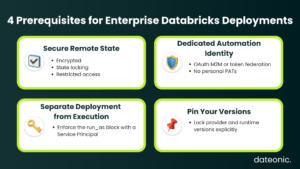
4 Prerequisites for Enterprise Deployment
Before defining a Databricks job in Terraform, establish these core boundaries:
- 1. Secure Remote State: Use an encrypted remote backend (Amazon S3, Azure Blob, GCS) with state locking and strictly restricted access. Never use local state in a team environment.
- 2. Use a Dedicated Automation Identity: Never run production deployments with a Personal Access Token (PAT) belonging to an individual employee. Prefer OAuth token federation (e.g., with GitHub Actions) or OAuth Machine-to-Machine (M2M) authentication.
- 3. Separate Deployment from Execution: The identity that deploys a job shouldn’t be the one running it. Use the run_as block to assign a dedicated Service Principal with least-privilege Unity Catalog permissions.
- 4. Pin Your Versions: Do not allow CI/CD pipelines to unpredictably pull the latest Terraform provider or Databricks Runtime. Pin versions deliberately (e.g., version = “~> 1.117.0”) and upgrade them via tested pull requests.
Choosing Compute for Databricks Jobs
Compute selection heavily impacts startup time, operational overhead, and cloud costs.
- Serverless Jobs Compute (Default): Use this whenever the workload supports it. Databricks manages the provisioning and scaling, removing infrastructure overhead and significantly improving startup times.
- Classic Jobs Compute: Use dedicated jobs compute (never interactive all-purpose clusters) only when you need specific cloud node types, custom containers, explicit compute policies, or runtimes not yet supported by serverless.
A Production-Oriented Terraform Example
This multi-task job example deliberately uses Classic Jobs Compute to demonstrate enterprise features like shared job clusters, autoscaling, explicit runtime pinning, and artifact deployment via Unity Catalog Volumes (avoiding legacy DBFS roots).
terraform {
required_version = “~> 1.10”
required_providers {
databricks = {
source = “databricks/databricks”
version = “~> 1.117.0”
}
}
}
provider “databricks” {
host = var.databricks_workspace_url
# CI/CD injects credentials via environment variables or OAuth federation
}
resource “databricks_job” “mlops_pipeline” {
name = “platform-mlops-${var.environment}”
description = “Platform-managed MLOps workflow deployed through Terraform.”
# 1. Enforce Execution Identity
run_as {
service_principal_name = var.job_service_principal_application_id
}
# 2. Configure Shared Ephemeral Compute
job_cluster {
job_cluster_key = “shared_workflow_compute”
new_cluster {
spark_version = var.spark_version # e.g., “16.4.x-scala2.12”
node_type_id = var.worker_node_type
policy_id = var.job_compute_policy_id
data_security_mode = “USER_ISOLATION”
autoscale {
min_workers = 2
max_workers = 8
}
}
}
# 3. Task Dependencies and Python Wheels
task {
task_key = “data_prep”
job_cluster_key = “shared_workflow_compute”
python_wheel_task {
package_name = “enterprise_ml”
entry_point = “prepare_data”
}
library {
# Referencing a governed Unity Catalog Volume instead of DBFS
whl = var.python_wheel_volume_path
}
}
task {
task_key = “model_training”
job_cluster_key = “shared_workflow_compute”
depends_on {
task_key = “data_prep”
}
# 4. Task-Level Reliability Controls
max_retries = 1
min_retry_interval_millis = 60000
python_wheel_task {
package_name = “enterprise_ml”
entry_point = “train_model”
}
library {
whl = var.python_wheel_volume_path
}
}
email_notifications {
on_failure = var.failure_notification_emails
}
}
CI/CD & Governance Checklist
Infrastructure as Code does not make a Databricks platform automatically secure. To ensure your deployment process is production-ready, enforce the following guardrails:
- Artifact Governance: Build Python wheels/JARs via CI/CD and upload them to governed storage (Unity Catalog Volumes) before running terraform apply. Never manually overwrite latest.whl.
- Least-Privilege Unity Catalog: Grant the job’s Service Principal only the explicit privileges it needs (e.g., USE CATALOG, SELECT, MODIFY). Separate identities by trust boundaries (e.g., Ingestion vs. PII data).
- Automated Validation: Run terraform fmt, validate, and automated policy checks (like Checkov or Sentinel) before generating a plan.
- Explicit Plan Reviews: Configure your CI pipeline to output the terraform plan directly into PR comments. Never merge infrastructure changes without authorized human review.
- Control Configuration Drift: Terraform cannot prevent users from clicking buttons in the UI. Lock down workspace permissions, run scheduled Terraform plans to detect drift, and establish strict processes for importing emergency UI changes back into state.
Conclusion
Terraform remains a critical component of enterprise Databricks platform engineering, but it requires a strict ownership model. Use Terraform for foundational platform infrastructure, shared identities, compute policies, and Unity Catalog governance. Leave application code, specific ML pipelines, and project-level jobs to Declarative Automation Bundles.
At Dateonic, we help organizations design governed Databricks architectures, modernize CI/CD deployment processes, establish Unity Catalog controls, and reduce operational compute costs. Talk to a Databricks expert at Dateonic to review your platform architecture and ensure your automated deployments are truly production-ready.