
This guide is based on the official Dateonic Databricks YouTube tutorial series: Databricks Asset Bundles – Hands-On Tutorial. Part 3 – implementing a for_each loop. I highly recommend watching this video as a complement to this guide for a visual walkthrough of the concepts covered here.
Check out our GitHub repository for this series of tutorials: https://github.com/Dateonic/Databricks-Asset-Bundles-tutorial

In this third part of our guide on Databricks Asset Bundles (DABs), I’ll focus on how to implement for_each loops in DABs with practical examples that you can apply to your own projects.
This is part 3 of a 4-part series on Databricks Asset Bundles:
- How to Run Python and SQL Files with All-Purpose Compute (completed)
- How to pass local and global parameters in DABs (completed)
- How to do a for_each loop in DABs (this guide)
- How to run multiple jobs in one main workflow (coming soon)
What is a for_each loop in DABs?
The for_each functionality in DABs allows you to dynamically create multiple instances of a task based on a list of inputs. Instead of creating separate tasks for each item, you can define a single task template and have DABs automatically generate and execute instances of that task for each item in your input list.
Key benefits of using for_each include:

Prerequisites
Before we begin, ensure you have:
- A Databricks workspace
- DABs CLI installed (pip install databricks-cli)
- Basic understanding of DABs structure and configuration
Step-by-Step Implementation
Let’s build a practical example where we process data for multiple brands using a for_each loop. Our workflow will:
- Create brand tables
- Retrieve a list of brands
- Execute a processing task for each brand in parallel
Step 1: Set up your DABs project structure
Our project will have the following structure:
bundle_tutorial/
├── databricks.yml
├── resources/
│ └── for_each_job.yml
└── src/
├── create_brands.sql
├── get_brands.py
└── action_for_each.sql
Step 2: Define your bundle configuration
First, let’s look at the databricks.yml file which defines our bundle:
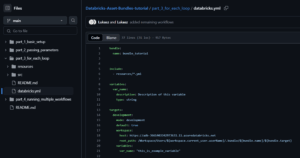
Important: Replace the https://adb-*****************.**.azuredatabricks.net placeholder with your actual Databricks workspace URL. You can find this URL in your browser’s address bar when you’re logged into your Databricks workspace.
This configuration establishes our bundle name, includes any YML files from the resources directory, and sets up our development environment.
Step 3: Create tables for our brands
In our src/create_brands.sql file, we’ll create tables for different brands:

This script creates a brands table with the list of brand suffixes and then creates sample data tables for each brand.
Step 4: Create a script to retrieve brand names
Next, we’ll create a Python script (src/get_brands.py) to query the brands table and extract the list of brand names:

This script:
- Retrieves parameters for catalog, schema, and table name
- Queries the database to get a list of distinct brand suffixes
- Stores this list as a task value using dbutils.jobs.taskValues.set()
The task value we set here will be used as the input for our for_each loop.
Step 5: Create the action to execute for each brand
Now we’ll define the action that will be performed for each brand in our src/action_for_each.sql file:
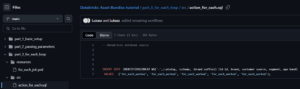
This simple SQL script inserts a test record into each brand’s table, demonstrating that our for_each loop is working correctly. In a real-world scenario, you would likely perform more complex processing here.
Step 6: Define the job with for_each functionality
Finally, we’ll create our job definition in resources/for_each_job.yml:
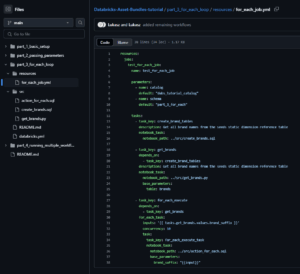
Here’s a breakdown of what’s happening in this job definition:
- We define a job named test_for_each_job with parameters for catalog and schema
- The first task, create_brand_tables, runs our SQL script to set up the tables
- The second task, get_brands, retrieves the list of brand names and stores them as task values
- The third task, for_each_execute, implements our for_each loop:
- inputs: '{{ tasks.get_brands.values.brand_suffix }}’ references the list of brands returned by the previous task
- concurrency: 10 allows up to 10 tasks to run in parallel
- The task section defines what will run for each brand, with {{input}} being replaced by each brand name
Understanding the for_each_task Configuration
The most important part of our implementation is the for_each_task section in our job definition:
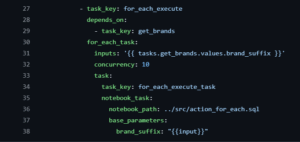
Let’s break down each component:
- inputs: This defines the list of items to iterate over. In our case, we’re using the output from the get_brands task, which contains our list of brand names. The notation {{ tasks.get_brands.values.brand_suffix }} references the task values we set using dbutils.jobs.taskValues.set().
- concurrency: This controls how many instances of your task can run in parallel. Setting this appropriately helps manage resource utilization in your Databricks workspace.
- task: This defines the template for what will run for each item in your inputs list. Within this section:
- task_key: This is used as a base name for each task instance.
- notebook_task: Specifies the notebook to run.
- base_parameters: Parameters passed to each notebook execution. Note the special {{input}} placeholder, which gets replaced with the current item from the inputs list.
Deploying and Running Your DAB
Now that we’ve set up our DAB with for_each functionality, let’s deploy and run it:
Deploy your bundle:
databricks bundle deploy
Run your job:
databricks bundle run
Monitor execution: Navigate to the Jobs UI in your Databricks workspace to view the progress and results of your job.
When the job runs, you’ll see:
- The create_brand_tables task creates our tables
- The get_brands task retrieves our list of brands ([’adidas’, 'nike’, 'puma’])
- The for_each_execute task dynamically creates three parallel tasks, one for each brand
- Each brand-specific task inserts a test record into its respective table
Visualizing the Workflow
The execution of our for_each job would look like this:
create_brand_tables
↓
get_brands
↓
for_each_execute ───┬───────┬───────┐
↓ ↓ ↓
adidas task nike task puma task
Common Issues and Troubleshooting
| Issue | Symptoms | Troubleshooting Steps |
|---|---|---|
| Inputs not being passed correctly | The for_each loop isn’t receiving inputs correctly. | – Check that your task values are being set correctly in the Python code – Verify the JSON format of your task values – Ensure you’re referencing the correct task and value name in your for_each configuration |
| Task execution failures | Individual tasks are failing during execution. | – Check task logs for specific error messages – Verify that input values are valid and in the expected format – Ensure parameters are being passed correctly to the notebooks |
| Concurrency issues | You’re experiencing resource contention or timeouts. | – Reduce the concurrency setting – Check for potential deadlocks in your database operations – Ensure your cluster has sufficient resources for parallel execution |
Conclusion
The for_each functionality in Databricks Asset Bundles offers a powerful way to execute repetitive tasks across multiple entities while keeping your code DRY (Don’t Repeat Yourself). By dynamically generating tasks based on runtime data, you can create more flexible and maintainable workflows.
In this guide, we’ve covered how to:
- Create a list of inputs using a Python notebook
- Set up a for_each loop in your job configuration
- Pass different values to each task instance
- Control parallel execution with concurrency settings
With these techniques, you can efficiently process data for multiple brands, regions, time periods, or any other dimension that requires similar but separate processing steps.
Here’s what you might explore next in our tutorial series:
- How to run multiple jobs in one main workflow (coming soon) – The final guide in our series will teach you how to orchestrate complex workflows by coordinating multiple parameterized jobs within a single parent workflow.
By mastering these techniques, you’ll be able to fully leverage the power of Databricks Asset Bundles, treating your data infrastructure as code and creating robust, repeatable, and manageable Databricks deployments.