
Data ingestion is the critical first step in building a Lakehouse. Without a robust pipeline, your Data Intelligence Platform cannot function. AWS S3 is the standard storage layer for raw data, and connecting it efficiently to Databricks is a fundamental skill for any data engineer.
In this article, we will provide a technical walkthrough of the three best modern methods to ingest data s3 to databricks: Auto Loader, COPY INTO, and Unity Catalog Volumes.
Prerequisites for Secure Ingestion
Before ingesting data, you must establish a secure connection between AWS and Databricks. Modern security best practices dictate that we move away from legacy key-based access.
AWS Configuration:
- S3 Bucket: Ensure your target S3 bucket is created and contains the raw data you intend to ingest.
- IAM Roles: Create an AWS IAM role (Instance Profile) that has specific read/write permissions to your S3 bucket, rather than using long-lived Access Keys.
Databricks Configuration:
- Unity Catalog: We strongly recommend enabling Unity Catalog for all new ingestion pipelines. It replaces legacy hive metastores and provides centralized governance.
- Storage Credentials: Create a Storage Credential in Databricks that maps to your AWS IAM role.
- External Locations: Define an External Location in Databricks using that credential. This allows you to access S3 paths securely (e.g., s3://my-bucket/data) without hardcoding secrets in your notebooks.
Method 1: Auto Loader (The Recommended Standard)
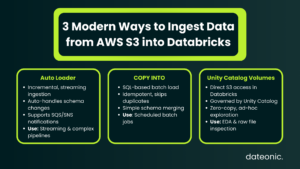
Concept: Auto Loader (specifically the cloudFiles format) is the gold standard for incremental, streaming file ingestion on Databricks. It is designed to handle massive scales of data arrival without the overhead of listing directories repeatedly.
Key Features:
- Incremental Processing: It tracks which files have been processed using a checkpoint, ensuring that only new files are read.
- Schema Evolution: It features „Schema Rescue,” which automatically handles changing data structures by capturing unexpected columns in a _rescued_data column rather than failing the job.
- Notification Mode: For high-volume ingestion, Auto Loader can subscribe to AWS SQS/SNS file events, making file discovery highly scalable compared to traditional directory listing.
Code Snippet:
# Python/PySpark Auto Loader Syntax
df = (spark.readStream
.format(„cloudFiles”)
.option(„cloudFiles.format”, „json”)
.option(„cloudFiles.schemaLocation”, „s3://my-bucket/schemas/sales”)
.load(„s3://my-bucket/landing/sales_data”)
)
df.writeStream.trigger(availableNow=True).toTable(„bronze_sales”)
Use Case: Auto Loader is best for continuous data pipelines, streaming data, and scenarios with complex schema changes. It is a core component of Databricks architecture best practices for building a resilient Bronze layer.
Method 2: COPY INTO (The SQL Batch Solution)
Concept: The COPY INTO command is a simple, idempotent SQL command that loads data from a file location into a Delta table. It is the preferred method for analysts and engineers who prefer SQL over Python/Scala.
Key Features:
- Simplicity: No Spark Structured Streaming code is required; it is pure SQL syntax.
- Idempotency: The command automatically tracks loaded files. If you run the command twice, it skips files that have already been ingested, preventing duplicates.
- Validation: It offers validation options to preview data before committing it to the table.
Code Snippet:
— SQL Syntax for COPY INTO
COPY INTO target_table
FROM ’s3://source-bucket/landing/data’
FILEFORMAT = PARQUET
FORMAT_OPTIONS (’mergeSchema’ = ’true’)
COPY_OPTIONS (’mergeSchema’ = ’true’);
Use Case: This method is best for scheduled batch jobs, data analysts comfortable with SQL, and straightforward file loads where advanced schema evolution is not required.
Method 3: Unity Catalog Volumes (Direct Access)
Concept: Unity Catalog Volumes allow you to treat S3 directories as file system objects within the Databricks explorer. Unlike the previous methods, this does not necessarily move data into a Delta table immediately but makes it accessible as a file.
Key Features:
- Governance: You manage permissions (READ VOLUME, WRITE VOLUME) via Databricks Unity Catalog, extending governance to non-tabular files.
- Zero-Copy: Users can access data immediately without waiting for an ingestion job to finish.
- Explorer Access: Files appear in the Databricks UI, allowing users to browse S3 content as if it were a local folder.
Use Case: Volumes are best for Exploratory Data Analysis (EDA), data science workflows requiring raw file access (e.g., images, PDFs), and ad-hoc file inspection. For large organizations, implementing this correctly is part of Unity Catalog best practices.
Comparison: Which Method Should You Choose?
Selecting the right ingestion strategy depends on your specific workload requirements, latency needs, and team skillset.
Comparison Table:
| Feature | Auto Loader | COPY INTO | Unity Catalog Volumes |
|---|---|---|---|
| Best For | Streaming & Massive Scale | Simple Batch (SQL) | Ad-hoc & Unstructured |
| Complexity | Medium (PySpark) | Low (SQL) | Low (UI/Path access) |
| Schema Evolution | Excellent (Schema Rescue) | Basic (Merge Schema) | N/A (File Access) |
| File Discovery | Notification / Listing | Listing | Direct Access |
| Scale | Billions of files | Thousands of files | Manual / Ad-hoc |
For most production data engineering pipelines, Auto Loader is the superior choice due to its robustness. However, COPY INTO remains a powerful tool for quick SQL-based tasks.
Best Practices for Production
To ensure your ingestion pipeline is production-ready, consider these critical best practices:
- Security: Always use Unity Catalog External Locations. Never use hardcoded AWS Access Keys and Secret Keys in your notebooks.
- Architecture: Follow the Medallion Architecture. Ingest S3 data to Databricks into a „Bronze” raw layer first, keeping the data as close to the source format as possible before transformation.
- File Formats: While Databricks supports CSV and JSON, prefer Parquet or Avro for source data in S3 whenever possible for better performance and lower costs.
Conclusion
Mastering these three methods covers 99% of ingestion needs on AWS. Whether you utilize the automation of Auto Loader for streaming pipelines or the simplicity of COPY INTO for batch jobs, the goal remains the same: a reliable, governed flow of data into your Lakehouse.
By implementing these standards, you ensure your AWS S3 to Databricks pipelines are secure, scalable, and ready for advanced analytics.
Building a robust Data Intelligence Platform on AWS?
Don’t leave your data architecture to chance. Dateonic is an official Databricks partner with deep expertise in both AWS and Azure implementations.
Contact Dateonic today to help you architect a scalable, secure ingestion pipeline that fits your business needs.