
When enterprise organizations transition from legacy data warehouses to modern Lakehouse architectures, they often encounter a common performance bottleneck: untreated data pipelines are slow and expensive to query. Deploying machine learning models into production requires high-throughput, reliable data streams. If the underlying Delta tables are heavily fragmented, downstream MLOps and GenAI pipelines will suffer from severe latency.
Understanding how to properly tune and optimize data storage within the Databricks ecosystem is a critical business imperative. It reduces cloud compute costs, improves query speeds, and provides the scalable foundation necessary for production-grade AI.
The Impact of Storage Optimization on Lakehouse Performance
The core of most performance degradation in distributed storage systems is the “small file problem.” When streaming jobs or frequent micro-batches ingest data into Delta Lake, they generate thousands of tiny Parquet files.
While Delta Lake handles this well at first, a massive accumulation of small files creates severe metadata overhead. When a compute cluster runs a query, it must spend excessive time opening, reading, and closing thousands of small files before actually processing the data. This slows down read operations drastically and inflates cloud compute bills across AWS, Azure, or GCP.
Performance Impact: Consolidating 100,000 small files into 100 optimized Parquet files can reduce cluster compute time for a simple SELECT query from 45 seconds to under 2 seconds.
Solving the small file problem and efficiently arranging data on disk is the first step toward scalable Data & AI platform operations.
Key Techniques to Optimize Data Storage in Databricks
Engineers have several native Delta Lake commands to manage data layout and file size. Implementing these techniques allows you to efficiently optimize data storage in Databricks, providing the reliable foundation required for complex data science workloads.
File Compaction with OPTIMIZE
The OPTIMIZE command is the primary defense against the small file problem. Under the hood, Delta Lake reads the numerous small files that make up a table and rewrites them into larger, evenly distributed files (typically aiming for 1GB file sizes, though this can be tuned based on the Databricks cluster configuration).
Here is the basic syntax to run file compaction:
SQL:
OPTIMIZE catalog_name.schema_name.table_name;
PySpark:
spark.sql(“OPTIMIZE catalog_name.schema_name.table_name”)
# Or using the DeltaTable API
from delta.tables import *
deltaTable = DeltaTable.forName(spark, “catalog_name.schema_name.table_name”)
deltaTable.optimize().executeCompaction()
Data Skipping and Z-Ordering (ZORDER)
Delta Lake automatically collects minimum and maximum statistics for the first 32 columns of a table, storing this metadata in the transaction log. When a query is executed, Databricks uses these statistics to skip files that do not contain relevant data, drastically speeding up query times.
To maximize the effectiveness of data skipping, you can co-locate related information using ZORDER BY. Z-Ordering maps multidimensional data into one dimension while preserving the locality of the data points. Use Z-Ordering on high-cardinality columns (columns with many unique values) that are frequently used in query WHERE clauses.
SQL:
OPTIMIZE catalog_name.schema_name.table_name ZORDER BY (customer_id, transaction_date);
Architectural Warning: Do not Z-Order on too many columns. Doing so degrades the effectiveness of the clustering and creates unnecessary compute overhead during the optimization job. Stick to 1-4 frequently queried columns.
Modern Tuning with Liquid Clustering
Databricks introduced Liquid Clustering as the modern alternative to traditional Hive partitioning and Z-Ordering. Liquid Clustering dynamically redefines how data is clustered over time, removing the need to rewrite partitions manually as data scales or query patterns change.
You should use Liquid Clustering for new tables, especially those that will experience heavy concurrent writes or changing access patterns over time.
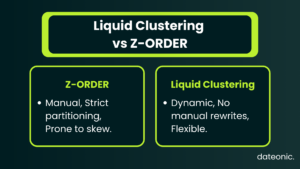
Note: Liquid Clustering is available in Databricks Runtime 13.3 LTS and above. In DBR 15.2 and above, it is the default for new Delta tables.
— Creating a table with Liquid Clustering
CREATE TABLE catalog_name.schema_name.events (
id STRING,
event_time TIMESTAMP,
event_type STRING,
payload STRING
)
USING DELTA
CLUSTER BY (event_type, event_time);
— Optimizing a clustered table
OPTIMIZE catalog_name.schema_name.events;
Managing Stale Data with VACUUM
As you update, delete, and OPTIMIZE tables, Delta Lake keeps the older versions of your data files to enable “Time Travel” (the ability to query earlier versions of the table). Over time, these stale files consume significant and costly cloud storage.
The VACUUM command safely removes data files that are no longer referenced in the current Delta transaction log and are older than the retention threshold.
SQL:
VACUUM catalog_name.schema_name.table_name RETAIN 168 HOURS;
Important Data Governance Fact: The default retention period for VACUUM is exactly 7 days (168 hours). If you run VACUUM without specifying a retention period, it defaults to 7 days. Once a file is vacuumed, you permanently lose the ability to Time Travel back to a version of the table that relied on that file.
Unity Catalog and Predictive Optimization
For organizations leveraging Unity Catalog for enterprise data governance, optimization workflows are significantly streamlined. OPTIMIZE and VACUUM can be executed seamlessly on managed tables. Furthermore, Databricks recently introduced Predictive Optimization for Unity Catalog managed tables. This modern feature uses AI to automatically determine the best times to run OPTIMIZE and VACUUM operations, entirely eliminating the need for manual scheduling while ensuring peak performance and cost efficiency.
| Scenario | Recommended Feature | Why |
|---|---|---|
| Thousands of small Parquet files | OPTIMIZE | Consolidates fragmented files |
| Queries filter by customer_id or transaction_date | Z-Ordering | Improves file skipping |
| New production Lakehouse deployment | Liquid Clustering | Eliminates manual clustering maintenance |
| Storage costs increasing over time | VACUUM | Removes unused historical files |
| Continuous streaming ingestion | Auto Optimize + Auto Compact | Prevents small-file accumulation automatically |
Automating Storage Maintenance in Production
For continuous ingestion workflows, relying on manual OPTIMIZE runs is not sustainable. Databricks provides two table properties to automate storage maintenance:
- delta.autoOptimize.optimizeWrite: Dynamically optimizes Parquet file sizes during the write operation. This slightly increases the latency of the write itself, but ensures the data is highly performant for immediate reads. It is ideal for high-throughput batch or streaming workloads.
- delta.autoOptimize.autoCompact: Checks if the table has too many small files after a write operation completes, and automatically triggers a background compaction job if necessary.
SQL:
ALTER TABLE catalog_name.schema_name.table_name SET TBLPROPERTIES (
‘delta.autoOptimize.optimizeWrite’ = ‘true’,
‘delta.autoOptimize.autoCompact’ = ‘true’
);
For deeper dives into automating these processes using MLOps standards, review the specific implementation patterns on the Dateonic technical blog.
How Dateonic Drives Cost-Efficiency in Databricks
Transitioning from raw data to actionable intelligence requires more than just provisioning cloud resources. It demands strict data governance, precise cluster optimization, and a production-ready Lakehouse architecture.
As an Official Databricks Consulting Partner, Dateonic structures its entire engineering methodology around the Databricks ecosystem. We specialize in configuring enterprise security via Unity Catalog, optimizing legacy data warehouse migrations, and deploying structured MLflow environments. We do not deal in generic software development; we deliver highly specialized, cost-effective Big Data and AI solutions.
Ready to scale your data operations and drastically reduce your compute costs?
FAQ
How often should I run the OPTIMIZE command?
For daily batch jobs, running OPTIMIZE once a day after the ingestion completes is standard practice. For continuous streaming, it is better to enable autoCompact or schedule an automated Databricks Asset Bundle job to run optimization during off-peak hours.
Does running VACUUM delete my current table data?
No. VACUUM only deletes underlying storage files that are no longer referenced by the active Delta table state and fall outside the specified retention period (default 7 days). Your active data remains untouched.
When should I use Liquid Clustering instead of Z-Ordering?
Databricks recommends Liquid Clustering for all new Delta tables, especially if the table is expected to grow significantly or if the queries hitting the table have unpredictable or evolving filtering conditions.
Can Z-Ordering slow down my write speeds?
Yes. Running OPTIMIZE … ZORDER BY requires the cluster to read, sort, and rewrite massive amounts of data. This is compute-intensive and will take longer than a standard compaction job, which is why it should only be applied to columns strictly required for downstream read performance.