
Scaling production-grade Databricks environments requires strict governance over cloud compute costs. While Data Engineering Leads and Chief Data Officers (CDOs) prioritize rapid job execution, leaving virtual machines running indefinitely silently drains Infrastructure as a Service (IaaS) budgets.
For data teams managing classic compute architectures, achieving meaningful Databricks instance pools cost savings is a matter of precise configuration. Rather than simply turning resources off and absorbing 10-minute delays for every job, optimizing instance pools allows your teams to maintain high performance without paying for unnecessary idle compute.
Here is an engineering-focused guide to tuning your Databricks instance pools for production-grade workloads.
The Financial Mechanics of Databricks Instance Pools
Databricks instance pools maintain a set of “warm,” ready-to-use virtual machine instances. When a cluster requires a node, it draws from the pool, completely eliminating the standard 5 to 10-minute VM startup time required by cloud providers.
Understanding the billing logic is critical to cost optimization:
- Databricks DBUs: Databricks does not charge Databricks Units (DBUs) for idle instances sitting in a pool. You are only billed DBUs when the instances are actively attached to a running cluster.
- Cloud Provider IaaS: Your underlying cloud provider (AWS, Azure, or GCP) will charge standard compute rates for any active VM, regardless of whether it is idle in a Databricks pool or attached to a cluster.
Consider a data science team running 200 short, ad-hoc jobs daily. Without pools, they spend an average of 4 minutes per job waiting for clusters to start. That is 800 minutes (over 13 hours) of wasted cluster time daily.
If your cluster operates at an effective rate of $0.40/hour per DBU, that startup overhead is quietly consuming your budget – while severely degrading developer productivity. Instance pools solve the latency problem, but they must be governed correctly to prevent IaaS costs from offsetting the DBU savings.
Strategic Configurations for Cost Reduction
Treat instance pools as highly specific resources. Do not use a single, monolithic pool for your entire workspace. Different Databricks Runtimes and instance types (e.g., heavy machine learning operations vs. simple ETL pipelines) require distinct, dedicated pools.
Note on Photon Acceleration: If you utilize Photon-accelerated clusters, ensure your pools are provisioned with compatible instance types. While warming up instances does not change standard DBU burn rates, misaligned instance types can lead to fallback and performance degradation.
Tuning Min Idle and Max Capacity
The foundational controls for any pool are Min Idle and Max Capacity.
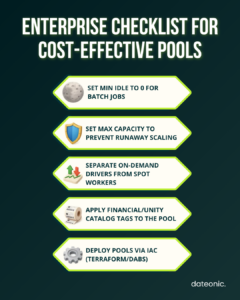
- Min Idle: This dictates how many instances remain warm and running, incurring cloud provider fees even when no cluster is using them. For strict budget environments or intermittent batch processing, set Min Idle to 0. For SLA-critical streaming applications or interactive BI clusters where fast starts are mandatory, setting this higher ensures immediate availability.
- Max Capacity: This acts as a hard financial guardrail. It sets the absolute maximum number of instances the pool will provision. If a cluster requests an instance and the pool is at max capacity, the request fails, preventing runaway auto-scaling events from destroying your monthly cloud budget.
Optimizing Idle Instance Auto-Termination
Misconfiguring the auto-termination window is the most common cause of wasted pool spend. The Idle Instance Auto-Termination timer dictates how long an instance remains in the pool after a cluster releases it before shutting down completely.
Calculate the perfect buffer time based on the scheduled gap between your workloads. If an ETL Job A finishes at 08:40 and Job B is scheduled to start at 09:00, setting a 25-minute auto-termination timeout is optimal.
It prevents the system from dropping the instances at 08:50 only to suffer a cold start 10 minutes later. For a deeper look at managing cluster lifecycles, review our guide on Databricks cluster configuration best practices.
For highly time-sensitive MLOps workloads, pre-populating pools before a scheduled model training run ensures resources are instantly ready. This trades a minor, controlled increase in compute cost for guaranteed execution speed.
Integrating Spot Instances Safely
Spot instances allow you to utilize spare cloud capacity at steep discounts, but they come with the risk of sudden termination by the cloud provider. When architecting pools, strictly separate driver and worker nodes.
- Worker Nodes: Create an instance pool explicitly configured to request Spot instances for worker nodes. This single configuration typically yields 60-90% savings depending on the cloud provider (such as AWS EC2 Spot or Azure Spot VM) and the specific instance family.
- Driver Nodes: Never use Spot instances for driver nodes. If a Spot driver is terminated, the entire Databricks job fails. Always use On-Demand instances for the driver pool to ensure job stability.
Managing Pools with Infrastructure as Code (IaC)
Manually configuring instance pools through the Databricks UI is not an enterprise best practice. To ensure reproducibility, version control, and strict governance, pool configurations should be deployed using Infrastructure as Code (IaC) tools like Terraform or Databricks Asset Bundles (DABs).
Managing configurations via code ensures that standardized tags, auto-termination limits, and Spot pricing strategies are uniformly applied across all environments.
Instance Pools vs. Databricks Serverless Compute
As of 2026, Databricks Serverless is the default, highly optimized choice for new Databricks SQL and Workflows. Serverless abstracts away infrastructure management entirely, offering instant compute without the need to manually tune pools.
However, enterprise environments rarely operate entirely on Serverless. Instance pools remain mandatory for specific workloads:
| Workload Type | Recommended Compute Strategy |
|---|---|
| Standard SQL Queries | Serverless Compute |
| Routine ETL Workflows | Serverless Compute |
| Custom Docker Containers | Classic Compute (Instance Pools) |
| Complex VNet-injected architectures | Classic Compute (Instance Pools) |
| Specialized MLOps / MLflow environments | Classic Compute (Instance Pools) |
Data engineering teams must migrate eligible workloads to Serverless to simplify operations, while applying rigorous instance pool management to the classic compute clusters that power custom data science and highly secured network environments.
Tagging Pools for Enterprise Cost Governance
Effective FinOps requires accurate chargebacks to specific departments or projects. A common enterprise pitfall is relying entirely on cluster-level tags.
When a Databricks cluster draws an instance from a pool, the custom tags applied to that cluster do not propagate to the underlying cloud provider VMs. If you only tag the cluster, your AWS or Azure billing console will show untagged compute resources, breaking your cost governance model.
To ensure accurate chargebacks and integration with data governance frameworks like Unity Catalog, you must apply cost allocation tags directly to the instance pool configuration. Any instance provisioned by that pool will automatically inherit the correct tags in your cloud provider’s billing dashboard.
Scale Your Databricks ROI with Dateonic
At Dateonic, we build secure, scalable, and highly efficient Data & AI platforms. As an Official Databricks Consulting Partner, we structure our entire engineering methodology around the Databricks ecosystem and modern Lakehouse architectures.
Our team helps enterprise organizations migrate legacy systems, implement production-grade MLOps, and enforce rigorous cost optimization protocols across global cloud environments.
We ensure your architecture actually delivers on the promise of actionable intelligence, free of fragmented pipelines and runaway cloud bills.
Explore our Databricks Consulting services to learn how we implement robust governance and cluster optimization for enterprise clients.
Ready to audit your architecture and permanently lower your platform costs? Talk to a Databricks expert today.
Frequently Asked Questions (FAQ)
Do Databricks instance pools cost DBUs when idle?
No. Databricks does not charge DBUs for instances sitting idle in a pool. However, your cloud provider (AWS, Azure, GCP) will charge their standard virtual machine rates for keeping those instances running.
Can I use Spot instances for my entire Databricks cluster?
It is highly discouraged. You should use Spot instance pools for worker nodes to secure 60-90% cloud compute cost savings, but you must use On-Demand instance pools for the driver node. A terminated Spot driver node will crash the entire job.
Why aren’t my cluster tags showing up in my AWS/Azure bill?
If your cluster uses an instance pool, the cluster-level tags do not propagate to the underlying cloud instances. You must apply your financial and organizational tags directly to the instance pool itself.
When should I use Serverless instead of Instance Pools?
Databricks Serverless is ideal for standard SQL workloads and standard data engineering jobs. You should retain classic compute with instance pools for environments requiring custom Docker containers, specific VNet injections, or highly specialized machine learning libraries.