
This guide is based on the official Dateonic Databricks YouTube tutorial series: Databricks Asset Bundles – Hands-On Tutorial. Part 2 – passing parameters and variables.. I highly recommend watching this video as a complement to this guide for a visual walkthrough of the concepts covered here.
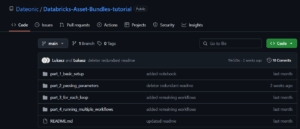
Check out our GitHub repository for this series of tutorials: https://github.com/Dateonic/Databricks-Asset-Bundles-tutorial
In this second part of our guide on Databricks Asset Bundles (DABs), I’ll focus on a critical aspect of DAB configuration: how to pass local and global parameters. Understanding parameter handling is essential for creating flexible, reusable, and environment-aware DABs that can adapt to different deployment contexts.
This is part 2 of a 4-part series on Databricks Asset Bundles:
- How to Run Python and SQL Files with All-Purpose Compute (completed)
- How to pass local and global parameters in DABs (this guide)
- How to do a for_each loop in DABs (coming soon)
- How to run multiple jobs in one main workflow (coming soon)
Understanding Parameters in DABs
Parameters are the backbone of creating dynamic, adaptable DABs. Think of parameters as adjustable inputs that allow your Databricks assets to behave differently based on context—much like function arguments in programming.
Before diving into implementation, let’s build a mental model of the different types of parameters you can use in DABs:
- Global Variables: These are defined at the bundle level and accessible across all resources. Think of them as environment variables that any part of your bundle can reference. They establish a „single source of truth” for values that might be used in multiple places.
- Target-specific Variables: These are global variables that change values depending on the deployment target (like development, staging, or production). They’re essential for creating bundles that adapt to different environments without code changes.
- Local Parameters: These are defined at the resource level (like a job) and only accessible within that resource. They give you fine-grained control over specific resource behavior without affecting other parts of your bundle.
- Task Parameters: These are passed directly to notebooks or other tasks. They allow you to customize the behavior of individual tasks within a job.
Let’s explore how to implement each of these parameter types using practical examples from a real deployment workflow.
Setting Up Global Variables
Global variables are defined in your main databricks.yml file at the bundle level. They establish a foundation of values that can be referenced throughout your bundle configuration.
Let’s look at how to define global variables in the databricks.yml file:
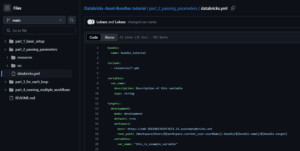
Important: Replace the https://adb-*****************.**.azuredatabricks.net placeholder with your actual Databricks workspace URL. You can find this URL in your browser’s address bar when you’re logged into your Databricks workspace.
This configuration demonstrates several important concepts:
- Bundle Definition: The bundle section identifies your DAB with a name (bundle_tutorial).
- Include Statement: The include section tells the DAB system to look for additional resource definitions in any YAML files within the resources/ directory.
- Global Variables Declaration: The variables section defines a variable called var_name. Notice that we’ve provided metadata:
- description: Explains the purpose of the variable
- type: Specifies that this variable should be treated as a string
- Target Configuration: The targets section creates a deployment target called development:
- mode: Sets this as a development environment
- default: true: Makes this the default target when none is specified
- workspace: Configures the Databricks workspace connection details
- variables: Assigns the actual value „this_is_example_variable” to our global variable var_name for this target
This structure allows you to:
- Define variables once, with proper documentation
- Set different values for different deployment targets
- Reference these variables in other configuration files
Defining Job-Level Local Parameters
While global variables are excellent for values that are used across your bundle, sometimes you need parameters that are specific to individual resources. This is where local parameters come in.
For jobs, local parameters allow you to create configurable aspects of your job that can be set at runtime without modifying your bundle definition. Let’s examine the job definition from passing_parameters_job.yml:

Let’s dissect what’s happening here:
- Job Definition: We’re creating a job resource called example_job with a display name of „Passing parameters”.
- Local Parameter Definition: The parameters section defines a local parameter called local_p with a default value of „local parameter”. This parameter is:
- Specific to this job
- Available to all tasks within this job
- Can be overridden when the job is run
- Task Configuration: The job includes two tasks, one using a Python notebook and another using a SQL notebook. Each task:
- Has a unique task_key for identification
- Specifies a notebook to run via notebook_path
- Provides direct parameters through the base_parameters section
- Task Parameters: In the base_parameters section, we’re passing a parameter called parameter with the value this_is_a_parameter to both notebooks. These are task-specific parameters that are only passed to the notebooks they’re defined for.
This layered approach to parameters gives you tremendous flexibility in how you configure and run your Databricks assets.
Python Notebooks
Once you’ve defined parameters at various levels, you need to access them in your notebooks. For Python notebooks, Databricks provides the dbutils.widgets API for working with parameters.
Let’s examine how our example Python notebook passing_params_python.py accesses the parameters:

This code follows a two-step process:
- Widget Creation: First, we create text widgets for each parameter we expect to receive:
- parameter: Will receive the task parameter value
- var_from_config: Will receive our global variable value
- local_p: Will receive the job’s local parameter
- The empty string („”) passed as the second argument to dbutils.widgets.text() represents the default value in case no parameter is provided.
- Parameter Retrieval: Next, we use dbutils.widgets.get() to retrieve the actual values passed to the notebook and store them in variables.
- Value Usage: Finally, we print each value to verify they’re being correctly passed, but in a real scenario, you would use these values in your data processing logic.
This pattern allows notebooks to receive parameters from the DAB system without having to hardcode values or manually set up notebook parameters.
When the job runs, the DAB system will automatically:
- Pass the task parameter parameter from the base_parameters section
- Pass the global variable var_from_config from the target configuration
- Pass the local parameter local_p from the job configuration
This happens seamlessly, allowing your notebooks to adapt to different configurations without code changes.
SQL Notebooks
SQL notebooks in Databricks use a different syntax for accessing parameters, but the underlying concept is the same. Parameters are passed to SQL notebooks and can be referenced in your queries.
Let’s examine the SQL notebook passing_params_sql.sql:
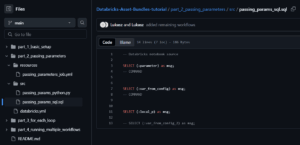
When working with SQL notebooks:
- Parameter Reference Syntax: SQL notebooks access parameters using the (:parameter_name) syntax. This special notation tells Databricks to substitute the parameter value at runtime.
- Command Separation: Each SQL command is separated by — COMMAND which Databricks interprets as a cell separator (similar to having multiple cells in a Python notebook).
- Query Results: Each SELECT statement will return the parameter value as a column named msg. This is a simple way to verify that parameters are being correctly passed to your SQL notebook.
- Commented Out Line: Notice the last line is commented out. This shows what would happen if you try to reference a parameter that wasn’t passed – your query would fail at runtime.
The SQL notebook can access all the same parameter types as Python notebooks:
- Task parameters (like parameter)
- Global variables (like var_from_config)
- Job local parameters (like local_p)
This allows you to create parameterized SQL queries that adjust based on your bundle configuration and job settings, making your SQL workflows more dynamic and adaptable.
Common Parameter‑Related Errors
Quick “look up the fix” reference.
| Symptom/Error Message | Likely Cause | Remedy |
|---|---|---|
| Widget not found: local_p | Missing dbutils.widgets.text call | Add widget declaration for every parameter your code expects |
| Parameter not supplied: var_from_config | Global var not referenced in job/task | Ensure var_from_config is listed under base_parameters |
| YAML schema validation error | Mis‑indented or misspelled key | Run databricks bundle init and fix the reported line numbers |
| Notebook cell fails at runtime substitution | Using (:param) in Python cell or vice versa | Use correct API: SQL uses (:param), Python uses dbutils.widgets |
How It All Works Together
Let’s build a mental model of how parameters are propagated through your DAB when you deploy and run it.
The Parameter Hierarchy
Parameters in DABs follow a hierarchical flow with specific rules about how they propagate and override each other:
- Global Bundle Variables: Defined in the main databricks.yml at the bundle level with the variables key.
- Target-Specific Values: Override the global defaults with values specific to a deployment target (e.g., development, production).
- Job Parameters: Defined at the job level and available to all tasks within that job.
- Task Parameters: Defined directly in the base_parameters section of a task and only available to that specific task.
- Runtime Overrides: Values provided when manually running a job that temporarily override defaults.
Parameter Resolution Process
When a job runs, here’s how the DAB system resolves parameters:
- It starts with global variables defined at the bundle level.
- It applies target-specific values based on which target you’re deploying to.
- It incorporates job parameters with their default values.
- It adds task-specific parameters from the base_parameters section.
- It applies any runtime overrides provided during job execution.
This flow creates a final set of parameters that are passed to your notebooks. The later stages in this process can override values from earlier stages.
Visual Representation of Parameter Flow
To illustrate this concept, think of parameters flowing like water through a series of filters, with each level potentially modifying what passes through:
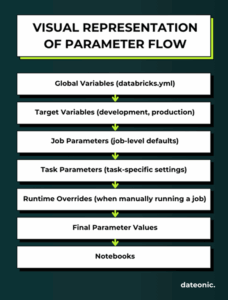
This layered approach gives you precise control over how parameters behave across different environments and execution contexts.
Deploying and Running Your Parameterized DAB
1. Validate Your Bundle
Use the Databricks CLI to validate your bundle:
databricks bundle validate
This validates your configuration files and prepares them for deployment. During this process, the CLI will check the parameter configurations we’ve defined in the databricks.yml file and ensure they’re properly formatted.
2. Deploy Your Bundle
Deploy your bundle to your development workspace:
databricks bundle deploy
This command:
- Validates your bundle configuration, including all parameter definitions
- Creates necessary resources in your Databricks workspace
- Uploads your Python and SQL files as notebooks
- Creates the parameterized job we defined in passing_parameters_job.yml
- Passes the target-specific variable values based on your deployment target
3. Run Your Job
You can run the job using:
databricks bundle run
If you want to override any parameters at runtime, you can do so with the –parameters flag:
databricks bundle run –parameters local_p=„override value”
Or navigate to the Jobs UI in your Databricks workspace to run the job manually, where you can also override parameters through the interface.
Understanding the Results
When your parameterized job runs:
- The Python task executes first and outputs:
- The task parameter value: „this_is_a_parameter”
- The global variable value: „this_is_example_variable”
- The local parameter value: „local parameter” (or your override value)
- Once the Python task completes, the SQL task runs and outputs:
- Three tables, each with a single column „msg” containing the three parameter values
Next Steps
Now that you’ve learned how to effectively pass local and global parameters in DABs, you can leverage this knowledge to create more dynamic and adaptable Databricks workflows. Here’s what you might explore next in our tutorial series:
- How to do a for_each loop in DABs (coming soon) – This upcoming guide will show you how to create dynamic, repeatable components in your DABs configuration.
- How to run multiple jobs in one main workflow (coming soon) – The final guide in our series will teach you how to orchestrate complex workflows by coordinating multiple parameterized jobs within a single parent workflow.
By mastering these techniques, you’ll be able to fully leverage the power of Databricks Asset Bundles, treating your data infrastructure as code and creating robust, repeatable, and manageable Databricks deployments. The parameter handling skills you’ve developed in this guide provide the foundation for the more advanced DAB capabilities you’ll explore next.