
Your Snowflake bill has become a boardroom conversation. Credits burn through faster than your team can optimize queries, and every new pipeline added to the platform compounds the cost. You’ve run the numbers, you’ve seen the architecture ceiling, and you’ve already decided: it’s time to migrate.
The problem isn’t the decision. It’s execution. Most migrations fail not because of tooling, but because of undocumented dependencies, poorly translated SQL dialects, and governance models that collapse the moment Unity Catalog enters the picture.
Dateonic has migrated enterprise Snowflake environments across fintech, logistics, and manufacturing – and we’ve built a repeatable methodology that eliminates the guesswork. This guide breaks down exactly how we do it.
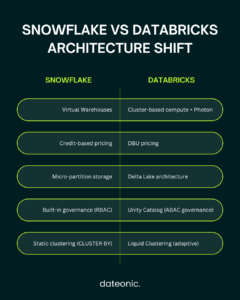
Why Snowflake Migrations Stall at the Architectural Layer
Snowflake’s virtual warehouse model is fundamentally different from Databricks’ cluster-based compute with Photon engine acceleration. Teams that treat this as a 1:1 SQL migration consistently hit the same wall: query plans that worked beautifully on Snowflake’s columnar micro-partition architecture underperform on Delta Lake without deliberate retuning.
Three root causes account for 80% of failed migrations we’ve inherited:
- Unresolved table format debt: Source tables still in Parquet or ORC, never converted to Delta with proper OPTIMIZE and ZORDER strategies.
- Governance gaps: Row-level security and dynamic data masking policies that lived inside Snowflake roles, not translated into Unity Catalog attribute-based controls.
- Compute misconfiguration: Clusters sized for memory pressure, not I/O throughput, leading to Photon underutilization.
Advanced Technical Best Practices for Snowflake to Databricks Migration
1. Replace Snowflake Clustering Keys with Liquid Clustering
Snowflake’s CLUSTER BY syntax creates a static physical sort order that requires periodic automatic reclustering – a credit-consuming background operation you pay for continuously.
In Databricks, Liquid Clustering (ALTER TABLE … CLUSTER BY) is the correct replacement. It uses a Hilbert curve space-filling algorithm to co-locate related data across Delta files, enabling incremental clustering on write rather than expensive background compaction jobs. Critically, Liquid Clustering adapts to changing query patterns without requiring a full table rewrite.
— Replace this Snowflake pattern:
CREATE TABLE orders CLUSTER BY (region, order_date);
— With Databricks Liquid Clustering:
ALTER TABLE orders CLUSTER BY (region, order_date);
OPTIMIZE orders;
For tables exceeding 500GB with high-cardinality filter columns, Liquid Clustering consistently delivers 40–70% reduction in files scanned per query compared to naive Delta migrations.
2. Photon Engine: It Is Not Automatic – You Must Design for It
Photon is a vectorized query engine written in C++ that accelerates Spark SQL and DataFrame operations. But Photon only activates for specific operation types. Teams migrating from Snowflake often see disappointing benchmark results because their workloads inadvertently bypass Photon.
Operations that leverage Photon:
- Filter, project, aggregate, join on Delta tables
- MERGE INTO statements on Delta
- Window functions with OVER clauses
- SQL scan operations with predicate pushdown
Operations that do not leverage Photon:
- Python UDFs (use Pandas UDFs or vectorized UDFs instead)
- Arbitrary mapPartitions or foreachPartition Scala/Python calls
- Streaming with non-Delta sources
Action: Audit your Snowflake UDFs and JavaScript procedures. Any logic wrapped in Snowflake UDFs must be refactored into vectorized Pandas UDFs or native Spark SQL expressions before Photon can accelerate them.
3. Unity Catalog Is Not Optional – It Is the Migration Target
One of the most costly mistakes we see: teams migrate data to Delta Lake and bolt on Unity Catalog as a post-migration step. This doubles the governance migration effort.
Unity Catalog‘s three-tier namespace (catalog.schema.table) must be your target architecture from Day 1. Snowflake’s database.schema.table maps cleanly to this model, but your role hierarchy, grants, and row-access policies do not migrate automatically.
The correct sequence:
- Map Snowflake RBAC to Unity Catalog attribute-based access control (ABAC) before a single table is moved.
- Define metastore boundaries aligned to your data domains (not your Snowflake account structure).
- Migrate tables into Unity Catalog external locations backed by ADLS Gen2 or S3, never into managed storage during initial migration (preserves rollback capability).
4. SQL Translation Is the Smallest Part of the Problem
Everyone focuses on converting Snowflake SQL dialect to Databricks SQL. Tools like Databricks Labs’ REMORPH handle 60–75% of straightforward SELECT/DDL translation. The remaining 25–40% requires human judgment.
| Snowflake Construct | Databricks Equivalent | Complexity |
|---|---|---|
| FLATTEN() + LATERAL | EXPLODE() / INLINE() | Low |
| QUALIFY clause | Window function subquery | Medium |
| MERGE with WHEN NOT MATCHED BY SOURCE | Delta MERGE + conditional logic | High |
| TASK + STREAM pipelines | Delta Live Tables (DLT) | Architectural rewrite |
| JavaScript UDFs | Pandas UDFs / SQL functions | High |
| Dynamic Tables | Streaming DLT tables | Architectural rewrite |
Snowflake Dynamic Tables and TASK/STREAM pipelines are the true migration bottleneck. These require a full architectural translation into Delta Live Tables with declarative pipeline definitions – they cannot be lifted and shifted.
The Dateonic Migration Methodology
We do not run migrations as a single cutover event. We run them as a phased engineering program with defined exit criteria at every stage.
Phase 1: Technical Audit (Week 1–2)
We deploy our Snowflake Audit Accelerator – a set of metadata queries and account usage analysis scripts – to extract:
- Full warehouse credit consumption by query pattern and user group
- All UDFs, stored procedures, and JavaScript objects
- TASK and STREAM dependency graphs
- Row-level security and masking policy inventory
- Actual data access patterns from QUERY_HISTORY (not assumed patterns)
Output: A Migration Risk Register with a complexity score per object and a total estimated effort in engineering days.
Phase 2: Architecture Design (Week 2–3)
We design your target-state Databricks architecture before touching a single byte of data:
- Unity Catalog metastore topology and catalog hierarchy
- Compute policy: Job clusters vs. SQL Warehouses vs. All-Purpose clusters per workload type
- Delta Live Tables pipeline design for all STREAM/TASK equivalents
- Cluster policies and instance pool configurations to cap runaway costs
- Photon-optimized cluster node types (memory-optimized vs. compute-optimized per workload)
Phase 3: Parallel Run & Validation (Week 3–8)
We never cut over blind. During parallel run:
- Source Snowflake environment remains live and writable
- Databricks pipelines ingest from the same upstream sources
- We run row count reconciliation, checksum validation, and statistical distribution comparison across all critical tables daily
- Business logic outputs (reports, ML features, aggregates) are compared against the Snowflake baseline with acceptable variance thresholds defined upfront
Exit criterion: Zero P0/P1 data quality deviations for 10 consecutive business days.
Phase 4: Cutover & Snowflake Decommission (Week 8–10)
We execute cutover during a pre-agreed low-traffic maintenance window, with a documented rollback procedure that can revert to Snowflake within 2 hours if needed.
Post-cutover, we run a 30-day hypercare period with dedicated Dateonic engineers on-call before handing over to your team.
💡 Ready to stop burning Snowflake credits? Get a precise migration cost estimate before you commit to anything. Book your free Migration Cost Calculator session with a Dateonic Architect →
Case Study: Finanzwelt – 45% Cost Reduction on Snowflake to Databricks Migration
Finanzwelt, a leading fintech company specializing in digital banking, payment processing, and financial analytics, came to Dateonic after their Snowflake environment hit a hard ceiling. Surging data volumes, complex ML workloads, and separate siloed environments for storage, processing, and model training were compounding operational costs at an unsustainable rate.
Dateonic conducted a comprehensive assessment of Finanzwelt’s full data estate – schema definitions, SQL workloads, and pipeline dependencies – then devised a phased migration strategy, beginning with non-critical workloads before transitioning core financial analytics.
Throughout the 8+ month engagement, the team applied Unity Catalog integration to achieve seamless compliance with financial regulations, refactored ML pipelines to eliminate the weeks-long model training cycles that had been blocking their data science team, and enabled real-time analytics on payment processing and transaction data that Snowflake’s architecture simply couldn’t support economically.
The result: a 45% reduction in total cost of ownership compared to the Snowflake implementation, ML model training cycles reduced from weeks to days, and a fully unified lakehouse that eliminated the data silos holding their product teams back.
Read the full Finanzwelt case study →
The Business Case: What You Actually Get
Migrating from Snowflake to Databricks is not just a cost-cutting exercise. Done correctly, it is an architectural upgrade that unlocks capabilities Snowflake structurally cannot offer:
- Unified lakehouse: ML, BI, and streaming workloads on a single platform, eliminating data copies between Snowflake and your ML platform.
- Open formats: Delta Lake with no vendor lock-in; your data is always accessible via Apache Spark, DuckDB, or any Iceberg-compatible engine.
- Photon-accelerated SQL: Sub-second query response on petabyte-scale Delta tables with the right clustering strategy.
- Cost predictability: Databricks DBU pricing on reserved capacity is structurally more favorable than Snowflake credit consumption for mixed workloads at enterprise scale.
As demonstrated with Finanzwelt: a 45% reduction in total platform spend, with ML delivery velocity accelerated from weeks to days.
Next Step: Get Your Migration Cost Estimate
You don’t need another vendor pitch. You need a number.
No commitments. No sales deck. Just architecture and numbers.