
Imagine your data engineering team has spent weeks refining a complex set of ETL pipelines. The logic is flawless. The data models are pristine. But the moment comes to push those assets from Development into Production, and progress suddenly grinds to a halt.
Instead of a smooth, automated pipeline, the release becomes a tangled web of manual UI clicks, disjointed deployment scripts, and crossed fingers.
When organizations struggle to scale their data platforms, the bottleneck is rarely the computing engine itself. The friction lies in how the infrastructure and code are managed. Databricks offers immense, untapped architectural potential, yet too many teams inadvertently sideline it, operating their environments without the rigorous software engineering standards they apply elsewhere.
To achieve true enterprise scalability, infrastructure and deployment pipelines must be predictable, automated, and version-controlled. Databricks Asset Bundles (DABs) represent the definitive architectural standard to achieve exactly that.
The Deployment Nightmare: How Organizations Sabotage Their Own Pipelines
When data platforms scale out to multiple teams working within the same ecosystem, ad-hoc deployment strategies inevitably buckle under the weight of their own complexity.
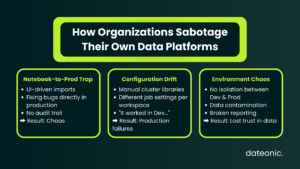
The Notebook-to-Prod Trap
Many data teams still rely on UI-driven imports and exports, or basic Repos integrations that lack a strict, automated CI/CD pipeline. In these scenarios, Databricks is treated more like an isolated playground than a tier-one engineering environment. Code is modified on the fly in production workspaces to „fix” bugs, completely bypassing source control and destroying any audit trail.
Configuration Drift and Environment Chaos
This lack of rigor directly leads to the dreaded „it works in Dev, but fails in Prod” scenario. When cluster configurations, job definitions, and workspace settings live outside of version control, configuration drift is unavoidable.
A pipeline might succeed in development because of a specific library version installed manually on a cluster, only to crash spectacularly when deployed to a production environment missing that identical setup.
Furthermore, without strict data governance and environment isolation – often resulting in messy, interwoven table permissions, development data bleeds into staging, and staging logic corrupts production reporting.
The Dateonic Way: Engineering Enterprise-Grade Platforms
At Dateonic, we recognize a persistent gap in the ecosystem: many companies invest in Databricks but fundamentally treat it as just a basic Spark cluster for ad-hoc querying. The „Dateonic Way” requires treating Databricks as a first-class enterprise platform.
This means adopting stringent software engineering practices. We replace manual configurations with Infrastructure as Code (IaC) via DABs, and we replace messy, workspace-level permissions with centralized, ironclad data governance using Unity Catalog.
Embracing Databricks Asset Bundles (DABs)
DABs allow platform architects to define Databricks Jobs, Delta Live Tables (DLT) pipelines, and MLOps workflows in simple YAML files right alongside the Python or SQL source code. This entirely eliminates the disconnect between what the code does and how the compute infrastructure should execute it.
By defining everything as a bundle, your deployment pipeline becomes a repeatable, automated artifact that integrates seamlessly into GitHub Actions, GitLab CI, or Azure DevOps. Furthermore, DABs natively respect Unity Catalog configurations, ensuring that a „Dev” deployment automatically points to your Dev catalog, completely isolating it from your Production data assets.
The Legacy Approach vs. The Enterprise Standard
| Capability | The „Wrong Way” (Legacy Setup) | The „Dateonic Way” (Modern Architecture) |
|---|---|---|
| Deployment Method | Manual UI imports, disconnected scripts | Fully automated CI/CD via Databricks Asset Bundles |
| Infrastructure | Hand-configured clusters leading to drift | Infrastructure as Code (YAML) living with application code |
| Data Governance | Messy, workspace-level ACLs | Centralized, isolated environments via Unity Catalog |
| Rollbacks | Highly manual, risky, and time-consuming | Instant, Git-based version control reversions |
Show, Don’t Tell: DABs in Action
We believe in showing, not just telling. Check out our public GitHub repository (Dateonic/Databricks-Asset-Bundles-tutorial) for production-grade examples of what we teach.
With a properly configured bundle, defining a multi-task Databricks Job becomes as straightforward as this YAML snippet:
resources:
jobs:
daily_etl_pipeline:
name: „Daily Sales ETL”
tasks:
– task_key: „ingest_raw_data”
notebook_task:
notebook_path: „../src/ingestion.py”
job_cluster_key: „standard_compute”
When you are ready to deploy, a simple CLI command or automated CI runner orchestrates the entire deployment safely and predictably.
Stop Searching for Unicorns: Upskill Your Existing Team
As organizations realize they need to modernize their deployment architectures, they often default to the same strategy: trying to hire their way out of the problem.
Here is the talent reality: true Databricks platform experts who deeply understand strict CI/CD, DABs, and Unity Catalog architecture are incredibly rare and expensive. Spending six months hunting for a „unicorn” engineer stalls your roadmap and inflates your budget.
The smartest, most cost-effective move is to upskill the engineers you already have. They already understand your business logic and your data; they just need the architectural blueprint to deploy it correctly.
Inside Our Corporate Deployment Training
This is exactly where our Corporate Deployment Training workshops bridge the gap. We don’t teach generic tutorials; we deliver intensive, hands-on architectural transformations.
When your team completes a Dateonic training workshop, they will master:
- Migrating Legacy Workloads: Safely transitioning from outdated dbx tools or manual setups to modern DABs.
- Pipeline Automation: Building robust CI/CD pipelines using your company’s actual CI runner (GitHub Actions, Azure DevOps, etc.).
- Environment Isolation: Integrating deployments flawlessly with Unity Catalog to ensure strict separation of Dev, Staging, and Prod.
- Best Practices: Establishing the standardized repository structures required for scalable enterprise teams.
Ready to Standardize Your Databricks Deployments?
You cannot build a scalable, resilient data platform on a foundation of manual deployments and hope. It is time to empower your data engineering team with the exact architectural patterns utilized by top-tier enterprise technology companies.
Stop wrestling with configuration drift and start deploying with confidence.
Would you like to schedule a discovery call to customize a Corporate Deployment Training curriculum specifically for your engineering team’s tech stack?