
Data engineering teams are under pressure to optimize Databricks environments, balancing skyrocketing data volumes with cost and performance demands. In 2025, fine-tuning your Databricks setup is critical to stay ahead.
| Pressure in 2025 | Opportunity with Optimization Techniques |
|---|---|
| Explosive Data Growth (50%+ yearly) | Smarter Delta Lake tuning (compaction, clustering) |
| Rising Cloud Costs | Cluster and spot optimization to cut spend by 70% |
| Demand for Real-Time Insights | Photon Engine and caching strategies |
| Complex Pipelines and Joins | Advanced join handling (AQE, broadcast joins) |
| High User Expectations (BI/ML) | Fast cache hit rates and dynamic cluster scaling |
In this article, I explore five powerful performance optimization techniques to supercharge your Databricks environment, delivering faster processing and lower costs without compromising reliability.
5. Join Operation Optimization
Joins are often the heaviest part of data pipelines. Optimizing them minimizes resource use and accelerates processing for complex workflows.
Key Components:
- Broadcast joins: Apply broadcast joins for small tables (<200MB, e.g., dimension tables) to eliminate shuffles, ideal for star-schema queries.
- Sort-merge tuning: Adjust shuffle partitions based on data size (e.g., 200-1000 for 100GB+ datasets) and use Adaptive Query Execution (AQE) to dynamically optimize large-to-large joins.
- Skew handling: Address data skew in joins (e.g., uneven customer data) by splitting large keys or adding random prefixes, ensuring balanced processing.
- Predicate pushdown: Filter data early in queries to reduce join input sizes, leveraging Delta Lake’s data skipping for efficiency.
Best Practice: Use Spark UI to analyze join performance, identifying skew or excessive shuffles. Test AQE on unpredictable datasets to auto-optimize query plans.
4. Data Caching Strategies
Databricks’ multi-layered caching slashes I/O bottlenecks, accelerating repeated data access for interactive and BI workloads.
Key Components:
- Delta Cache: Automatically caches frequently accessed data on local SSDs (e.g., AWS i3 instances) for near-instant retrieval, ideal for dashboard queries.
- SSD-backed instances: Choose instances like Azure L-series or AWS i3 for high-speed caching, boosting cache hit rates.
- Strategic caching: Cache critical datasets (e.g., lookup tables) at workflow start to pre-warm the cache, ensuring fast access during peak usage.
- Cache monitoring: Track cache hit rates (target 80%+) and evict unused data to free memory, maintaining cluster efficiency.
Performance Impact: Delta Cache can reduce query times by 50-70% for frequently accessed data, as seen in BI dashboards querying terabyte-scale tables.
Best Practice: Use SSD-backed instances for cache-intensive workloads. Pre-warm caches for daily reports to minimize initial query latency.
3. Delta Lake Optimizations
Delta Lake’s advanced features turbocharge query performance and streamline storage, making it essential for large-scale data processing.
Key Components:
- File compaction: Run OPTIMIZE regularly to merge small files into larger ones (e.g., 128MB-1GB), reducing metadata overhead and speeding up reads for tables over 100GB.
- Z-Ordering and Liquid Clustering: Apply Z-Ordering on high-filter columns (e.g., customer ID) for data co-location. Use Liquid Clustering for dynamic, multi-column clustering, improving merge operations by up to 60% for large tables.
- Smart partitioning: Partition large tables (>1TB) by low-cardinality columns (e.g., date, region), ensuring each partition exceeds 1GB to avoid overhead. Avoid over-partitioning small tables.
- Data skipping: Enable automatic min/max statistics to skip irrelevant files during queries, boosting performance for filtered datasets.
Best Practice: Schedule OPTIMIZE, Liquid Clustering, and VACUUM during off-peak hours using automated workflows. For merge-heavy workloads, prioritize Liquid Clustering to enhance update efficiency.
2. Photon Engine Implementation
Photon, Databricks’ high-performance query engine, accelerates SQL and DataFrame operations with vectorized execution, making it a game-changer for analytics and ETL workloads.
Key Components:
- Enablement: Activate Photon via the cluster configuration checkbox in Databricks Runtime 9.1 LTS or newer, requiring no setup complexity.
- Workload fit: Ideal for ETL pipelines, large-scale analytics, and BI dashboards using SQL or DataFrame APIs. Most built-in functions are Photon-compatible.
- Runtime optimization: Use Databricks Runtime 11.3 LTS or newer for enhanced Photon performance and broader compatibility.
Performance Impact: Photon delivers 2-10x speedups for analytical queries, with some ETL workloads running up to 15x faster, as reported by enterprise users processing terabyte-scale data.
Best Practice: Test Photon on high-throughput workloads like nightly ETL jobs to quantify gains. Monitor query performance to ensure compatibility with your data patterns.
1. Cluster Configuration Optimization
Well-configured clusters are the backbone of Databricks performance, enabling significant cost savings and tailored resource allocation for diverse workloads.
Key Components:
- Auto-scaling: Set minimum (e.g., 1 worker for ad hoc tasks) and maximum worker counts to dynamically adjust to workload demands, preventing over-provisioning while ensuring peak-time performance.
- Instance selection: Match instance types to workload needs—compute-optimized (e.g., AWS C5 for ETL pipelines) for CPU-intensive tasks, memory-optimized (e.g., R5 for machine learning) for large in-memory datasets.
- Spot instances: Use spot instances for non-critical jobs like data exploration, saving 70-90% on costs. Pair with on-demand drivers for stability in production environments.
- Auto-termination and pools: Configure clusters to terminate after 15-30 minutes of inactivity. Leverage cluster pools to pre-allocate resources, reducing startup times for frequent jobs.
Best Practice: Deploy job-specific clusters for tasks like ETL or ML training instead of all-purpose clusters. Monitor utilization (target 60-80%) to right-size resources, ensuring cost efficiency.
Conclusion
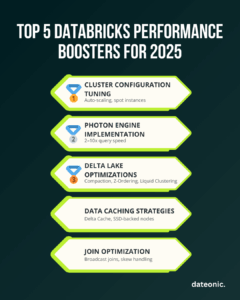
These five techniques—cluster optimization, Photon engine, Delta Lake enhancements, caching strategies, and join tuning—empower your Databricks environment to handle 2025’s data challenges with unmatched speed and cost efficiency. Tailor them to your workloads, monitor their impact, and iterate for continuous improvement.
Ready to unlock Databricks’ full potential? Our certified Databricks experts can assess your environment and implement these optimizations for maximum impact. Contact us for a personalized performance review and elevate your data platform today.