
Change Data Feed (CDF) lets you read row-level inserts, updates, and deletes between versions of a table without repeatedly comparing full snapshots.
That basic purpose has not changed, but the Databricks product has. Databricks now supports two CDF implementations:
- Automatic change data feed, which calculates changes when they are read by using row lineage metadata.
- Legacy change data feed, which materializes change information when data is written.
The two approaches use the same read APIs, but their requirements, storage behavior, and operational trade-offs are different. This guide explains how each one works, provides current SQL and PySpark examples, and covers the retention and VACUUM rules that determine how far back you can actually query.
What is Change Data Feed in Databricks?
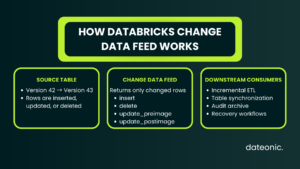
Databricks Change Data Feed returns the rows that changed between table versions. Each returned row includes metadata showing:
- whether the row was inserted, deleted, or updated;
- the table version in which the change was committed; and
- the timestamp of that commit.
For an update, CDF can return both the value before the update and the value after it. This makes it useful for:
- incremental ETL and ELT pipelines;
- propagating changes between Bronze, Silver, and Gold tables;
- synchronizing downstream systems;
- rebuilding derived datasets after a failure; and
- recording row-level changes for audit workflows.
CDF operates on data already stored in a supported Databricks table. It is therefore not a replacement for an upstream change data capture tool that reads the transaction log of a source database. A tool such as Debezium or a managed ingestion service can capture changes from PostgreSQL or SQL Server; Databricks CDF can then track how the ingested data changes inside the lakehouse.
If you are still designing the surrounding data layers, see our guide to Medallion Architecture in Databricks.
Automatic CDF vs legacy CDF
Databricks introduced automatic change data feed as a new approach to CDF. The older implementation is now called legacy change data feed. It is also sometimes described as „materialized CDF” because it materializes changes during writes.
| Area | Automatic change data feed | Legacy change data feed |
|---|---|---|
| When changes are calculated | At read time, from row lineage metadata | At write time |
| Supported table formats | Delta Lake and Apache Iceberg v3 | Delta Lake only |
| Configuration | No delta.enableChangeDataFeed setting on each table | Must be enabled on each table |
| Core requirements | Databricks Runtime 18+, Unity Catalog, and row tracking for Delta tables | A Delta table with delta.enableChangeDataFeed = true |
| Product status | Public Preview at the time of this update | Existing implementation retained for compatibility |
| Write impact | Avoids calculating changes on each MERGE and UPDATE, improving write performance and reducing CDF storage overhead | Some operations can create separate change data files |
| Read APIs | table_changes() and readChangeFeed | table_changes() and readChangeFeed |
| Databricks recommendation | Preferred direction for supported workloads | Migrate to automatic CDF when its requirements fit the workload |
You cannot use automatic and legacy CDF on the same table at the same time.
When should you choose automatic CDF?
Automatic CDF is the better target architecture when:
- the workspace can use Public Preview features;
- compute runs Databricks Runtime 18 or newer;
- the table is registered in Unity Catalog;
- Delta tables have row tracking enabled; and
- your workload is not affected by the automatic CDF limitations described later in this guide.
Legacy CDF remains relevant when an environment cannot meet those requirements or when an organization does not allow Public Preview features in production.
How to use automatic change data feed
Automatic CDF is available for the following tables registered in Unity Catalog:
- managed Delta Lake tables with row tracking enabled;
- external Delta Lake tables with row tracking enabled; and
- managed Apache Iceberg v3 tables, which include row lineage.
For Delta Lake, enable row tracking rather than the legacy CDF property:
ALTER TABLE main.sales.customer_data
SET TBLPROPERTIES (’delta.enableRowTracking’ = 'true’);
You can check the property with:
SHOW TBLPROPERTIES main.sales.customer_data (’delta.enableRowTracking’);
Enabling row tracking on an existing large table is not just a metadata toggle. Databricks assigns row IDs and row commit versions to existing rows, which can take time and create multiple table versions. Pause continuous writers before changing the property because concurrent writes can fail with a MetadataChangedException.
Once the workspace preview and table requirements are satisfied, do not set delta.enableChangeDataFeed. Automatic CDF uses the standard read APIs without per-table CDF configuration.
How to enable legacy change data feed
Legacy CDF must be enabled explicitly on every Delta table.
For a new table:
CREATE TABLE main.sales.customer_data (
customer_id BIGINT,
name STRING,
email STRING,
updated_at TIMESTAMP
)
USING DELTA
TBLPROPERTIES (’delta.enableChangeDataFeed’ = 'true’);
For an existing table:
ALTER TABLE main.sales.customer_data
SET TBLPROPERTIES (’delta.enableChangeDataFeed’ = 'true’);
Legacy CDF records only changes committed after the feature is enabled. Enabling it does not reconstruct earlier row-level history. If you later turn it off and enable it again, the interval during which it was disabled is not available through legacy CDF.
How to read change data
Automatic and legacy CDF use the same interfaces. This makes it possible to migrate the implementation without rewriting downstream readers, provided that the consumers do not request versions outside the available history.
Read changes with SQL
Use the table_changes() table-valued function for batch queries:
SELECT *
FROM table_changes(’main.sales.customer_data’, 42, 57)
ORDER BY _commit_version, customer_id;
The start and end versions are inclusive. To read from one version through the latest available version, omit the end:
SELECT *
FROM table_changes(’main.sales.customer_data’, 42);
You can also query by timestamp:
SELECT *
FROM table_changes(
'main.sales.customer_data’,
'2026-07-01 00:00:00′,
'2026-07-02 00:00:00′
);
Batch reads require a starting version or timestamp. If the requested starting point is no longer present in the table history, the query cannot replay those changes.
Read changes with PySpark
The current option name is readChangeFeed:
changes_df = (
spark.read
.option(„readChangeFeed”, „true”)
.option(„startingVersion”, 42)
.option(„endingVersion”, 57)
.table(„main.sales.customer_data”)
)
changes_df.show()
To read by timestamp:
changes_df = (
spark.read
.option(„readChangeFeed”, „true”)
.option(„startingTimestamp”, „2026-07-01 00:00:00”)
.option(„endingTimestamp”, „2026-07-02 00:00:00”)
.table(„main.sales.customer_data”)
)
Understand the CDF metadata columns
Every CDF result includes three metadata columns:
| Column | Meaning |
|---|---|
| _change_type | insert, delete, update_preimage, or update_postimage |
| _commit_version | The table version containing the change |
| _commit_timestamp | The timestamp associated with the commit |
For an update:
- update_preimage contains the row before the update;
- update_postimage contains the row after the update.
If a source table already contains a column with one of these reserved names, CDF cannot be used until the conflicting column is renamed.
Incrementally process CDF with Structured Streaming
Databricks recommends Structured Streaming when a pipeline should track table versions automatically.
change_stream = (
spark.readStream
.option(„readChangeFeed”, „true”)
.table(„main.sales.customer_data”)
)
query = (
change_stream.writeStream
.option(
„checkpointLocation”,
„/Volumes/main/operations/checkpoints/customer_data_cdf”
)
.trigger(availableNow=True)
.toTable(„main.audit.customer_data_changes”)
)
If you start a new CDF stream without specifying a starting version, the first batch returns the current table snapshot as insert records. Later batches return subsequent changes.
If a downstream table already contains data through a known source version, specify the next version to avoid loading the current snapshot again:
change_stream = (
spark.readStream
.option(„readChangeFeed”, „true”)
.option(„startingVersion”, 76)
.table(„main.sales.customer_data”)
)
The starting version must still be available. A new stream fails if its requested starting version has already been removed from the source table history. This is why checkpoint monitoring and explicit recovery procedures matter in production.
For SCD Type 1 and Type 2 processing in Lakeflow pipelines, Databricks also provides AUTO CDC APIs, which can be safer than maintaining custom foreachBatch merge logic.
CDF retention: why „30 days by default” is misleading
CDF is transient. It is not designed to be a permanent archive of every change.
There is no single setting that guarantees „30 days of CDF.” Two retention mechanisms matter for Delta tables:
| Setting | Default | What it controls |
|---|---|---|
| delta.logRetentionDuration | 30 days | Delta transaction log history. Old log entries are removed asynchronously after checkpoints. |
| delta.deletedFileRetentionDuration | 7 days | How long obsolete data files remain eligible for removal by VACUUM. |
The practical query window is limited by the table history and the underlying files required to reconstruct the requested versions. Keeping the transaction log for 30 days does not guarantee that 30-day-old row changes remain readable if the necessary files were vacuumed after 7 days.
Databricks therefore recommends using only the past 7 days for time travel unless both data and log retention have been configured for a longer period.
Legacy CDF adds another implementation detail:
- some operations materialize changes in files under the managed _change_data directory;
- VACUUM removes eligible change data files according to the table’s retention policy; and
- operations such as insert-only writes or full-partition deletes can be reconstructed from the transaction log instead of separate change files, so their availability also depends on retained log and checkpoint history.
Do not read files from _change_data directly. Always use table_changes() or readChangeFeed.
Configure a longer retention window
If the recovery requirement is 30 days, configure both properties rather than changing only the log retention:
ALTER TABLE main.sales.customer_data
SET TBLPROPERTIES (
'delta.logRetentionDuration’ = 'interval 30 days’,
'delta.deletedFileRetentionDuration’ = 'interval 30 days’
);
Longer retention increases storage costs. In Databricks Runtime 18 and above, logRetentionDuration must be greater than or equal to deletedFileRetentionDuration.
How VACUUM affects CDF history
VACUUM physically deletes files that are no longer needed by table versions inside the configured data-file retention window. Its default threshold is 7 days.
Preview eligible files before deleting them:
VACUUM main.sales.customer_data DRY RUN;
Run the operation:
VACUUM main.sales.customer_data;
VACUUM does not delete Delta log entries; checkpoint cleanup handles those asynchronously. However, retaining log entries alone is not enough. Once VACUUM removes the data or legacy change files required by an older version, that version’s CDF and time-travel queries can no longer be relied on.
Unity Catalog managed tables can also be vacuumed automatically by predictive optimization. Treat the table properties, not a manually remembered VACUUM schedule, as the source of truth for the intended retention window.
Never shorten retention aggressively while long-running streams or batch jobs may still reference older files. This can cause failures and make recovery from an old checkpoint impossible.
How to keep a permanent history of changes
If compliance or recovery requirements exceed the source table’s retention window, copy CDF records incrementally to a separate archive table. The streaming example above uses a checkpoint and trigger(availableNow=True) to do exactly that.
Define retention separately for the archive and protect it with the appropriate Unity Catalog permissions. For a complete audit trail, also capture operation identity from table history or platform audit logs.
CDF includes row values, commit version, and commit timestamp, but it does not add the user who performed the source write to every change row.
This distinction matters: CDF is an excellent input for an audit solution, but by itself it is not a complete, permanent compliance log.
Important CDF limitations
Before using CDF as a production dependency, account for the following constraints.
1. CDF cannot replay changes that no longer exist
If the required table version, transaction log entry, data file, or change data file has been removed, CDF cannot recreate it. An unavailable starting version also prevents a new stream from starting at that point.
2. Non-additive schema changes can break a version range
CDF queries cannot span a version range that contains a non-additive schema change, including:
- renaming or dropping a column;
- changing a column data type; or
- changing column nullability.
Split batch queries into ranges before and after the schema change. Tables using column mapping have additional restrictions around these operations.
3. Legacy CDF does not backfill earlier history
Only changes committed after legacy CDF was enabled are available. A period during which legacy CDF was disabled creates a gap for that implementation.
4. Automatic CDF has additional requirements and restrictions
At the time of this update, automatic CDF:
- is a Public Preview feature;
- requires Databricks Runtime 18 or newer;
- requires a supported table registered in Unity Catalog;
- requires row tracking for Delta Lake tables;
- does not support tables with row filters or column masks;
- is not supported when a source table is modified inside a multi-statement transaction; and
- cannot be combined with legacy CDF on the same table.
Automatic CDF for Delta Lake can only be queried by Databricks readers. Databricks readers can query automatic CDF for Apache Iceberg v3, but external Iceberg clients cannot because CDF is not part of the Apache Iceberg specification.
5. CDF is not source-system CDC
CDF tracks changes between versions of a lakehouse table. It does not connect to an operational database and read its write-ahead log. Most end-to-end architectures still need a separate ingestion mechanism before CDF can distribute changes within Databricks.
How to migrate from legacy to automatic CDF
A practical migration sequence is:
1. Enable automatic CDF from the workspace’s Previews page.
2. Verify Databricks Runtime 18 or newer and Unity Catalog registration.
3. Enable row tracking on the Delta table if it is not already enabled.
4. Pause or coordinate writers while row tracking is enabled on an existing table.
5. Test existing batch and streaming readers against the retained version range.
6. Turn off the legacy table property:
ALTER TABLE main.sales.customer_data
UNSET TBLPROPERTIES (’delta.enableChangeDataFeed’);
7. Restart and monitor consumers using their existing table_changes() or readChangeFeed logic.
The read API remains the same, but migration testing should still cover schema changes, old checkpoints, and the earliest version each downstream workload may request.
When Databricks CDF is the right choice
CDF is particularly valuable when:
- downstream transformations would otherwise scan entire large tables;
- multiple consumers need the same row-level changes;
- a pipeline needs reproducible processing by source table version;
- near-real-time synchronization is required inside the lakehouse; or
- an audit solution needs before-and-after row images.
It might not be the right tool when:
- the requirement is to capture changes directly from an external operational database;
- the organization needs an immutable history but has not designed a separate archive;
- workloads regularly need versions older than the configured retention window; or
- schema changes cannot be coordinated with downstream consumers.
Frequently asked questions
Is Change Data Feed the same as Change Data Capture?
Not exactly. CDC is the broader pattern of capturing changes, often from an operational database transaction log. Databricks CDF exposes changes between versions of a supported table after the data is in Databricks.
Does Databricks CDF keep a complete history forever?
No. CDF is transient and limited by table retention, transaction log cleanup, and VACUUM. Write changes to a separate archive table if permanent history is required.
Can CDF be enabled on an existing Delta table?
Yes. For automatic CDF, enable row tracking and meet the Unity Catalog and runtime requirements. For legacy CDF, set delta.enableChangeDataFeed = true. Legacy CDF does not backfill changes from before it was enabled.
Should new projects use automatic or legacy CDF?
Databricks recommends migrating supported workloads to automatic CDF. However, automatic CDF is still in Public Preview at the time of this update. Teams that cannot use previews or Databricks Runtime 18 should continue using legacy CDF and plan a later migration.
Conclusion
Databricks Change Data Feed can make incremental data pipelines far more efficient, but production reliability depends on more than enabling a table feature.
Teams must choose between automatic and legacy CDF, use the current read APIs, coordinate schema evolution, and align both retention settings with their recovery objectives.
Automatic CDF is the direction of travel for supported Unity Catalog workloads. Legacy CDF remains useful for compatibility, but its materialized write-time model and retention behavior need to be understood explicitly.
If you are planning an incremental processing architecture or migrating existing CDF pipelines, Dateonic’s Databricks consulting team can help you validate the design, retention policy, and recovery strategy before it reaches production.
Official Databricks references