
Databricks clusters serve as the computational backbone of your data platform, but without proper optimization, they become significant cost centers that drain resources while delivering suboptimal performance.
In this guide, I examine the technical aspects of cluster optimization to balance performance requirements with cost efficiency.
Why Cluster Optimization Matters
Compute resources consistently represent the largest cost component in cloud-based data platforms, often accounting for 60-80% of total infrastructure expenses.
Many organizations default to using all-purpose clusters for all workloads, creating an inherent mismatch between compute resources and actual business requirements.
The relationship between cluster configuration and overall system performance extends beyond simple resource allocation. Even well-optimized code can suffer from poor performance when executed on improperly configured clusters.
This interconnected relationship means that cluster optimization must be approached as part of a holistic performance strategy that considers workload patterns, data characteristics, and cost constraints simultaneously.
Autoscaling and Autotermination
Autoscaling automatically adjusts the number of worker nodes based on current workload demands, providing elastic compute capacity that matches actual processing requirements rather than peak theoretical needs.
The system continuously monitors cluster utilization metrics including CPU usage, memory consumption, and task queue depth, provisioning additional nodes when constraints are detected and terminating excess nodes when utilization drops.
Autoscaling Configuration Best Practices:
- Set minimum nodes to maintain baseline performance (typically 2-4 nodes)
- Configure maximum nodes based on largest expected workload (10-20x minimum)
- Account for 2-5 minute provisioning latency during demand spikes
- Monitor cluster performance and adjust limits if failures occur at maximum capacity
Autotermination complements autoscaling by automatically shutting down clusters after periods of inactivity. The optimal timeout period typically ranges from 15-30 minutes, balancing cost savings against user convenience.
Interactive development environments may benefit from longer timeouts to accommodate natural breaks in work, while automated batch processing can use much shorter timeouts since human interaction is minimal.
If you’re new to Databricks and want to understand these concepts practically, creating your first cluster provides hands-on experience with these configuration options.
Choosing the Right Cluster Type
Databricks offers three primary cluster types, each optimized for specific use cases and cost structures. Understanding their technical characteristics enables effective resource allocation.
Job Clusters:
- Most cost-effective option for predictable, batch-oriented workloads
- Automatically created when jobs begin and terminated upon completion
- Eliminate idle resource consumption risks
- Excel in scheduled ETL processes, automated reporting, and ML model training
- Best when human interaction is minimal
All-Purpose Clusters:
- Provide flexibility for interactive development and collaborative analytics
- Support multiple concurrent users and various workload types simultaneously
- Carry cost premium due to always-available nature and enhanced functionality
- Should be configured with autotermination to prevent unnecessary costs
- Ideal for experimentation and iterative development work
Serverless Clusters:
- Provide instant-on capabilities with automatic resource management
- Eliminate cold start delays for ad hoc queries and dashboard refreshes
- Well-suited for business intelligence workloads requiring low query latency
- Carry the highest cost per compute unit
- Best for unpredictable or infrequent workloads where immediate availability is crucial
| Cluster Type | Startup Time | Cost Structure | Best Use Cases |
|---|---|---|---|
| Job | 2-5 minutes | Lowest (ephemeral) | Batch processing, ETL |
| All-Purpose | Immediate (if running) | Medium (persistent) | Interactive development |
| Serverless | < 30 seconds | Highest per DBU | BI dashboards, ad-hoc analysis |
💡 Stop Overpaying for Databricks Compute
Wondering which architecture will be more cost-effective and performant for your specific data workloads? Stop guessing. Book a free 30-minute consultation with our Databricks Architect and identify immediate savings.
These cluster types work particularly well when orchestrating complex data processing pipelines. Understanding how Databricks jobs work within workflows helps you choose the most appropriate cluster type for your specific automation needs.
Strategic Implementation of Photon Engine
Photon represents a fundamental reimplementation of the Spark execution engine, written in C++ rather than Java to achieve superior performance characteristics.
This architectural change enables vectorized processing and more efficient CPU utilization, resulting in performance improvements of 2-3x for compatible workloads.
Photon demonstrates maximum effectiveness with workloads involving complex aggregations, multi-table joins, and large-scale analytical queries.
The performance benefits become particularly pronounced when processing datasets exceeding 100GB, where the vectorized execution model can fully utilize available CPU resources.
Ideal Photon Use Cases:
- Large-scale data aggregations with complex grouping and windowing functions
- Multi-table joins involving datasets larger than 100GB
- Machine learning feature engineering with high-cardinality categorical variables
- Real-time analytics requiring sub-second query response times
When NOT to Use Photon:
- Simple data loading operations or basic transformations
- Small-scale processing affecting less than 10GB of data
- I/O-bound processes where disk or network latency dominates execution time
However, the 2x cost premium requires careful evaluation of return on investment. A practical approach involves establishing performance benchmarks for representative workloads.
For example, a typical 1TB join operation might complete in 45 minutes using standard Spark but only 20 minutes with Photon enabled.
These optimization techniques are part of broader performance strategies covered in our comprehensive guide to Databricks performance techniques for 2026.
Cluster Sizing and Monitoring
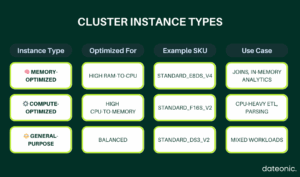
Optimizing your Databricks clusters starts with selecting the right instance type for your workload. This visual guide breaks down the three primary categories – Memory-Optimized, Compute-Optimized, and General-Purpose – so you can align hardware characteristics with processing needs.
Whether you’re running large joins, CPU-heavy transformations, or a mix of everything, the right choice improves performance and lowers cost.
Use this table to quickly match your workloads to the most effective compute resources.
Cluster Policies for Governance
Cluster policies provide a governance framework that balances user flexibility with organizational control over resource consumption and configuration standards.
Policies can specify allowed instance types, maximum cluster sizes, required tags, and mandatory configuration options such as autotermination settings.
A comprehensive cluster policy might restrict cluster types to job and all-purpose only, enforce autotermination between 10-120 minutes, limit instance types to approved configurations, and require specific tagging for cost attribution.
Policy application can be scoped to specific user groups, enabling different teams to have appropriate levels of flexibility while maintaining overall governance standards.
These governance principles become particularly important when implementing comprehensive data security measures, as outlined in our guide to Unity Catalog and data security.
Optimization Checklist
Systematic cluster optimization requires attention to multiple configuration and operational aspects:
Essential Configuration Steps:
- Confirm autoscaling parameters align with workload patterns
- Map specific processing requirements to appropriate cluster types
- Enable Photon selectively based on empirical performance testing
- Implement monitoring systems for cluster utilization patterns
- Enforce policies to prevent common misconfigurations
Governance and Monitoring:
- Establish cluster policies with appropriate instance type restrictions
- Configure mandatory autotermination settings (15-30 minutes)
- Implement cost attribution through comprehensive tagging
- Set up alerts for unusual resource consumption or performance degradation
The systematic application of these optimization principles creates a foundation for sustainable, cost-effective data processing that scales with organizational growth and evolving requirements.
For organizations evaluating Databricks against other platforms, our detailed comparison with Snowflake provides context on how cluster optimization advantages position Databricks in the competitive landscape.
Ready to Optimize Your Databricks Environment?
Don’t let suboptimal cluster configurations drain your budget or limit your data capabilities. Contact our Databricks experts today to discuss how we can help optimize your environment and accelerate your data-driven initiatives.