
The adoption of Databricks has revolutionized how enterprises approach big data, AI, and analytics. But as data volumes grow and workloads scale, a new challenge emerges: rising cloud costs. Without a strategic approach, your powerful data platform can quickly become a significant financial drain.
This is where effective Databricks cost optimization becomes not just a best practice, but a business necessity for scaling innovation responsibly.
This in-depth guide is your comprehensive resource for mastering Databricks costs. Drawing on proven strategies from the Databricks experts at Dateonic, an official Databricks implementation partner, we will move beyond generic tips.
Databricks cost optimization is the continuous process of reducing your platform’s Total Cost of Ownership (TCO) without sacrificing the performance or analytical capabilities your teams rely on. We will unveil Dateonic’s structured methodology, a framework informed by real-world implementations that consistently delivers significant savings for our clients.
Understanding Databricks Costs: Key Drivers and Pricing Models
To effectively control costs, you first need to understand what you’re paying for. Databricks pricing is a composite of several components, each offering opportunities for optimization.
- Databricks Compute (DBUs): The primary cost is measured in Databricks Units (DBUs), which are units of processing capability per hour. The DBU rate depends on the type and size of the virtual machines you use.
- Cloud Provider Fees: Databricks runs on your cloud account (AWS, Azure, or GCP). You are responsible for the costs of the underlying virtual machines, storage, and networking.
- Storage Costs: You also pay for the cloud storage where your data resides, such as AWS S3 or Azure Data Lake Storage.
The platform offers several pricing options to align with different usage patterns:
- Pay-As-You-Go: Flexible, on-demand pricing ideal for unpredictable workloads.
- Reserved Instances (or Commitments): Discounts for committing to a certain level of usage over a one- or three-year term.
- Spot Instances: Utilizes spare cloud capacity at a significant discount, perfect for fault-tolerant, non-critical workloads.
Based on industry benchmarks, unoptimized Databricks environments can inflate costs by 30-50%. The most common drivers are overprovisioned clusters, inefficient workloads, bloated data storage, and a lack of governance.
As a key Dateonic insight from countless client audits, we consistently observe that compute accounts for 60-80% of total Databricks expenses, making it the most critical area for optimization. For a detailed breakdown, you can always refer to the official Databricks Pricing page.
Dateonic’s Framework for Databricks Cost Optimization
Generic advice can only take you so far. At Dateonic, we developed a proprietary, phased framework to deliver sustainable Databricks cost reduction strategies without compromising performance. This approach ensures savings are not a one-time fix but an integrated part of your data operations.
Our framework is built on a principle of holistic optimization, combining architectural design, workflow tuning, and best practices from our Databricks consulting services. It consists of four key phases: Assessment, Configuration, Enhancement, and Governance.
This structured methodology has been proven to deliver up to 45% cost reductions, as demonstrated in multiple anonymized client migrations and implementations.
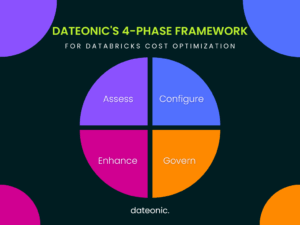
Phase 1: Assess Your Current Databricks Environment
You can’t optimize what you can’t measure. The first step in our framework is a comprehensive workload audit to gain deep visibility into your current spending and usage patterns.
This involves analyzing your environment to identify the biggest cost contributors.
- Utilize System Tables: Query Databricks System Tables to get granular data on cluster usage, job runtimes, and user activity.
- Enforce Tagging: Implement a consistent tagging strategy to allocate costs to specific teams, projects, or business units.
- Analyze Usage Patterns: Identify idle clusters, inefficient queries, and overutilized resources that are driving up expenses.
Tools like the Databricks billing dashboards and external cloud monitoring services are invaluable here. They provide the metrics needed to pinpoint waste.
In a recent audit for a new client, this assessment phase alone uncovered that 40% of their total Databricks costs stemmed from underutilized, long-running all-purpose clusters, highlighting an immediate opportunity for significant savings.
Phase 2: Optimize Cluster Configuration for Efficiency
With compute being the largest cost driver, efficient cluster configuration is the cornerstone of Databricks cost optimization. Tailoring your clusters to the specific needs of each workload prevents overprovisioning and maximizes resource utilization.
Here’s how to optimize Databricks clusters for maximum efficiency:
- Choose the Right Cluster Types: Not all clusters are created equal. Using the right type for the job is critical.
| Cluster Type | Best Use Case | Cost Profile |
|---|---|---|
| Job Clusters | Automated ETL, batch processing | Lower cost; terminates when job ends |
| All-Purpose Clusters | Interactive analysis, data science | Higher cost; designed for collaboration |
| Serverless | Low-latency BI, SQL analytics | Pay-per-query; minimal management |
- Implement Autoscaling and Autotermination: These are your most powerful automated cost-control features.
- Autoscaling: Set a minimum and maximum number of worker nodes (e.g., 2-4 min, scaling up to 20 max for peak loads). This ensures you only pay for compute you actually use.
- Autotermination: Automatically shut down clusters after a period of inactivity. A setting of 15-30 minutes is a common best practice.
- Use Spot Instances: For non-critical jobs, leverage spot instances to achieve savings of up to 90% on compute costs. Learn more about how they work from providers like AWS.
- Enable the Photon Engine Selectively: Photon, Databricks’ native vectorized query engine, can provide a 2-3x performance boost for SQL workloads, especially those with large joins and aggregations ($>$100GB). This speedup translates directly into lower DBU consumption. For example, we benchmarked a 1TB join that was reduced from 45 minutes to just 20 minutes after enabling Photon.
Caveat: For smaller operations, Photon didn’t provide any improvements, and still cost twice as much. Before enabling it in production, test first to ensure it makes sense for your workload.
- Rightsize Instances: Match instance types to your workload. Use memory-optimized instances for RAM-intensive jobs and compute-optimized instances for CPU-heavy tasks. Continuously monitor utilization to ensure you aren’t paying for oversized VMs.
By applying these principles, a logistics firm we partnered with after they learned how to choose a Databricks implementation partner, achieved a 9.3% reduction in operational costs through enhanced fuel efficiency, a direct result of the highly optimized and performant data processing clusters we configured.
Phase 3: Enhance Data and Workflow Optimization
Beyond infrastructure, the way you manage data and structure workflows has a profound impact on costs. Efficient data access patterns and optimized code reduce the amount of compute required to generate insights.
Focus on these key areas for workflow and data layer optimization:
- Embrace Delta Lake: Use the open-source Delta Lake format for your data tables. Its features like data skipping, caching, and optimized file sizes dramatically reduce the amount of data that needs to be scanned during queries.
Partition and Liquid Cluster Data:
Partitioning: Structure your data in storage based on a low-cardinality column (like date or region) to prune files and minimize data scans.
Liquid Clustering: The successor to Z-Ordering, Liquid Clustering dynamically organizes data by high-cardinality columns, improving query performance without requiring expensive reorganization jobs.
- Tune Your Queries and Code:
- Leverage SQL Warehouses: For BI and SQL analytics, Databricks SQL Warehouses are highly optimized and often more cost-effective than all-purpose clusters.
- Optimize Spark Configurations: Fine-tune Spark settings for complex ETL and streaming jobs to ensure efficient memory management and parallelism.
- Minimize Data Movement: Avoid moving data across cloud regions, as this incurs additional data egress charges. Design your architecture to process data where it resides.
During our workflow tuning and ETL optimization services, clients have significantly reduced job runtimes, which directly aligns with a broader goal of Databricks cost optimization by lowering compute duration.
Phase 4: Implement Governance and Monitoring
Optimization is not a one-time project; it’s a continuous practice. Strong governance and proactive monitoring are essential to maintain efficiency and prevent costs from creeping back up. Understanding why unified data and AI governance matters is key to long-term success.
- Enforce Cluster Policies: Use cluster policies to set rules and guardrails for users. You can enforce tagging, limit instance sizes, set autotermination timeouts, and control the range of configurations available. This prevents accidental overspending and ensures compliance with best practices. You can find detailed guidance in the official Databricks documentation.
- Set Up Budget Alerts and Tagging: Track costs by team, project, or department using mandatory tags. Set up budget alerts in your cloud provider’s console or using Databricks tools to get proactive notifications when spending exceeds predefined thresholds.
- Continuously Monitor Performance: Use Databricks dashboards and integrated monitoring tools to watch for performance degradation or cost anomalies. Regular reviews ensure your environment remains optimized as workloads evolve.
This governance-first approach ensures accountability and provides clear visibility into costs, a best practice we apply in all our projects, including complex data migrations.
Real-World Results: Anonymized Client Success Stories
The effectiveness of Dateonic’s framework is best illustrated through real Databricks migration cost savings and implementation successes.
- Case 1: Fintech Migration: A leading financial services client partnered with Dateonic for their Databricks migration. By applying our phased optimization framework from day one, they achieved a 45% cost reduction compared to their previous system. This was accomplished while simultaneously accelerating their machine learning training cycles from weeks to just days.
- Case 2: Logistics Implementation: An international logistics provider used our cluster optimization expertise to enhance the accuracy of their routing algorithms. This led to an indirect but highly impactful cost saving of 9.3% in fuel consumption, showcasing how Databricks can help reduce waste in logistics.
These results underscore a critical lesson: the most significant savings come from a tailored, strategic framework, not a checklist of generic tips.
Common Pitfalls in Databricks Cost Optimization and How to Avoid Them
Many organizations attempt to optimize their Databricks environment but fall into common traps that limit their success.
- Over-reliance on all-purpose clusters: Using these more expensive, interactive clusters for automated jobs is a primary source of waste.
- Ignoring the Photon Engine: Failing to enable Photon for suitable workloads means leaving significant performance gains, and cost savings, on the table.
- Neglecting tags and policies: Without proper tagging, it’s impossible to attribute costs and identify optimization opportunities. A lack of policies allows bad habits to spread.
These issues often stem from a “quick fix” mentality. In contrast, Dateonic’s structured framework provides a strategic, long-term approach that embeds cost efficiency into your data culture for sustainable gains.
Conclusion
Transforming your Databricks cost optimization from a reactive chore into a proactive strategy is achievable. By following a structured framework that encompasses assessment, configuration, workflow enhancement, and governance, you can unlock the full potential of your Databricks platform without overspending. This guide, built on Dateonic’s proven methodology, provides the blueprint to control costs, improve efficiency, and future-proof your data and AI initiatives as Databricks continues to evolve with new features.
Ready to optimize your Databricks environment and achieve significant, sustainable savings? Contact Dateonic today for a free consultation. Let our experts help you unlock a more efficient and cost-effective data platform tailored to your needs.