
A Databricks architecture operates on three core components: the Control Plane (managed by Databricks for metadata and workspace management), the Compute Plane (running clusters in your cloud account), and your Storage (e.g., S3 or ADLS, where your data resides).
The interaction between these components dictates the performance, cost, and security of your entire Lakehouse. Without a well-designed framework, this architecture can lead to slow queries, uncontrolled spending, and significant governance gaps.
In this technical guide, I outline the essential databricks architecture best practices for building a scalable, secure, and cost-effective platform. Following these practices is critical to optimizing performance, enforcing governance, and creating a stable foundation for your data and AI workloads.
Understanding Databricks High-Level Architecture
To implement best practices, you must first understand the high-level design. The „classic” Databricks architecture operates with the Control Plane (managed by Databricks) and the Compute/Storage Planes (managed by you, in your cloud account).
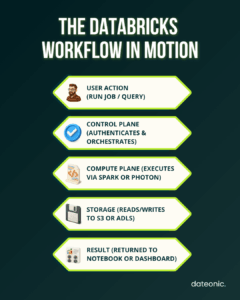
The Control Plane is the central management hub. It manages workspaces, user access, and crucially, the metadata that defines your data objects. When you run a query, the Control Plane coordinates with the Compute Plane to provision resources and execute the job.
The Compute Plane is where all data processing occurs. This includes:
- Cluster Management: Provisioning, terminating, and managing the clusters (groups of virtual machines) that run your Spark jobs.
- Job Scheduling: Orchestrating automated data pipelines and workflows.
- Execution Environments: Running notebooks, BI queries via Databricks SQL, and machine learning models.
Finally, Storage Integration relies on the separation of compute and storage. Your data lives in your own object storage (like S3), managed by the open-source Delta Lake format. This provides reliability, schema enforcement, and time-travel (data versioning) capabilities directly on your data lake.
Best Practices for Performance Efficiency
A common pitfall is a slow or inefficient platform. Performance optimization ensures your queries run fast and your pipelines meet their SLAs.
- Implement Smart Scaling: Utilize both vertical and horizontal scaling.
- Vertical scaling: Increase the instance size (e.g., more RAM) for memory-intensive jobs.
- Horizontal scaling: Add more worker nodes (using auto-scaling) for parallelizable, distributed tasks.
- Leverage Serverless: Where available, use Serverless compute (like Databricks SQL Serverless) to eliminate the management overhead of clusters. This provides instant-on compute and fine-grained billing, managed entirely by Databricks.
- Optimize Workloads: Design your data and queries for performance. This includes data partitioning in your Delta tables (based on common query filters like date) and using Z-Ordering to co-locate related data.
- Use Up-to-Date Runtimes: Always use the latest Databricks Runtimes (DBRs). Each release includes performance gains, new features, and optimized versions of Apache Spark and Photon, Databricks’ native execution engine.
Best Practices for Cost Optimization
Without strong cost controls, Databricks expenses can spiral. A well-designed architecture is inherently cost-effective.
| Optimization Area | Technique | Description | Expected Impact |
|---|---|---|---|
| Scaling | Auto-scaling clusters | Adjusts nodes dynamically | Cost savings + faster jobs |
| Compute Mode | Serverless SQL | Eliminates cluster management overhead | Reduced latency, per-query billing |
| Data Layout | Delta partitioning & Z-Ordering | Organizes data for common filters | Faster reads & reduced shuffle |
| Runtime | Latest DBR with Photon | Optimized Spark execution | Up to 2–3× performance gain |
Choose Job Clusters over Interactive Clusters for all automated, production workloads. Job clusters are ephemeral (start for the job, terminate after) and have significantly lower compute costs than the all-purpose, „always-on” interactive clusters, which should only be used for development and ad-hoc analysis.
- Dynamically Allocate Resources: Always enable auto-scaling for your clusters and Databricks SQL warehouses. This ensures you only pay for the compute you actively use, scaling up for peak loads and down during idle times.
- Monitor Storage Costs: Use Delta Lake features to your advantage. Regularly run VACUUM to remove old, unreferenced data files and OPTIMIZE to compact small files, which improves query speed and can reduce storage API costs.
- Select Appropriate Instances: Don’t use a one-size-fits-all approach. Choose instance types that match your workload (e.g., memory-optimized, storage-optimized). Critically, leverage Spot Instances (or preemptible VMs) for non-critical workloads to achieve massive (50-80%+) cost savings.
To learn more, read our detailed guide on The Complete Guide to Databricks Cost Optimization.
Best Practices for Security and Governance
A modern data platform must be secure and well-governed. This is where Databricks truly shines, especially with its latest innovations.
The single most important best practice for modern governance is to enable Unity Catalog (UC). UC provides a unified data and AI governance solution across all your workspaces. It delivers:
- Fine-grained permissions (table, row, and column-level) using standard SQL.
- A centralized metastore for all your data assets.
- Automated, built-in data lineage and lineage tracking.
- Secure data sharing capabilities via Delta Sharing.
Beyond UC, standard security practices are mandatory. Implement encryption for your S3 buckets (or ADLS containers) using customer-managed keys (CMKs) and restrict all public access.
Enforce role-based access controls (RBAC) by integrating Databricks with your identity provider (like Azure AD or Okta) and use audit logging to track all platform and data access for compliance.
For a deep dive, read our What is Unity Catalog and How It Keeps Your Data Secure or the official Unity Catalog documentation.
Best Practices for Operational Excellence
An excellent architecture is one that is easy to manage, deploy, and maintain.
Standardize your integration patterns. Use optimized, official connectors for BI tools (Power BI, Tableau) and data ingestion partners (Fivetran, Airbyte). For automation, automate everything with CI/CD pipelines.
Treat your notebooks, SQL queries, and job definitions as code. Store them in Git and use tools like Databricks Asset Bundles (DABs) or the Databricks Terraform provider to manage deployments.
- Plan for Multi-Workspace Setups: Don’t run everything in a single workspace. A common best practice is to isolate environments by business unit or by development lifecycle (e.g., dev, staging, prod workspaces). This simplifies access control and is a key component of a disaster recovery strategy.
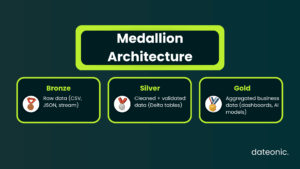
- Incorporate Medallion Architecture: This is the industry-standard data quality pattern for the Lakehouse.
- Bronze: Raw, ingested data.
- Silver: Cleaned, validated, and merged data.
- Gold: Business-level, aggregated data ready for BI and AI.
This layered approach ensures data quality and traceability. See how this works in our What is Medallion Architecture in Databricks and How to Implement It.
Best Practices for Interoperability and Usability
Your Databricks platform doesn’t exist in a vacuum. It must integrate with your broader data ecosystem.
Define clear standards for how external tools will connect and interact with Databricks. Thanks to its open nature, you can ensure compatibility with a vast ecosystem of open-source tools like Apache Spark, dbt, and Airflow.
Finally, promote reusability. Don’t let every team reinvent the wheel.
- Build and share common data pipelines.
- Create cluster policies to standardize cluster configurations.
- Use the Databricks Feature Store to promote reusability in ML workflows, allowing data scientists to share and discover curated features for model training.
Implementing Databricks Architecture: Real-World Considerations
Knowing the best practices is one thing; implementing them is another. Common reference architectures include real-time streaming platforms (using Auto Loader and Delta Live Tables) and end-to-end AI platforms (using MLflow and the Feature Store).
When migrating from legacy systems (like Hadoop or traditional data warehouses), avoid these common pitfalls:
- Over-provisioning: Don’t default to large, all-purpose clusters. Tailor your compute to the workload.
- Neglecting Governance: Implementing Unity Catalog from day one is far easier than trying to retrofit it onto a chaotic platform.
- Lift-and-Shift: Don’t just copy old, inefficient data models. Use the migration as an opportunity to refactor and optimize for the Lakehouse paradigm.
Conclusion
Following Databricks architecture best practices is fundamental to building a high-performance, secure, and cost-efficient data platform. By focusing on the key pillars of performance efficiency, cost optimization, robust governance, and operational excellence, you create a scalable foundation for all your data and AI initiatives.
However, these practices are not a „set it and forget it” checklist. They require ongoing monitoring, refinement, and expertise. A well-designed architecture, tailored to your specific business needs, is what separates a world-class AI-ready platform from a costly data swamp. This is where expert Databricks consulting becomes invaluable.
Build Your AI-Ready Data Platform
Are you ready to optimize your Databricks setup and unlock the full potential of your data?
The experts at Dateonic specialize in designing and implementing robust Databricks architectures. Contact Dateonic for Databricks consulting services to build an AI-ready data platform that scales with your business.