
Data workflows require consistent execution, monitoring, and management to ensure reliable data processing and analytics. Databricks Jobs provide a powerful solution for orchestrating these workflows, allowing data engineers and scientists to automate, schedule, and monitor their work efficiently.
In this article, I explore how Databricks Jobs can help you build robust, production-grade data workflows with automation and observability in mind.
What Are Jobs in Databricks?
Jobs in Databricks are a mechanism for reliably running notebooks, JAR files, Python scripts, or Delta Live Tables pipelines on a scheduled or triggered basis. They provide a structured way to execute data processing tasks with specific compute resources, scheduling parameters, and failure handling policies.
Unlike ad-hoc execution of notebooks on interactive clusters, Jobs offer:
- Reliable execution with retry capabilities
- Detailed monitoring and logging
- Resource isolation through dedicated job clusters
- Scheduled runs based on time or events
- Notification systems for success or failure
Jobs are particularly useful for production workloads where reliability, monitoring, and scheduling are critical requirements. They form the backbone of productionized data pipelines in the Databricks environment.
Creating Your First Job
To create a job in the Databricks UI:
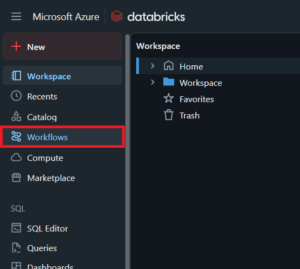
1. Navigate to the Workflows section in the left sidebar
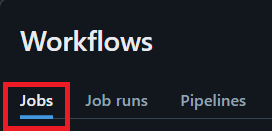
2. Click on „Jobs”
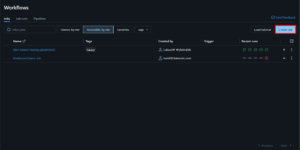
3. Select „Create Job” in the upper right corner
4. Configure the job with essential components
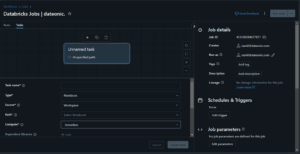
Key configuration elements include:
- Task Name: A descriptive identifier for your job
- Type: Notebook, JAR, Python script, or Delta Live Tables pipeline
- Source: „Workspace” for a workspace folder or Databricks Repo; „Git provider” for a remote repository.
- Path: Path to your notebook or script
- Compute: Either a new job cluster or an existing all-purpose cluster
- Parameters: Any runtime parameters to pass to your code
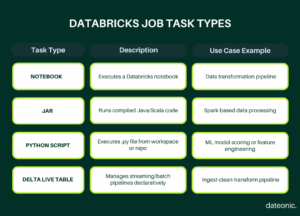
For notebook-based jobs, you’ll need to specify the path to your notebook. The notebook should be designed to run independently, with all dependencies clearly defined.
Jobs Features
Scheduling Jobs
Databricks offers flexible scheduling options to automate job execution.
You can schedule jobs based on:
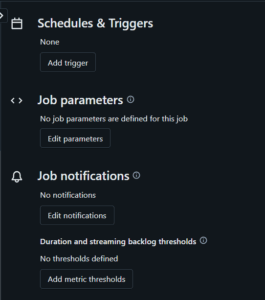
- Time-based schedules: Set regular intervals (hourly, daily, weekly) or use cron expressions for more complex scheduling
- Event-based triggers: Execute based on file arrivals or external API calls
- Dependent jobs: Trigger execution when another job completes
When configuring time-based schedules, you can specify the timezone to ensure jobs run at appropriate hours regardless of where your team is located.
Monitoring and Troubleshooting
The Jobs UI provides comprehensive monitoring capabilities.
For each job execution, you can:
- View run status (running, succeeded, failed, skipped)
- Access execution logs for debugging
- See execution time and resource consumption metrics
- Review parameter values used in the run
- Access the output and results
The historical record of job runs helps identify patterns in performance and reliability. When troubleshooting failed jobs, the detailed logs help pinpoint exactly where and why failures occurred.
Email Alerts and Notifications
Databricks Jobs include notification capabilities to keep teams informed.
You can configure alerts for:
- Job success
- Job failure
- Job start
- Long-running jobs (exceeding expected duration)
Notifications can be sent via:
- Email to specified recipients
- Webhook integrations with Slack, Microsoft Teams, or custom endpoints
- REST API callbacks to trigger other systems
These notifications are essential for maintaining observability in production environments, allowing teams to respond quickly to failures or anomalies.
Best Practices
Using Job Clusters vs. All-Purpose Clusters
| Feature | Job Cluster | All-Purpose Cluster |
|---|---|---|
| Lifecycle | Ephemeral (per job run) | Persistent |
| Resource Isolation | High – runs in isolation | Shared across users |
| Cost Efficiency | High for scheduled jobs | Better for frequent, interactive workloads |
| Initialization Time | Slower (cold start) | Faster (warm start) |
| Use Case | Production jobs, CI/CD pipelines | Ad-hoc development, shared team environments |
Job Clusters are ephemeral clusters created specifically for a job run and terminated upon completion. They provide:
- Resource isolation to prevent interference from other workloads
- Cost efficiency by running only when needed
- Consistent environments with fresh initialization on each run
All-Purpose Clusters are persistent and shared across users and jobs. Consider these when:
- You need to minimize start-up time for frequent, short-running jobs
- Multiple jobs can effectively share resources
- You’re working with warm caches or maintained state
For production workloads, job clusters are generally recommended as they provide better isolation and predictability.
Managing Cluster Permissions and Access Control
Proper access control ensures security and governance:
- Utilize Databricks’ permission model to restrict who can create, modify, or view jobs
- Implement cluster access control to manage who can attach to specific clusters
- Use service principals for automated job execution instead of personal accounts
- Apply minimum necessary permissions following the principle of least privilege
Version-Controlling Job Notebooks with Git Integration
Maintaining job definitions in version control provides several benefits:
- Track changes to job definitions and configurations
- Collaborate on job development with proper review processes
- Roll back to previous versions when needed
- Maintain consistent deployment across environments
Databricks’ Git integration allows you to:
- Connect your repositories directly to the workspace
- Reference specific branches or commits in job definitions
- Implement CI/CD pipelines for automated testing and deployment
Learn how Databricks Asset Bundles can further streamline your deployment process.
What’s Next?
Now that you understand Databricks Jobs, consider exploring:
- Lakehouse architecture concepts for building your overall data platform
- Advanced workflow orchestration techniques for complex data pipelines
- Data governance with Unity Catalog to secure your workflows
Contact Us
Need expert help with your Databricks implementation? Our team specializes in designing and implementing efficient data workflows on the Databricks platform. Contact us to discuss your project requirements.