
While Databricks is central to your enterprise data strategy, is your environment truly secure? A single misconfiguration can expose sensitive data, leading to costly breaches and steep GDPR fines. Robust security isn’t just an option – it’s essential.
In this guide, I provide an actionable checklist of Databricks security best practices. Designed for enterprises with a focus on European compliance, it offers clear steps to lock down your platform, protect your data, and leverage Databricks with confidence.
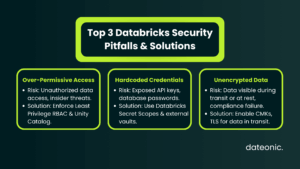
Understanding Databricks Security Framework
Databricks provides a comprehensive security framework with built-in features for authentication, network controls, encryption, and compliance. To maintain a strong security posture, Databricks recommends a “define, deploy, and monitor” approach.
This model emphasizes a shared responsibility between Databricks and the enterprise, where Databricks secures the platform and you are responsible for securing your data within the platform.
| Security Feature | Description | Enterprise Benefit |
|---|---|---|
| Customer-Managed Keys (CMK) | Encrypts notebooks and workspace data using a key you control in your cloud provider’s KMS. | Full Control & Compliance: Meets strict compliance requirements by giving you ownership of the encryption keys. |
| Unity Catalog | A unified governance solution for all data and AI assets across any cloud. | Centralized Governance: Simplifies fine-grained permissions and provides a single source of truth for data access. |
| SSO & Multi-Factor Auth (MFA) | Integrates with identity providers (like Entra ID, Okta) to enforce strong authentication. | Enhanced Security: Drastically reduces the risk of unauthorized access from compromised credentials. |
| Private Connectivity | Ensures traffic between users, serverless compute, and your workspace stays off the public internet. | Network Isolation: Protects against network-based attacks and secures data in transit within your cloud environment. |
| Audit Logs | Provides detailed, chronological logs of activities performed by users within the workspace. | Visibility & Forensics: Enables security monitoring, threat detection, and forensic analysis during an incident. |
Authentication and Access Management Best Practices
Effective authentication and access management are the first line of defense in securing your Databricks environment.
- Implement Least Privilege Access: Utilize role-based access control (RBAC) and access control lists (ACLs) to ensure users only have access to the data and resources necessary for their roles. For more details, see our guide on Permissions in Databricks.
- Enable Single Sign-On (SSO): Integrate with identity providers like Microsoft Entra ID or Okta to streamline user authentication and reduce password-related risks.
- Require Multi-Factor Authentication (MFA): Add an extra layer of security by enforcing MFA for all users.
- Regularly Audit User Permissions: Periodically review and audit user permissions to identify and remove unnecessary access rights, minimizing potential security risks.
- Use Unity Catalog for Governance: Leverage Unity Catalog for fine-grained governance over your data assets, providing a centralized way to manage data access policies.
Network Security Best Practices
Securing your network is crucial to prevent unauthorized access to your Databricks environment.
- Configure Customer-Managed VPCs: Deploy Databricks in your own virtual private cloud (VPC) to create an isolated network environment.
- Set Up Private Connectivity: Use private connectivity and firewall rules for serverless compute to ensure secure communication.
- Encrypt Traffic: Ensure all traffic between cluster nodes and endpoints is encrypted to protect data in transit.
- Implement Endpoint Protection: Secure your ingress and egress controls and implement endpoint protection to safeguard against external threats.
- Monitor Network Policies: Continuously monitor your network policies to detect and prevent unauthorized access.
Data Encryption and Protection Best Practices
Protecting your data at rest and in transit is a fundamental aspect of Databricks security.
- Enable Encryption at Rest: Use customer-managed keys (e.g., AWS KMS, Azure Key Vault) to encrypt data at rest, giving you full control over your encryption keys.
- Protect Data in Transit: Ensure data in transit is protected with TLS encryption to prevent eavesdropping.
- Use Credential Redaction: Avoid exposing sensitive information in logs by using credential redaction.
- Apply Data Masking and Anonymization: For handling Personally Identifiable Information (PII), apply data masking and anonymization techniques.
- Leverage Delta Lake Features: Use Delta Lake’s features for secure data management, including versioning and time travel, which can aid in data recovery and auditing.
Secret and Credential Management Best Practices
Properly managing secrets and credentials is key to preventing unauthorized access to your data and systems.
- Store Secrets Securely: Use Databricks secret scopes or integrate with external vaults like AWS Secrets Manager or Azure Key Vault to store secrets securely.
- Avoid Hardcoding Credentials: Never hardcode credentials in notebooks or code. Instead, use secrets in Spark configurations and environment variables.
- Regularly Rotate Secrets: Implement a policy for regular rotation and auditing of secrets to maintain a strong security posture.
- Integrate with External Secret Managers: For enhanced security, integrate with external secret managers to centralize and streamline secret management.
Compliance and Regulatory Best Practices
For enterprises, especially those in Europe, adhering to compliance regulations like GDPR is paramount.
- Align with GDPR Requirements: Implement the “right to be forgotten” (RTBF) using Delta Lake’s DELETE and VACUUM functions. Maintain audit trails to demonstrate compliance. For more information, see the official Databricks documentation on GDPR.
- Enable PII Discovery and Masking: Use tools for PII discovery, masking, and anonymization to ensure data protection by design, a key principle of GDPR.
- Achieve Compliance with Other Regulations: Databricks provides compliance security profiles for regulations such as HIPAA, PCI DSS, SOC 2, and FedRAMP. For a comparison of Databricks on different cloud platforms and their security integrations, check out our article on Azure Databricks vs Databricks.
- Conduct Regular Compliance Audits: Perform regular audits and use enhanced security monitoring to detect anomalies and ensure ongoing compliance.
- Document DSAR and Breach Notification Processes: Establish and document clear processes for handling Data Subject Access Requests (DSARs) and breach notifications as required by GDPR.
Monitoring, Auditing, and Incident Response Best Practices
Continuous monitoring and a solid incident response plan are essential for maintaining a secure Databricks environment.
- Enable System Tables and Audit Logs: Use system tables and enable audit logs for comprehensive tracking of activities within your Databricks workspace.
- Set Up Enhanced Security Monitoring: Implement enhanced security monitoring to detect threats and anomalies in real-time.
- Establish Incident Response Plans: Develop and maintain incident response plans that are aligned with your compliance requirements and industry best practices.
- Use Databricks Tools for Security Assessments: Leverage Databricks’ built-in tools for ongoing security posture assessments.
- Train Your Teams: Conduct regular security awareness training for your teams to ensure they are up-to-date on the latest Databricks security best practices. For more insights into the world of data and AI, visit the Dateonic Blog.
Conclusion and Next Steps
By following these Databricks security best practices, enterprises can build a secure and resilient data intelligence platform. Adhering to these guidelines not only protects against data breaches but also ensures compliance with regulations like GDPR, which is crucial for operations in Europe.
For tailored implementation of these Databricks security best practices, contact Dateonic to leverage our expert consulting services in data security and compliance.