
Databricks permissions determine who can discover, read, modify, create, or manage data and AI assets. In a Unity Catalog environment, however, access is not controlled by one isolated table grant.
The effective decision combines:
- the identity making the request;
- privileges on the catalog, schema, and target object;
- privilege inheritance and ownership;
- access to a compatible compute resource;
- and, where applicable, row filters, column masks, or attribute-based access control (ABAC) policies.
The most common permission mistake is granting SELECT on a table and assuming that this is enough. It is not. To query a Unity Catalog table, a principal normally needs all three of the following:
GRANT USE CATALOG ON CATALOG prod TO `finance-analysts`;
GRANT USE SCHEMA ON SCHEMA prod.finance TO `finance-analysts`;
GRANT SELECT ON TABLE prod.finance.transactions TO `finance-analysts`;
The user also needs access to suitable compute, such as a SQL warehouse or a compatible Standard or Dedicated compute resource.
This guide explains the current Unity Catalog permission model, including account groups, service principals, ownership, access modes, row filters, column masks, and Databricks ABAC. It reflects the General Availability of ABAC row-filtering and column-masking policies announced in May 2026.
How Databricks access control is divided
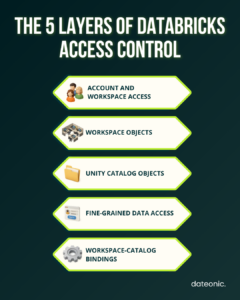
Databricks uses several related but separate access-control layers. Keeping them separate makes permission errors much easier to diagnose.
| Layer | What it controls | Typical mechanism |
|---|---|---|
| Account and workspace access | Who can enter a workspace and use platform features | Account identities, workspace assignment, entitlements |
| Workspace objects | Who can use notebooks, jobs, pipelines, folders, and compute | Workspace object ACLs such as CAN VIEW, CAN RUN, CAN ATTACH TO, and CAN MANAGE |
| Unity Catalog objects | Who can discover, read, write, create, or manage governed assets | GRANT, REVOKE, ownership, and MANAGE |
| Fine-grained data access | Which rows and column values an authorized principal can see | Row filters, column masks, dynamic views, and ABAC policies |
| Workspace-level data boundaries | From which workspaces selected governed objects can be accessed | Workspace-catalog bindings |
These layers are cumulative. CAN ATTACH TO on compute does not grant access to a table. Likewise, SELECT on a table does not give a user permission to attach to classic compute or use a restricted SQL warehouse.
Unity Catalog is the central data-governance layer. Workspace permissions still control workspace resources, but data access should be designed around Unity Catalog rather than legacy workspace-local table ACLs.
The Unity Catalog permission model
Unity Catalog represents data and AI assets as securable objects. A privilege can be granted to a principal on each supported securable object.
The core data hierarchy is:
Metastore
└── Catalog
└── Schema
├── Table or view
├── Materialized view or streaming table
├── Volume
├── Function
└── Model
Unity Catalog also governs objects outside this three-level namespace, including storage credentials, external locations, connections, shares, recipients, and providers.
A principal can be:
- a user;
- an account group;
- or a service principal used by an application, job, pipeline, CI/CD process, or other automation.
Privileges answer the question: What may this principal do to this object? Common examples include:
| Privilege | Purpose |
|---|---|
| BROWSE | Discover objects and view metadata without receiving data access |
| USE CATALOG | Pass the catalog-level usage boundary |
| USE SCHEMA | Pass the schema-level usage boundary |
| SELECT | Read a table, view, or materialized view |
| MODIFY | Insert, update, and delete table data; SELECT is also required |
| CREATE SCHEMA | Create schemas in a catalog |
| CREATE TABLE | Create tables or views in a schema |
| CREATE VOLUME | Create volumes in a schema |
| READ VOLUME / WRITE VOLUME | Read or modify files in a volume |
| EXECUTE | Run a function or load a registered model for inference |
| APPLY TAG | Apply tags to supported securable objects |
| MANAGE | Manage privileges, transfer ownership, and delete an object without becoming its owner |
The exact list differs by object type. For the current platform reference, use the official Unity Catalog privileges documentation.
USE CATALOG and USE SCHEMA: the permissions most often missed
USE CATALOG and USE SCHEMA are prerequisite privileges. They let a principal pass through the parent containers, but they do not grant access to the data inside them.
For example:
GRANT USE CATALOG ON CATALOG prod TO `finance-analysts`;
does not let the group query every table in prod.
Similarly:
GRANT USE SCHEMA ON SCHEMA prod.finance TO `finance-analysts`;
does not grant SELECT, MODIFY, or CREATE TABLE.
For the most common operations, the required privilege chain is:
| Operation | Required Unity Catalog privileges |
|---|---|
| Read a table or view | USE CATALOG + USE SCHEMA + SELECT |
| Modify table data | USE CATALOG + USE SCHEMA + SELECT + MODIFY |
| Create a schema | USE CATALOG + CREATE SCHEMA on the catalog |
| Create a table | USE CATALOG + USE SCHEMA + CREATE TABLE |
| Execute a function | USE CATALOG + USE SCHEMA + EXECUTE |
| Read files in a volume | USE CATALOG + USE SCHEMA + READ VOLUME |
This design gives catalog and schema administrators a boundary that individual table owners cannot bypass. A table owner may grant SELECT, but the recipient still cannot query the table if the parent catalog or schema owner has not granted the required usage privilege.
BROWSE is not the same as USE CATALOG
BROWSE lets users discover an object, see its metadata, and request access without granting access to the underlying data. Databricks recommends using it to improve governed data discovery.
For example:
GRANT BROWSE ON CATALOG prod TO `account users`;
This can make the production catalog discoverable across the account while preserving separate, explicit data grants.
How privilege inheritance works
Unity Catalog privileges inherit down the catalog hierarchy. A privilege granted on a container applies to its current and future child objects.
- A catalog-level privilege can apply to all eligible schemas and objects in the catalog.
- A schema-level privilege can apply to all eligible tables, views, volumes, and functions in the schema.
- A metastore-level privilege does not inherit to catalogs and data objects.
- Ownership does not inherit as ownership, although owners of containers can manage their child objects.
To give a group read access to every current and future table and view in one schema:
GRANT USE CATALOG ON CATALOG prod TO `finance-analysts`;
GRANT USE SCHEMA, SELECT ON SCHEMA prod.finance TO `finance-analysts`;
The SELECT grant on prod.finance is inherited by existing and future tables and views in that schema.
To grant the same access across an entire catalog:
GRANT USE CATALOG, USE SCHEMA, SELECT
ON CATALOG analytics
TO `enterprise-bi`;
This is efficient, but it is also broad. A new schema or table created under analytics is automatically covered. That can be exactly what you want for a curated analytics catalog and a serious exposure risk for a mixed-sensitivity catalog.
Design parent-level grants around trust boundaries
Unity Catalog does not support the legacy DENY statement. Because grants inherit downward, do not design a broad catalog grant with the expectation that you will add child-level denials later.
Instead:
- grant at catalog level only when all child objects share the same access boundary;
- grant at schema level when teams or data classifications differ;
- use narrower groups rather than mixing unrelated personas;
- separate highly restricted data into a dedicated schema or catalog;
- use row filters, column masks, or ABAC when access differs within a table.
Be careful with ALL PRIVILEGES
ALL PRIVILEGES is evaluated dynamically and can include new applicable privileges introduced later. It does not include MANAGE, EXTERNAL USE LOCATION, or EXTERNAL USE SCHEMA, but it is still usually too broad for consumer groups.
Prefer named privileges:
GRANT SELECT ON SCHEMA prod.finance TO `finance-analysts`;
rather than:
GRANT ALL PRIVILEGES ON SCHEMA prod.finance TO `finance-analysts`;
Use account groups, not workspace-local groups
For human access, account groups should be the default unit of permission management. They can be synchronized from an identity provider such as Microsoft Entra ID or Okta and used consistently across workspaces and Unity Catalog.
Workspace-local groups are a legacy mechanism. They cannot be granted access to Unity Catalog data. This means that SQL such as CREATE GROUP and ALTER GROUP creates or manages the wrong type of group for a modern Unity Catalog design.
Create and maintain account groups through:
- automatic identity management or account-level SCIM;
- the Databricks account console;
- workspace admin settings in an identity-federated workspace;
- or the Account Groups API.
Then grant Unity Catalog privileges to those groups:
GRANT USE CATALOG ON CATALOG prod TO `finance-analysts`;
GRANT USE SCHEMA, SELECT ON SCHEMA prod.finance TO `finance-analysts`;
This approach makes onboarding and offboarding predictable: access changes with group membership instead of leaving dozens of direct grants behind.
Direct user grants can still be useful for short-lived testing or an incident response, but they should be the exception and have an owner and expiry process.
Use service principals for jobs and production automation
A service principal is a non-human identity for jobs, applications, CI/CD, infrastructure as code, and external integrations. Production workloads should not depend on the credentials or continued employment of an individual user.
Databricks recommends using service principals for processes that modify production data. This allows interactive users to remain read-only while pipelines receive the exact write permissions they need.
A service principal can receive privileges directly. In SQL it is represented by its application ID:
GRANT USE CATALOG ON CATALOG prod
TO `00000000-0000-0000-0000-000000000000`;
GRANT USE SCHEMA, SELECT, MODIFY
ON SCHEMA prod.ingestion
TO `00000000-0000-0000-0000-000000000000`;
At scale, a cleaner pattern is to add service principals to purpose-built account groups, such as prod-ingestion-writers, and grant permissions to the group. This keeps the permission model readable and separates identity lifecycle management from data grants.
For scheduled workloads:
- configure the job or pipeline to run as the service principal;
- give it only the catalog, schema, table, volume, and external-location privileges it needs;
- avoid making it a metastore or workspace admin;
- use a different service principal for materially different trust boundaries;
- transfer production job ownership away from personal identities.
See the official service principal guide for the current identity and run-as model.
Ownership and MANAGE are not the same
Every Unity Catalog securable object has one owner. The principal that creates the object becomes its initial owner.
An owner:
- has all capabilities on the object;
- can grant and revoke privileges;
- can transfer ownership;
- can drop the object;
- and can manage child objects when the owned object is a catalog or schema.
These capabilities are implied. The owner is not shown as having an explicit ALL PRIVILEGES grant, and ownership itself does not pass down to child objects.
Production objects should normally be owned by a stable account group rather than an individual:
ALTER CATALOG prod OWNER TO `data-platform-owners`;
ALTER SCHEMA prod.finance OWNER TO `finance-data-owners`;
ALTER TABLE prod.finance.transactions OWNER TO `finance-data-owners`;
MANAGE delegates administrative control without changing the single owner:
GRANT MANAGE ON SCHEMA prod.finance TO `data-governance-admins`;
A principal with MANAGE can manage privileges, transfer ownership, and delete the object, but it does not automatically receive SELECT, MODIFY, or every other object capability. It also needs the applicable USE CATALOG and USE SCHEMA privileges to exercise MANAGE.
This distinction supports separation of duties. A governance team can administer access without automatically becoming a data consumer. However, because a principal with MANAGE can grant itself data access, it remains a highly privileged role and should be assigned sparingly.
Grant, revoke, and inspect Unity Catalog permissions
The standard SQL patterns are:
— Grant
GRANT SELECT
ON TABLE prod.finance.transactions
TO `finance-analysts`;
— Revoke
REVOKE SELECT
ON TABLE prod.finance.transactions
FROM `finance-analysts`;
— Show all grants that affect an object
SHOW GRANTS ON TABLE prod.finance.transactions;
— Show grants for one principal on a specific object
SHOW GRANTS `finance-analysts`
ON TABLE prod.finance.transactions;
SHOW GRANTS is object-scoped. The old pattern SHOW GRANTS FOR <principal> without a target object should not be used as a Unity Catalog-wide audit query.
You can also manage grants in Catalog Explorer → select object → Permissions. SQL, Terraform, REST APIs, or deployment automation are better for repeatability at enterprise scale, while Catalog Explorer is useful for inspection and controlled one-off changes.
For ongoing governance:
- review parent-level grants, not only table-level grants;
- track changes through the audit log system table;
- verify group membership in the identity provider;
- review ownership and MANAGE separately from read/write privileges;
- remember that INFORMATION_SCHEMA views do not provide a complete representation of every ABAC policy.
If you are designing the broader governance model rather than fixing one permission error, see Dateonic’s Unity Catalog data governance guide.
Compute access modes and data permissions
Compute access mode determines who can use a compute resource and how user isolation is enforced. It does not replace Unity Catalog privileges.
| Compute option | Identity and isolation model | Typical use |
|---|---|---|
| Standard compute | Multiple users, with user workload and data isolation | Recommended for most collaborative engineering and analytics workloads |
| Dedicated compute | Assigned to one user or group | Workloads that require capabilities not supported on Standard compute, such as selected ML, GPU, R, or lower-level Spark use cases |
| SQL warehouse / serverless compute | Managed, isolated query execution | BI, SQL analytics, and serverless workloads |
Databricks recommends Standard access mode for most classic compute workloads. Dedicated access mode should be selected for a specific technical reason, not as a shortcut around governance.
For every mode:
- the user still needs the required Unity Catalog privileges;
- the compute must be compatible with Unity Catalog;
- workspace ACLs determine who can use the compute;
- row filters, column masks, and ABAC have additional runtime requirements.
Compute requirements for fine-grained access
As of July 2026:
| Control | Supported compute requirements |
|---|---|
| Table-level row filters and column masks | SQL warehouse; Standard access mode on Databricks Runtime 12.2 LTS+; or Dedicated access mode on 15.4 LTS+ |
| ABAC row-filter and column-mask policies | Serverless compute; Standard on Databricks Runtime 16.4+; or Dedicated on 16.4+ with fine-grained access-control filtering enabled |
For table-level filters and masks on Dedicated compute, the workspace must be enabled for serverless compute. Read operations are supported from Databricks Runtime 15.4 LTS, while write operations to protected tables require Databricks Runtime 16.3 or above and supported write patterns.
For current access-mode limitations, check the official Databricks compute configuration reference before standardizing a production runtime.
Row filters for table-specific row-level security
A row filter is a SQL user-defined function that returns a Boolean. Unity Catalog evaluates it at query time and removes rows for which the function returns FALSE.
The following example lets members of global-sales see every region, while members of emea-sales see only EMEA rows:
CREATE OR REPLACE FUNCTION prod.security.filter_sales_region(region STRING)
RETURNS BOOLEAN
RETURN
is_account_group_member(‘global-sales’)
OR (
is_account_group_member(’emea-sales’)
AND region = ‘EMEA’
);
ALTER TABLE prod.sales.orders
SET ROW FILTER prod.security.filter_sales_region ON (region);
To remove the table-level filter:
ALTER TABLE prod.sales.orders DROP ROW FILTER;
Use a table-level row filter when the rule is specific to one table or a small, stable set of tables and the table owner should manage it.
The filter does not grant access by itself. The querying principal still needs USE CATALOG, USE SCHEMA, and SELECT on the table. To add or remove a filter or mask on an existing table, the administrator must own the table or have both MANAGE and SELECT; applying the UDF also requires the relevant usage privileges and EXECUTE on the function.
Column masks for table-specific data redaction
A column mask is a SQL UDF that returns the original or transformed value for a column. Its return type must match or be castable to the masked column’s type.
This example shows full email addresses only to a trusted account group:
CREATE OR REPLACE FUNCTION prod.security.mask_email(email STRING)
RETURNS STRING
RETURN CASE
WHEN is_account_group_member(‘customer-pii-readers’) THEN email
ELSE ‘REDACTED’
END;
ALTER TABLE prod.crm.customers
ALTER COLUMN email
SET MASK prod.security.mask_email;
To remove the mask:
ALTER TABLE prod.crm.customers
ALTER COLUMN email
DROP MASK;
Table-level masks are useful for local rules, but they must be attached separately to each column and can be changed or removed by a sufficiently privileged table administrator. For consistent policies across many tables, use ABAC.
For a deeper explanation of views and when a curated view is a better interface than a mask, see Dateonic’s guide to views in Databricks.
Databricks ABAC: centralized policies based on governed tags
Databricks attribute-based access control uses governed tags as data attributes and evaluates centrally defined policies against those tags. ABAC row-filtering and column-masking policies, governed tags, and automated data classification became generally available in May 2026.
ABAC is designed for rules such as:
- mask every column classified as an email address or national identifier;
- filter rows by region across all tagged sales tables;
- protect new tagged tables automatically without attaching a mask to each one;
- keep policy ownership with a governance team rather than individual table owners.
ABAC does not replace object privileges. It adds restrictions to data a principal is already authorized to query.
How ABAC differs from table-level filters and masks
| Consideration | ABAC policy | Table-level row filter or column mask |
|---|---|---|
| Scope | Catalog, schema, or table and matching descendants | One table or column |
| Targeting | Governed tag conditions | Direct object binding |
| New objects | Covered automatically when their tags match | Must be configured individually |
| Administration | Higher-level owner or principal with MANAGE | Table owner or principal with MANAGE |
| Table-owner override | A table owner cannot remove a parent ABAC policy | Table owner can manage the table-level rule |
| Best fit | Consistent enterprise controls | Local, table-specific logic |
Example: mask every SSN-tagged column
The following example assumes that an account-level governed tag named pii, with the allowed value ssn, already exists. An authorized data steward can apply it to a column in Catalog Explorer or with SQL:
SET TAG ON COLUMN prod.hr.employees.ssn pii = ssn;
Applying a governed tag requires object ownership or the relevant APPLY TAG and usage privileges, plus ASSIGN permission on the governed tag.
First, create the masking function:
CREATE OR REPLACE FUNCTION prod.security.mask_ssn(
ssn STRING,
show_last INT
)
RETURNS STRING
RETURN CONCAT(‘***-**-‘, RIGHT(ssn, show_last));
Then attach one policy to the production catalog:
CREATE POLICY mask_ssn_columns
ON CATALOG prod
COLUMN MASK prod.security.mask_ssn
TO `account users`
EXCEPT `pii-compliance`
FOR TABLES
MATCH COLUMNS has_tag_value(‘pii’, ‘ssn’) AS ssn_col
ON COLUMN ssn_col
USING COLUMNS (4);
The policy applies the mask to columns whose governed tag has the key pii and value ssn. Members of pii-compliance are exempt and receive unmasked values, assuming they also have the required base data privileges.
This is materially different from applying ALTER TABLE … SET MASK to hundreds of individual columns. The policy follows the governed attribute.
ABAC requirements and operational limitations
Before rollout, verify the following:
- ABAC uses governed tags, not unrestricted tags.
- Creating or managing a policy requires ownership or MANAGE on its catalog, schema, or table scope.
- The policy author needs EXECUTE on a referenced UDF.
- Supported compute is serverless, Standard on Databricks Runtime 16.4+, or Dedicated on 16.4+ with fine-grained access-control filtering enabled.
- ABAC policies cannot be attached directly to ordinary views, but policies on their underlying tables are enforced using the session user’s identity.
- Time travel and deep or shallow clones are not supported on tables while an applicable ABAC row filter or column mask is active.
- Materialized-view and streaming-table refresh identities may need a carefully controlled EXCEPT entry.
- If multiple distinct row filters or masks resolve for the same user and object, Databricks fails closed instead of choosing one arbitrarily.
An exempt service principal sees unfiltered and unmasked data. Use EXCEPT only for trusted operational identities and document why the exemption exists.
One terminology distinction matters: ABAC row-filter and column-mask policies are GA, while ABAC GRANT policies for dynamically granting EXECUTE on models remain Beta as of July 2026.
See the official Databricks ABAC documentation for current syntax, supported objects, and limitations.
A practical production permission design
A manageable Unity Catalog setup usually maps permissions to job functions and automation identities.
| Principal | Typical responsibility | Example access |
|---|---|---|
| data-platform-owners | Stable ownership of production catalogs | Ownership of prod |
| data-governance-admins | Administer grants and policies | MANAGE with required usage privileges |
| finance-analysts | Read curated finance data | USE CATALOG, USE SCHEMA, SELECT |
| finance-engineers | Build data products in finance schemas | Usage, SELECT, MODIFY, CREATE TABLE |
| prod-ingestion-writers | Group containing ingestion service principals | Narrow write access to ingestion schemas |
| pii-compliance | Approved access to unmasked sensitive values | Exemption or identity-aware mask logic |
| account users | Discover governed assets | BROWSE on appropriate catalogs |
An implementation might begin with:
— Stable group ownership
ALTER CATALOG prod OWNER TO `data-platform-owners`;
— Discoverability without data access
GRANT BROWSE ON CATALOG prod TO `account users`;
— Finance consumers
GRANT USE CATALOG ON CATALOG prod TO `finance-analysts`;
GRANT USE SCHEMA, SELECT
ON SCHEMA prod.finance
TO `finance-analysts`;
— Finance engineers
GRANT USE CATALOG ON CATALOG prod TO `finance-engineers`;
GRANT USE SCHEMA, SELECT, MODIFY, CREATE TABLE
ON SCHEMA prod.finance
TO `finance-engineers`;
— Production ingestion automation
GRANT USE CATALOG ON CATALOG prod TO `prod-ingestion-writers`;
GRANT USE SCHEMA, SELECT, MODIFY
ON SCHEMA prod.ingestion
TO `prod-ingestion-writers`;
The identity provider controls who belongs to each human group. Databricks jobs run as service principals that belong to the automation groups. ABAC policies then apply consistent fine-grained protection to tagged data.
This is easier to audit than a model built from personal ownership, direct user grants, and table-by-table exceptions.
Troubleshooting common Databricks permission errors
| Symptom | Likely cause | What to verify |
|---|---|---|
| User has SELECT but cannot query a table | Missing usage privilege | Check USE CATALOG and USE SCHEMA |
| User can discover an object but cannot read it | BROWSE without data access | Add the required usage and object privileges if approved |
| A group grant does not work with Unity Catalog | Workspace-local group | Use an account or external group |
| User has data grants but cannot run a query | No compatible compute access | Check SQL warehouse permissions or classic compute ACLs and access mode |
| A production job fails after an employee leaves | Job or object tied to a user identity | Transfer ownership and run the workload as a service principal |
| Dedicated compute cannot query a filtered table | Runtime or serverless FGAC requirement not met | Check runtime version and serverless enablement |
| ABAC-secured table fails on older compute | Runtime earlier than 16.4 | Upgrade compute or design a temporary, tightly controlled exemption |
| User sees masked or filtered data despite SELECT | Fine-grained policy is working | Inspect row filters, column masks, ABAC policies, tags, and group membership |
| Clone or time-travel operation fails | Active ABAC policy limitation | Use a documented trusted operational identity only if the operation is required |
| Grant appears on a parent but not as a direct table grant | Privilege is inherited | Inspect grants at catalog and schema level |
When diagnosing a failure, work from the outside in:
- Confirm the user, group membership, or service principal identity.
- Confirm workspace assignment and access to compatible compute.
- Check USE CATALOG.
- Check USE SCHEMA.
- Check the object privilege such as SELECT, MODIFY, or EXECUTE.
- Check inherited grants and ownership.
- Check row filters, column masks, ABAC policies, tags, and workspace bindings.
Databricks permission best practices
- Default to account groups for human access. Keep group membership in the identity provider and avoid long-lived direct user grants.
- Run production automation as service principals. Do not make production writes dependent on personal identities.
- Assign ownership to stable groups. Review personal ownership before users leave or change roles.
- Grant at the lowest scalable level. Use catalog-level grants only for genuinely uniform trust boundaries and schema-level grants for most team access.
- Use named privileges instead of ALL PRIVILEGES. This makes intent easier to review and reduces accidental expansion.
- Treat MANAGE as highly privileged. It delegates access administration and can lead to self-granted data access.
- Use BROWSE for discovery without consumption. This supports governed self-service without opening the data.
- Prefer ABAC for repeatable sensitive-data rules. Use table-level filters and masks for genuinely local logic.
- Standardize compatible compute. Fine-grained controls are only useful if production workloads run on supported access modes and runtimes.
- Manage permissions as code where possible. Version-controlled Terraform or deployment automation reduces manual drift.
- Audit both direct and inherited access. A table-level review alone can miss a broad schema or catalog grant.
- Test with representative personas. Validate consumers, engineers, owners, service principals, and exempt identities before rollout.
For organizations building or modernizing the wider platform, Dateonic’s Databricks consulting team can help design the catalog hierarchy, identity model, access-control policy, and migration path together rather than treating permissions as a final configuration step.
Frequently asked questions
What permissions are required to query a Databricks table?
In Unity Catalog, a principal normally needs USE CATALOG on the parent catalog, USE SCHEMA on the parent schema, and SELECT on the table or view. The user must also have access to compatible compute.
What is the difference between USE CATALOG and USE SCHEMA?
USE CATALOG passes the catalog-level access boundary. USE SCHEMA passes the schema-level boundary. Both are prerequisites and neither grants read or write access to the objects inside the schema.
Do Unity Catalog privileges apply to future tables?
Yes, when the privilege is granted on a parent container. For example, SELECT on a schema applies to eligible current and future tables and views in that schema. A direct grant on one table applies only to that table.
Should Databricks permissions be assigned to users or groups?
Use account groups for human access by default. This centralizes onboarding, role changes, and offboarding. Use service principals for automated workloads. Reserve direct user grants for controlled, short-lived exceptions.
What is the difference between ownership and MANAGE?
An object has one owner, and that owner has every capability on the object. MANAGE can be granted to multiple principals and allows them to administer privileges, transfer ownership, and delete the object, but it does not automatically grant all data privileges.
Do row filters, column masks, or ABAC grant access to a table?
No. They restrict what an already authorized principal sees. Base access still comes from object-level privileges such as USE CATALOG, USE SCHEMA, and SELECT.
Is Databricks ABAC generally available?
ABAC policies for row filtering and column masking are generally available. Governed tags and automated data classification are also GA. ABAC GRANT policies for model EXECUTE privileges remain Beta as of July 2026.
Why does a user still get PERMISSION_DENIED after receiving SELECT?
The most common reason is a missing USE CATALOG or USE SCHEMA privilege. Other causes include no access to compatible compute, a workspace binding, an unsupported access mode or runtime, or a grant assigned to a workspace-local rather than account group.
Conclusion
A reliable Databricks permission model starts with the Unity Catalog hierarchy and stable account identities. USE CATALOG, USE SCHEMA, and object privileges establish baseline access. Inheritance makes that access scalable, while group ownership and service principals keep it independent of individual employees.
Row filters and column masks provide table-specific security. ABAC extends the same idea across catalogs and schemas by applying centrally governed policies to tagged data. The result is a permission model that can remain understandable as the number of workspaces, teams, pipelines, and sensitive assets grows.
If your current setup relies on workspace-local groups, personal job owners, broad catalog grants, or manually maintained masks, contact Dateonic to plan a Unity Catalog access-control redesign or migration.