
Setting up a basic Databricks workspace is straightforward. However, deploying and managing a secure, enterprise-grade Lakehouse environment that scales across multiple business units requires rigorous Infrastructure as Code (IaC) governance. Without a strict architectural foundation, data engineering teams quickly run into sprawling configuration drift, stalled deployments, and massive blast radiuses.
As an Official Databricks Consulting Partner, Dateonic designs and implements production-ready Data & AI platforms for global enterprises. In this guide, I detail the architectural patterns required to structure repositories, enforce data governance, and manage large-scale MLOps securely.
The Challenges of Scaling Databricks with Terraform in the Enterprise
When organizations transition from experimental Data & AI projects to production environments, monolithic Terraform setups frequently fail. Placing every resource – from virtual networks to individual machine learning workflows – into a single state file introduces severe operational risks:
- Extended plan times: Running terraform plan on thousands of Databricks resources stalls CI/CD pipelines.
- Massive blast radius: A single syntax error can inadvertently destroy core infrastructure alongside a minor job cluster.
- UI-driven configuration drift: Without strict IaC enforcement, data scientists manually tweaking compute settings in the Databricks UI cause state mismatches and pipeline failures during subsequent deployments.
To prevent these issues, engineering teams must adopt a modular, decoupled approach to Databricks resource management.
Core Architecture: Structuring Your Terraform Repositories
Decoupling Cloud Infrastructure from Databricks Logical Resources
Separate base cloud provisioning from Databricks-specific application resources. Your Terraform code should utilize provider aliases and segmented states to handle these layers independently.
Use the account-level provider to manage workspace creation, identity federation, and global network configurations (like AWS VPCs or Azure VNets). Use the workspace-level provider strictly for logical assets inside the platform, such as clusters, notebooks, and Databricks Jobs. Mixing these lifecycles in a single module creates deployment bottlenecks.
Managing Blast Radius with Segmented State Files
Avoid monolithic state files. Split your Terraform states by environment (Dev, Staging, Prod) and business domain. A standard enterprise repository structure isolates lifecycles:
- infrastructure/ (Workspaces, networking, storage accounts)
- security/ (Service Principals, Unity Catalog Metastore, core IAM)
- workloads/ (Jobs, MLflow experiments, DLT pipelines, clustered by business unit)
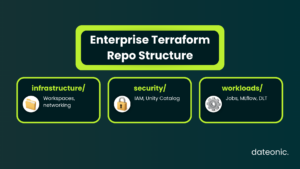
This segmentation limits the blast radius of deployment errors and allows data product teams to manage their own workflows without requiring elevated permissions over the core workspace infrastructure.
Enterprise Authentication & Security Best Practices
Hardcoding Personal Access Tokens (PATs) for CI/CD pipelines is a massive security risk. PATs are tied to individual users; if that user leaves the company, pipelines break.
Modern Databricks best practices require machine-to-machine (M2M) authentication. Use OAuth M2M for AWS and GCP deployments, or leverage Azure AD Service Principals natively if operating within the Azure ecosystem.
Here is a standard provider configuration utilizing OAuth M2M:
provider “databricks” {
host = var.databricks_workspace_url
client_id = var.service_principal_client_id
client_secret = var.service_principal_client_secret
# OAuth M2M is utilized automatically when client_id and client_secret are provided
}
For handling internal secrets securely within your workflows, deploy Databricks Secret Scopes via Terraform (databricks_secret_scope), backing them natively with Azure Key Vault or AWS Secrets Manager.
| Method | Recommended for Enterprise? |
|---|---|
| Personal Access Tokens (PATs) | ❌ No |
| OAuth M2M | ✅ Yes |
| Azure AD Service Principals | ✅ Yes |
Enforcing Data Governance with Unity Catalog as Code
Data governance must be auditable and version-controlled. Transitioning from legacy workspace-local Hive metastores to Unity Catalog allows enterprises to centralize access control, but managing these permissions manually through the UI defeats the purpose of IaC.
Define all access controls centrally via the databricks_grants resource. By codifying Metastores, External Locations, and granular Access Control Lists (ACLs), you ensure that your data governance posture is immutable.
resource “databricks_grants” “external_location_access” {
external_location = databricks_external_location.bronze_layer.id
grant {
principal = databricks_group.data_engineers.display_name
privileges = [“READ_FILES”, “WRITE_FILES”]
}
}
Explore our Technical Blog for deep dives into standardizing Unity Catalog and Delta Lake in enterprise environments.
Cluster Policies and Cost Optimization
Unrestricted cluster creation leads to runaway cloud compute costs. Developers leaving interactive clusters running over the weekend is a common enterprise pain point.
Use Terraform to define and enforce strict cluster policies across the workspace. By deploying databricks_cluster_policy resources, you restrict instance types, enforce tagging for cost allocation, and mandate auto-termination limits.
resource “databricks_cluster_policy” “cost_optimized_standard” {
name = “Enterprise Standard Compute”
definition = jsonencode({
“autotermination_minutes” : {
“type” : “fixed”,
“value” : 30
},
“node_type_id” : {
“type” : “allowlist”,
“values” : [“Standard_DS3_v2”, “Standard_DS4_v2”]
}
})
}
Automating MLOps: Terraform vs. Databricks Asset Bundles (DABs)
Moving machine learning models into production requires clear boundaries between infrastructure provisioning and application lifecycle management.
When promoting models from Dev to Prod, avoid manual UI exports. While Terraform handles the underlying workspace, Unity Catalog, and compute policies, modern Databricks operations rely on Databricks Asset Bundles (DABs) for managing jobs and MLflow pipelines. Use Terraform to provision the environment and enforce policies, then use DABs alongside your CI/CD pipelines to manage the lifecycle of Databricks Workflows.
If you must define core jobs via Terraform, ensure they reference your predefined cluster policies to maintain cost optimization:
resource “databricks_job” “mlops_pipeline” {
name = “Production Model Training”
job_cluster {
job_cluster_key = “prod_cluster”
new_cluster {
num_workers = 2
spark_version = “13.3.x-scala2.12” # [VERIFY: Confirm preferred LTS Spark version]
policy_id = databricks_cluster_policy.cost_optimized_standard.id
}
}
task {
task_key = “train_model”
job_cluster_key = “prod_cluster”
notebook_task {
notebook_path = “/Production/MLOps/Train”
}
}
}
Frequently Asked Questions
Why separate the account and workspace providers in Terraform?
The account-level provider handles overarching infrastructure (identity, workspace creation, cloud networking), while the workspace-level provider manages logical assets inside a specific workspace. Separating them prevents dependency cycles and protects foundational infrastructure from application-level deployment errors.
Can I use Terraform to manage Databricks Secret Scopes?
Yes. Manage secret scopes using the databricks_secret_scope resource. For enterprise security, configure scopes to read directly from cloud-native key vaults (like Azure Key Vault).
How do we prevent manual UI changes from causing configuration drift?
Adopt a strict “read-only” UI policy for higher environments (Staging/Prod). By restricting user permissions and requiring all changes to execute through Terraform via automated CI/CD pipelines, you eliminate UI-driven drift.
Build a Production-Ready Lakehouse with Dateonic
Implementing scalable IaC for big data platforms is exactly why enterprises hire specialized partners rather than generalist IT firms. Structuring complex state files, securing MLOps pipelines, and configuring Unity Catalog correctly from day one dictates the long-term success and cost-efficiency of your data initiatives.
As an Official Databricks Consulting Partner, Dateonic focuses entirely on building secure, robust, and optimized Data & AI platforms using modern Lakehouse architectures.
Ready to scale your infrastructure and eliminate deployment bottlenecks? Talk to a Databricks expert today.