
Your on-premises Hadoop cluster is bleeding money. Between HDFS storage overhead, aging commodity hardware refresh cycles, and a growing team of specialists whose sole job is keeping NameNodes alive – the true TCO of on-prem Hadoop is rarely what the original business case projected. For most enterprises we audit at Dateonic, the real cost is 2–4× the line-item infrastructure spend once you factor in engineering hours, downtime incidents, and the compounding opportunity cost of pipelines that can’t keep up with the business.
We’ve seen the fallout: ETL jobs running 14+ hours on 200-node clusters, data freshness SLAs that stakeholders quietly stopped trusting, and at least one failed cloud-lift that produced a hybrid mess nobody owns. You don’t need a Databricks pitch – you need a migration that actually closes the chapter on Hadoop for good.
At Dateonic, a certified Databricks Partner, we’ve designed and executed migrations across industries from multinational logistics to global retail. This article breaks down exactly how we do it – and what separates a clean, cost-optimized migration from another expensive half-measure.
Why Hadoop Migrations Fail (And What the Technical Debt Actually Looks Like)
Most failed migrations share a single root cause: teams treat it as a lift-and-shift exercise. They point HDFS paths at object storage, repackage MapReduce logic into Spark jobs, and declare victory. The result is a cloud-hosted Hadoop anti-pattern – paying Azure or AWS prices for on-prem-era performance.
The real work is workload refactoring, not file copying. A proper debt inventory typically surfaces:
- Hive SerDes and custom UDFs with no direct Delta Lake equivalent
- HBase or Impala dependencies embedded in BI tooling no one wants to touch
- Custom YARN scheduling logic replaced poorly by default Databricks cluster policies
- Oozie or legacy Airflow DAGs wired to assume HDFS data locality
- Over- or under-partitioned Parquet tables that destroy Spark scan performance
- Years of schema drift with zero governance – the worst possible input to a Unity Catalog migration
The longer the cluster has been live, the worse this inventory looks. A Hadoop environment running for 5+ years is not a data lake – it’s a data archaeology site.
Four Technical Best Practices That Define a High-ROI Migration
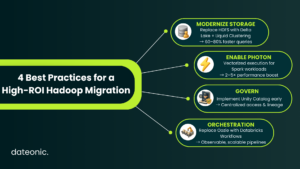
1. Replace HDFS File Layout with Delta Lake + Liquid Clustering
Stop designing around static partition columns. Liquid Clustering, available in Delta 3.x+, replaces brittle PARTITION BY year/month/day schemes with an adaptive clustering model that optimizes file layout based on actual query predicates – automatically. For Hadoop-era tables that were partitioned by time and nothing else, the impact is immediate.
We routinely see query latency drop 60–80% on analytical workloads after replacing legacy Hive partition schemes with Liquid Clustering on Delta tables – without modifying a single downstream SQL query.
2. Enable Photon for Vectorized Execution on CPU-Bound Pipelines
If your migrated Spark jobs are underperforming post-migration, the first diagnostic question is: is Photon enabled on this cluster? Photon is Databricks’ native vectorized query engine written in C++. It shares the Spark API surface but executes at near-hardware speed for columnar operations.
For the scan-heavy, aggregation-intensive pipelines that define Hadoop-era workloads, Photon typically delivers 2–5× throughput improvement over standard Spark on equivalent DBU spend. That directly compresses cluster runtime and your monthly bill.
3. Centralize Governance with Unity Catalog from Day One
Migrating without Unity Catalog is the single biggest architectural mistake we see in DIY migrations. Hadoop environments are notoriously ungoverned – Ranger policies are patchwork, Kerberos principals are tribal knowledge, and column-level security is often entirely absent.
Unity Catalog gives you a three-level namespace (catalog.schema.table), attribute-based access control, column-level data lineage, and cross-workspace governance from a single control plane. Retrofitting this after migration is painful and expensive. Architect it in from Sprint 1.
4. Migrate Orchestration to Databricks Workflows – Don’t Preserve Oozie
Oozie is functionally dead. Translating Oozie XML workflows into Databricks Workflows (or managed Airflow if your team is already invested in DAG-based orchestration) is non-negotiable. This is also where you instrument job cluster policies to right-size compute per workload class – a critical cost lever that Hadoop’s YARN model never exposed cleanly. Pair this with Auto Loader for incremental data ingestion and Delta Live Tables for pipeline reliability, and you’ve replaced your entire Oozie dependency chain with infrastructure that’s observable, testable, and self-healing.
Hadoop vs Databricks: Architecture Comparison
| Dimension | Hadoop (On-Prem) | Databricks on Cloud |
|---|---|---|
| Storage Layer | HDFS (local disks, rack-aware) | Delta Lake on object storage (S3/ADLS/GCS) |
| Compute Scaling | Static YARN cluster, slow scale-out | Auto-scaling clusters, serverless SQL |
| Query Engine | MapReduce / Hive / Impala | Photon-accelerated Spark + DBR |
| Governance | Apache Ranger + Kerberos (fragmented) | Unity Catalog (unified, lineage-native) |
| Orchestration | Oozie / manual cron | Databricks Workflows + Delta Live Tables |
| Table Format | ORC / Parquet (no ACID) | Delta Lake (ACID, time travel, CDC) |
| Infra Overhead | High (NameNode HA, hardware refresh) | Zero (fully managed) |
| TCO Trajectory | Increasing (hardware aging, talent cost) | Decreasing (Photon, serverless, SPOT) |
The Dateonic Migration Methodology
We operate a structured six-phase engagement. No scope creep, no black-box consulting.
Phase 1 – Discovery & TCO Audit (Week 1–2)
We instrument your existing cluster to build a full workload inventory: job frequency, DBU equivalency estimates, data volume by table, access patterns, and downstream dependency mapping. This is the foundation for accurate cost modeling before a single line of code is touched.
Phase 2 – Architecture Design & Lakehouse Blueprint (Week 2–3)
We design the target-state architecture: workspace topology, Unity Catalog hierarchy, cluster policy matrix, network configuration (Private Link or VNet injection), and the Delta table schema for each migrated data domain.
Phase 3 – Pipeline Refactoring & Translation (Week 3–8)
This is the core engineering phase. We translate Hive DDL to Delta, rewrite Pig or MapReduce jobs into Spark (Python or Scala), and port orchestration logic to Databricks Workflows. Workloads are prioritized by business criticality, not technical ease.
Phase 4 – Data Migration & Validation (Week 6–10, parallel)
Using Auto Loader, COPY INTO, or custom Spark migration jobs depending on volume and latency requirements, we move historical data with full row-count and checksum validation. A table is not “migrated” until reconciliation passes.
Phase 5 – Parallel Run & UAT (Week 10–13)
Both environments run simultaneously. Stakeholders validate outputs. We resolve behavioral discrepancies between Hive query semantics and Spark SQL before any cutover decision is made.
Phase 6 – Cutover, Decommission & Optimization (Week 13–16)
Hard cutover, Hadoop decommission planning, and a 30-day post-migration DBU optimization sprint – Liquid Clustering tuning, cluster right-sizing, and query profiling with the Databricks SQL Query History API.
💡 Ready to fix this? Find out exactly how long your migration will take and what it will cost – with no obligation. Request your free Migration Scope & Cost Estimate from Dateonic →
Real Case Study: TransGlobal Logistics – 45% Processing Cost Reduction in 12 Months
TransGlobal Logistics, a multinational provider operating a 3,500-vehicle fleet across 28 countries, came to Dateonic with a legacy data warehouse generating escalating processing costs and analytical delays. The platform could not support real-time route optimization or predictive maintenance at the scale the business required, slowing decision-making and inflating operational costs across the fleet.
Dateonic designed a full migration plan, replacing the legacy warehouse with a high-performance Spark environment on Databricks. The team used Auto Loader to ingest operational data into Delta Lake and Delta Live Tables to build analytics-ready datasets, while integrating MLflow to deploy AI models that unified vehicle telemetry, GPS, and weather data for logistics optimization.
The results were decisive:
- 45% reduction in processing costs while scaling analytics throughput
- 9.3% cut in fuel costs through AI-driven route optimization
- 68% reduction in delivery estimation errors
- 280% ROI delivered in the first year
Fleet managers gained real-time operational insights, predictive maintenance began minimizing unplanned breakdowns, and customer service teams were equipped with precise delivery window data – capabilities that were structurally impossible on the legacy stack.
Read the full TransGlobal Logistics case study →
The Business Case Is Already Made – Execution Is What’s Left
On-premises Hadoop is not a technical problem you can optimize your way out of. It is a structural cost and agility constraint that compounds every quarter you delay. The architecture case for Databricks – Delta Lake, Photon, Unity Catalog, serverless SQL – is settled. The only variable is how cleanly and quickly you execute the migration.
Dateonic’s structured methodology eliminates the two failure modes we see most: under-scoped DIY migrations that create hybrid debt, and over-engineered consulting engagements that take 18 months to deliver value. We scope to your workloads, migrate in phases, and optimize continuously.