
This guide is based on the official Dateonic Databricks YouTube tutorial series: Databricks Asset Bundles – Hands-On Tutorial. Part 1 – running SQL and python files as notebooks.. I highly recommend watching this video as a complement to this guide for a visual walkthrough of the concepts covered here.
Check out our GitHub repository for this series of tutorials: https://github.com/Dateonic/Databricks-Asset-Bundles-tutorial
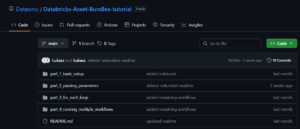
In the first part of the tutorial I explore running .sql and .py files with all-purpose job compute. Thanks to that we can run both SQL and Python files as notebooks, without the need to use SQL Warehouse or Spark cluster for them.
This is part 1 of a 4-part series on Databricks Asset Bundles:
- How to Run Python and SQL Files with All-Purpose Compute (this guide)
- How to pass local and global parameters in DABs (coming soon)
- How to do a for_each loop in DABs (coming soon)
- How to run multiple jobs in one main workflow (coming soon)
What Are Databricks Asset Bundles?
Databricks Asset Bundles are a deployment and development tool that enables you to:
- Version control your Databricks assets (notebooks, jobs, workflows)
- Use a code-first approach to Databricks development
- Deploy assets consistently across environments
- Manage permissions and configurations in code
For a detailed overview of the Databricks Asset Bundles check out our other article: Databricks Asset Bundles – how to use them in your projects.
One of the key benefits of using Databricks Asset Bundles is the ability to work with clean, modular Python and SQL script files instead of traditional notebooks. This approach improves version control, enhances team collaboration, and streamlines automation.
The table below highlights the differences between using .ipynb notebooks and .py/.sql files with DAB-compatible source markers:
| Feature | Traditional Notebooks (.ipynb) | Script Files (.py, .sql) with DAB Markers |
|---|---|---|
| Git-friendly versioning | ❌ Lots of metadata | ✅ Clean, readable diffs |
| Execution in Databricks | ✅ Native | ✅ With special markers |
| Supports interactive cells | ✅ Yes | ✅ With # COMMAND / — COMMAND |
| Merge conflict resilience | ❌ Poor | ✅ Easier to manage |
| Reusability across envs | ⚠️ Manual copying | ✅ DAB handles it via config |
Prerequisites
Before starting, ensure you have:
- Databricks CLI installed (pip install databricks-cli)
- Access to a Databricks workspace
- Basic understanding of YAML configuration files
- Git for version control
Setting Up Your First DAB
1. Create Your Project Structure
Create the following directory structure for your project:
bundle_tutorial/
├── databricks.yml # Main configuration file
├── src/
│ ├── run_hello.py # Python example file
│ ├── hello.sql # SQL example file
│ └── notebook.ipynb # Notebook example
└── resources/
└── first_job.yml # Job definition
2. Define Your Bundle Configuration
Create a databricks.yml file in your project root:
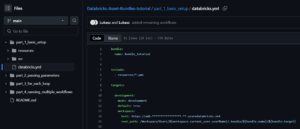
Important: Replace the https://adb-*****************.**.azuredatabricks.net placeholder with your actual Databricks workspace URL. You can find this URL in your browser’s address bar when you’re logged into your Databricks workspace.
Note: You’ll notice that the production section and its related configurations are commented out with hashtags (#). This is intentional for this tutorial, as we’re focusing only on the development environment. In more advanced DAB implementations, you would uncomment and configure these sections to enable multi-environment deployments.
Key components of this configuration:
- bundle.name: Defines the name of your bundle (bundle_tutorial)
- include: Specifies which resource files to include (all YML files in resources/)
- targets: Defines deployment environments
- development: Your development environment configuration
- workspace.host: Your Databricks workspace URL
- workspace.root_path: Where assets will be deployed in the workspace
- development: Your development environment configuration
3. Create Your Python File
Create run_hello.py in your src directory:
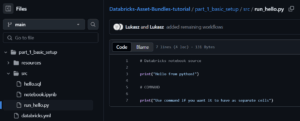
Notice the # Databricks notebook source marker at the top of the file. This line is critically important as it enables the file to run on all-purpose clusters. When Databricks sees this marker, it automatically converts your Python file into a proper Databricks notebook rather than treating it as a plain script file. Without this marker, you would need significantly more configuration code in your databricks.yml file to achieve the same functionality.
The # COMMAND marker serves as a cell separator, dividing your code into multiple executable cells just like in a native Databricks notebook.
4. Create Your SQL File
Create hello.sql in your src directory:
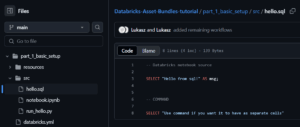
Just like with the Python file, the — Databricks notebook source marker at the top is essential. This special marker tells Databricks to convert the SQL file into a proper notebook that can run on all-purpose interactive clusters. Without this marker, you would need much more verbose configuration in your databricks.yml file to specify how to run these files, including cluster configurations and execution contexts.
The — COMMAND marker functions as a cell separator, allowing you to organize your SQL code into separate executable cells, providing the same interactive experience you’d get in a native Databricks notebook.
5. Define a Job to Run Your Files
Create first_job.yml in your resources directory:
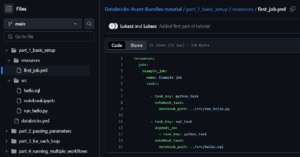
This job definition includes:
- A job named „Example job”
- Two tasks:
- python_task: Runs the Python file
- sql_task: Runs the SQL file (depends on the Python task completing)
Deploying and Running Your DAB
1. Validate Your Bundle
Use the Databricks CLI to validate your bundle:
databricks bundle validate
This validates your configuration files and prepares them for deployment.
2. Deploy Your Bundle
Deploy your bundle to your development workspace:
databricks bundle deploy
This command:
- Validates your bundle configuration
- Creates necessary resources in your Databricks workspace
- Uploads your Python and SQL files as notebooks
- Creates the job defined in first_job.yml
3. Run Your Job
You can run the job using:
databricks bundle run
Or navigate to the Jobs UI in your Databricks workspace to run the job manually.
Understanding the Results
When your job runs:
- The Python task executes first:
- Outputs: „Hello from python!” and „Use command if you want it to have as separate cells”
- Once the Python task completes, the SQL task runs:
- Outputs: A table with one column „msg” containing „Hello from sql!”
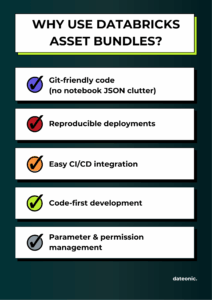
Benefits of Using DABs for Running Code
- Version Control: All your code and configurations are stored in Git
- Reproducibility: Consistent deployments across environments
- Automation: Easy to integrate with CI/CD pipelines
- Configuration Management: Environment-specific configurations are handled elegantly
- Dependency Management: Tasks can depend on each other, ensuring proper execution order
Advanced Configuration Options
The commented-out production target in databricks.yml shows some advanced configurations:
- Environment-specific variables: Different warehouse IDs or parameters for different environments
- Permissions: Setting who can run or manage the deployed assets
- Multiple targets: Easily deploy to dev, test, and production environments
Benefits of Using DABs for Running Code
Next Steps
Now that you’ve learned how to run basic Python and SQL files using DABs, you can continue your learning journey with the other tutorials in this series:
- How to pass local and global parameters in DABs – Learn to configure and use parameters to make your DABs more flexible and reusable across different environments.
- How to do a for_each loop in DABs – Discover how to create dynamic, repeatable components in your DABs configuration to avoid duplication and create more maintainable code.
- How to run multiple jobs in one main workflow – Master the techniques for orchestrating complex workflows by coordinating multiple jobs within a single parent workflow.
By mastering these techniques, you’ll be able to fully leverage the power of Databricks Asset Bundles, treating your data infrastructure as code and creating more robust, repeatable, and manageable Databricks deployments.