
Storing data in a raw lake (like S3 or ADLS) is risky. A single failed script can leave you with corrupt files and a manual cleanup headache. Delta Lake eliminates this risk.
It adds a transaction log to your data, ensuring that every operation either finishes completely or doesn’t happen at all. This turns a folder of files into a reliable, database-like table.
- Safety: Writes are atomic, preventing partial data corruption.
- History: Changes are tracked, allowing you to undo mistakes.
- Control: Bad data is rejected by strict schema enforcement.
If you are new to Databricks, understanding Delta Lake is critical. It is the foundation of the Lakehouse, allowing you to run dependable analytics directly on low-cost storage.
What Is Delta Lake?
Delta Lake is an open-source storage framework. It takes standard Parquet files and adds a file-based transaction log (the _delta_log) that tracks every change. Because it is compatible with Apache Spark, you can use it in Databricks without changing your existing code.
When you use Delta Lake, you aren’t just dumping files; you are building a system that supports complex data manipulation.
- Open Standard: It is a Linux Foundation project, not proprietary software.
- Default Storage: Databricks creates tables in Delta format automatically.
- Unified Workloads: One table supports both batch processing and streaming.
To understand how this compares to traditional warehousing, read the Databricks vs. Snowflake comparison.
Core Concepts: ACID Transactions and Time Travel
Delta Lake brings two essential database features to your file storage: ACID transactions and Time Travel. These features prevent the „data swamp” issues common in older architectures.
ACID Transactions
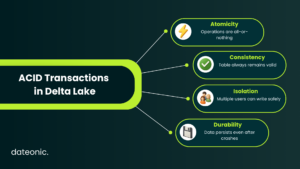
In a standard data lake, concurrent writes or system crashes result in messy data. ACID (Atomicity, Consistency, Isolation, Durability) transactions ensure data integrity.
- Atomicity: Operations are all-or-nothing; incomplete data is never visible.
- Consistency: The table always remains in a valid state.
- Isolation: Multiple users can write simultaneously without conflict.
This reliability is required for the Medallion Architecture, ensuring clean data flows from Bronze (raw) to Gold (curated) layers.
Time Travel
Delta Lake versions your data automatically. Time Travel allows you to query the table as it existed at any previous point in time.
- Audit Trails: See exactly how data looked before an update.
- Instant Rollbacks: Reverse accidental deletions immediately.
- Reproducibility: Access the exact dataset version used for a past ML model.
For tips on structuring these tables, check out Databricks architecture best practices.
| Feature | Traditional Data Lake | Delta Lake |
|---|---|---|
| Data Integrity | Risk of corruption | ACID transactions |
| Schema Enforcement | Weak or manual | Strict enforcement |
| History | No versioning | Time Travel & versioning |
| Workload Support | Batch only | Batch + Streaming |
| Recovery | Manual | Rollback & undo changes |
Getting Started with Delta Lake in Databricks
Using Delta Lake is simple because it is native to Databricks. You can interact with it using SQL commands or Python.
Creating a Delta Table
You generally do not need to specify a format; USING DELTA is the default behavior in Databricks.
— Create a simple Delta table
CREATE TABLE employees (
id INT,
name STRING,
salary DOUBLE
) USING DELTA;
Updating and Merging Data
Standard data lakes are read-only or append-only. Delta Lake allows full DML operations like UPDATE and DELETE. This is vital for Change Data Capture (CDC) where you sync changes from operational systems.
— Update salary for a specific employee
UPDATE employees
SET salary = salary * 1.1
WHERE id = 101;
- Upserts: Seamlessly handle inserts and updates in one merge command.
- Compliance: Delete specific records to comply with GDPR or CCPA.
Using Time Travel
To view historical data, simply add a timestamp or version number to your query.
— Query the table as of a specific version
SELECT * FROM employees VERSION AS OF 1;
— Query the table as of a specific timestamp
SELECT * FROM employees TIMESTAMP AS OF ’2023-10-27 10:00:00′;
This relies on the Change Data Feed (CDF) to track row-level changes efficiently.
Conclusion
Delta Lake removes the fragility of traditional data lakes. By providing ACID transactions and Time Travel, it allows you to build robust pipelines that can handle updates, enforce quality, and recover from errors.
Whether you are evaluating a Lakehouse vs. CDP solution or starting your first project, Delta Lake is the standard for modern data engineering.
For more details, refer to the Delta Lake documentation or the Databricks guide.
Ready to Build a Reliable Lakehouse?
Implementing Delta Lake is just the start. If you need help designing a scalable Databricks architecture or optimizing your existing data pipelines, Dateonic can help.