
Ever found yourself juggling different file formats—CSV, JSON, Parquet—trying to make sense of them and write clean, performant tables?
Maybe your SQL queries get messy, your schema breaks mid-pipeline, or your tables just aren’t fast enough for analytics. Efficiently reading files, transforming data, and writing it to optimized Delta tables is one of the most essential (and often frustrating) skills in modern data engineering.
In this guide, I’ll walk you through practical, real-world techniques for handling files and tables in Databricks—from reading raw files to writing high-performance Delta tables with partitioning, schema evolution, and more.
Supported File Formats in Databricks
Databricks offers robust support for various file formats, each with its own advantages and trade-offs. Understanding these differences helps you make informed decisions about which format to use for your specific use case.
Popular File Formats Comparison
| Format | Advantages | Disadvantages | Best Use Cases |
|---|---|---|---|
| Parquet | – Columnar storage – High compression – Schema evolution – Predicate pushdown support – Excellent query performance |
– Not human-readable – More complex than CSV/JSON |
– Analytics workloads – Large datasets – Complex queries |
| CSV | – Human-readable – Universal compatibility – Simple structure – Easy to create |
– No schema enforcement – Poor compression – Slower queries – No nested data support |
– Simple data exchange – Legacy systems integration – Small datasets |
| JSON | – Human-readable – Schema flexibility – Nested structure support – Wide compatibility |
– Verbose format – Less efficient storage – Slower than Parquet – Variable parsing performance |
– Semi-structured data – API responses – Document storage |
Key Considerations When Choosing a Format
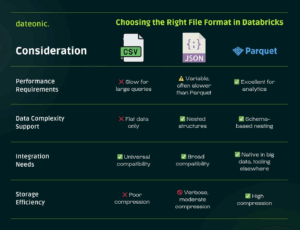
Selecting the right file format in Databricks depends on factors like query performance, data structure, compatibility, and storage efficiency. To help you quickly compare these trade-offs across CSV, JSON, and Parquet, I’ve summarized the differences in the following infographic:
How to Read Files in Databricks
Databricks provides several methods to read files, with options to customize the reading process according to your data’s specific characteristics.
CSV Files
# Basic CSV reading
df_csv = spark.read.csv(„/path/to/file.csv”)
# CSV with options
df_csv_with_options = spark.read.option(„header”, „true”) \
.option(„delimiter”, „,”) \
.option(„inferSchema”, „true”) \
.csv(„/path/to/file.csv”)
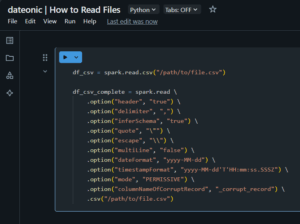
# Comprehensive CSV example with all common options
df_csv_complete = spark.read \
.option(„header”, „true”) \
.option(„delimiter”, „,”) \
.option(„inferSchema”, „true”) \
.option(„quote”, „\””) \
.option(„escape”, „\\”) \
.option(„multiLine”, „false”) \
.option(„dateFormat”, „yyyy-MM-dd”) \
.option(„timestampFormat”, „yyyy-MM-dd’T’HH:mm:ss.SSSZ”) \
.option(„mode”, „PERMISSIVE”) \
.option(„columnNameOfCorruptRecord”, „_corrupt_record”) \
.csv(„/path/to/file.csv”)
Key CSV reading options:
- header: Specifies if the first line is a header (true/false)
- delimiter: Character separating fields (comma, tab, pipe, etc.)
- inferSchema: Automatically detect column types (true/false)
- multiLine: Support records spanning multiple lines (true/false)
- mode: How to handle corrupt records (PERMISSIVE, DROPMALFORMED, FAILFAST)
Parquet Files
# Basic Parquet reading
df_parquet = spark.read.parquet(„/path/to/file.parquet”)
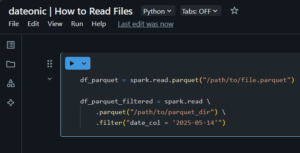
# Parquet with partition pruning (improves performance)
df_parquet_filtered = spark.read \
.parquet(„/path/to/parquet_dir”) \
.filter(„date_col = '2025-05-14′”)
JSON Files
# Basic JSON reading
df_json = spark.read.json(„/path/to/file.json”)
# JSON with options for multi-line JSON records
df_json_multiline = spark.read \
.option(„multiLine”, „true”) \
.option(„mode”, „PERMISSIVE”) \
.json(„/path/to/file.json”)

Reading Multiple Files with Wildcards
# Read all CSV files in a directory
df_multiple = spark.read \
.option(„header”, „true”) \
.option(„inferSchema”, „true”) \
.csv(„/path/to/csv_files/*.csv”)

Querying File Data Using SQL
After reading files, you can leverage Spark SQL to analyze your data effectively. This approach combines the flexibility of SQL with Databricks’ distributed computing power.
Creating Temporary Views
Temporary views allow you to query your dataframes using SQL syntax:
# Create a temporary view from our dataframe
df_csv_with_options.createOrReplaceTempView(„customer_data”)
# Now query using SQL
result_df = spark.sql(„””
SELECT
customer_id,
SUM(purchase_amount) as total_spent,
COUNT(*) as transaction_count
FROM
customer_data
WHERE
purchase_date >= '2025-01-01′
GROUP BY
customer_id
ORDER BY
total_spent DESC
„””)
# Display the results
display(result_df)

Creating Global Temporary Views
Global temporary views persist across multiple Spark sessions within the same cluster:
# Create a global temporary view
df_parquet.createOrReplaceGlobalTempView(„product_catalog”)
# Query the global temporary view (note the global_temp database prefix)
result_global = spark.sql(„””
SELECT * FROM global_temp.product_catalog
WHERE product_category = 'Electronics’
„””)

SQL Subqueries and Joins with Temporary Views
# Create multiple views
df_orders.createOrReplaceTempView(„orders”)
df_customers.createOrReplaceTempView(„customers”)
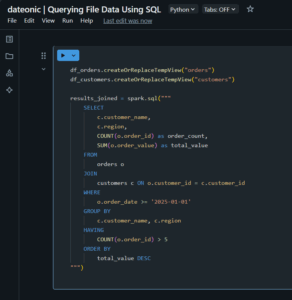
# Complex SQL with joins
results_joined = spark.sql(„””
SELECT
c.customer_name,
c.region,
COUNT(o.order_id) as order_count,
SUM(o.order_value) as total_value
FROM
orders o
JOIN
customers c ON o.customer_id = c.customer_id
WHERE
o.order_date >= '2025-01-01′
GROUP BY
c.customer_name, c.region
HAVING
COUNT(o.order_id) > 5
ORDER BY
total_value DESC
„””)
Writing to Table with Creating Table from File
Once you’ve processed your data, you’ll often want to persist it as a Delta table for optimized storage and future queries.
Creating a Delta Table from a DataFrame
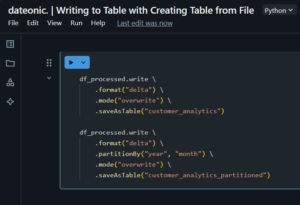
# Basic table creation
df_processed.write \
.format(„delta”) \
.mode(„overwrite”) \
.saveAsTable(„customer_analytics”)
# Table creation with partitioning
df_processed.write \
.format(„delta”) \
.partitionBy(„year”, „month”) \
.mode(„overwrite”) \
.saveAsTable(„customer_analytics_partitioned”)
Using INSERT OVERWRITE with SQL
# First, create or replace a temporary view
df_processed.createOrReplaceTempView(„processed_data”)
# Then use SQL to insert into a table
spark.sql(„””
INSERT OVERWRITE TABLE customer_analytics
SELECT
customer_id,
product_id,
purchase_date,
amount,
YEAR(purchase_date) as year,
MONTH(purchase_date) as month
FROM
processed_data
WHERE
amount > 0
„””)

Handling Schema Evolution
When your data schema changes over time, Delta tables can adapt seamlessly:
# Enable schema evolution
spark.sql(„SET spark.databricks.delta.schema.autoMerge.enabled = true”)
# Write with schema evolution enabled
df_new_schema.write \
.format(„delta”) \
.option(„mergeSchema”, „true”) \
.mode(„append”) \
.saveAsTable(„customer_analytics”)

Creating Tables with Advanced Options
# Create a Delta table with additional options
spark.sql(„””
CREATE TABLE IF NOT EXISTS sales_performance
USING DELTA
PARTITIONED BY (region, date)
LOCATION '/mnt/data/sales_performance’
COMMENT 'Sales performance data for analytics’
AS
SELECT * FROM processed_sales_data
„””)

Optimizing Delta Tables After Writing
To ensure optimal query performance, run optimization commands after substantial writes:
# Optimize (compaction)
spark.sql(„OPTIMIZE customer_analytics”)
# Z-ORDER optimization for faster filtering
spark.sql(„OPTIMIZE customer_analytics ZORDER BY (customer_id, purchase_date)”)

What’s Next?
Now that you’ve mastered querying files and writing to Delta tables in Databricks, you might want to explore these related topics:
- Understanding Medallion Architecture in Databricks and How to Implement It – Learn how to structure your data processing workflows in layers for better quality and management
- What is Unity Catalog and How It Keeps Your Data Secure – Discover how to enhance data governance and security in your Databricks environment
- What is Lakehouse Architecture and How It Differs from Data Lake and Data Warehouse – Gain a deeper understanding of the architecture that powers Databricks
- What are Workflows in Databricks and How Do They Work – Learn how to orchestrate your data processing pipelines effectively
- Getting Started with Databricks: Creating Your First Cluster – If you’re new to Databricks, start with the basics of setting up your environment
Take Your Data Engineering Skills to the Next Level
Ready to transform your data engineering capabilities with Databricks? Our team of certified data experts can help you implement best practices, optimize your workflows, and maximize the value of your data assets.
Contact us today to learn how we can help you harness the full power of Databricks for your organization.