
There is no permanent winner in the enterprise data platform market. A platform that suits a SQL-first reporting team may be a poor fit for an organization running streaming pipelines, machine learning, AI applications, and governed data products on the same foundation.
The useful question is not “Which platform is best?” It is “Which operating model fits our workloads, skills, cloud environment, governance requirements, and cost profile?”
This guide compares five current approaches:
-
Databricks
-
Snowflake
-
Google BigQuery
-
Microsoft Fabric
-
an AWS-native analytics stack built around services such as Amazon S3, AWS Glue, AWS Lake Formation, Amazon Athena, and Amazon Redshift
The comparison covers complete analytics and data platforms, not operational databases used to run transactional applications.
Enterprise data platforms at a glance
| Option | Architecture and operating model | A strong fit when | Main governance layer | Main point to validate |
|---|---|---|---|---|
| Databricks | Lakehouse platform for data engineering, SQL analytics, streaming, machine learning, and AI | Several technical teams need to work on shared data and governance | Unity Catalog | Workload design, cloud architecture, permissions, and cost controls still require deliberate platform engineering |
| Snowflake | Managed cloud data platform with separate storage and compute | SQL analytics, governed data sharing, and a managed warehouse experience dominate | Snowflake Horizon Catalog and policy controls | Test the exact mix of SQL, Snowpark, AI, ingestion, and sharing features because usage and cost drivers differ |
| Google BigQuery | Fully managed, serverless analytics platform | The organization is centered on Google Cloud and wants SQL analytics with minimal infrastructure management | Google Cloud IAM and BigQuery governance capabilities | Choose and govern the query billing model carefully, especially for unpredictable scan patterns |
| Microsoft Fabric | Software-as-a-service analytics environment built around OneLake and integrated workloads | Power BI and the wider Microsoft ecosystem are central to the operating model | OneLake security and catalog capabilities, with Microsoft Purview integrations | Capacity sizing, licensing, workload isolation, and migration gaps from existing Azure services |
| AWS analytics stack | Composable set of storage, catalog, governance, query, warehouse, processing, and AI services | The organization is AWS-native and values service-level control | AWS IAM, Lake Formation, and the AWS Glue Data Catalog | Cross-service architecture, permissions, observability, and cost ownership are distributed across more components |
The “strong fit” column is a shortlist, not a verdict. A proof of concept should use your own data, concurrency pattern, security policies, and recovery requirements.
1. Databricks
Architecture and workload fit
Databricks is built around the lakehouse pattern. Its documentation describes a lakehouse as a system that combines data lake and data warehouse capabilities while keeping data in standard formats.
Delta Lake is the default table format on Databricks and adds a transaction log, ACID transactions, and scalable metadata handling to files stored in cloud object storage.
This architecture is worth considering when data engineering, batch and streaming processing, SQL analytics, machine learning, and AI applications need to use a common data foundation.
Databricks documents these workloads as parts of the same platform rather than unrelated products. That does not mean every organization should consolidate everything into one workspace. It means consolidation is an option that can be tested against the current toolchain.
Governance
Unity Catalog governs data and AI assets across Databricks workspaces. Its documented capabilities include access control, discovery, lineage, auditing, row and column filters, and AI governance.
Delta Lake provides transactional reliability, while Unity Catalog provides the governance layer. They solve different problems and should not be presented as interchangeable security features.
Cost and operational considerations
Databricks is not accurately priced with one universal rate. For classic compute, official guidance describes total cost as Databricks Units plus the associated virtual machines, disks, and network usage.
For serverless services, the infrastructure component is included in the DBU charge. The platform also exposes billable usage through system tables for cost attribution and monitoring.
See the official Databricks cost-optimization guidance and Dateonic’s practical guide to forecasting and controlling Databricks costs.
Put Databricks on the shortlist when: the platform must serve data engineering and AI teams as well as SQL users, and a shared governance model is a real requirement rather than a future aspiration.
Validate before choosing it: representative workload cost, cloud networking, identity integration, workspace design, data ownership, and whether the team can operate the platform consistently across environments.
2. Snowflake
Architecture and workload fit
Snowflake separates persistent storage, compute, and cloud services. Queries and data processing run on compute resources called virtual warehouses. Snowflake’s architecture documentation is the right starting point for understanding how those layers interact.
The platform remains a natural candidate for SQL-centric analytics, business intelligence, and governed data collaboration. It is no longer accurate to describe it as only a traditional warehouse.
Snowpark supports code written in Python, Java, and Scala, so teams can run non-SQL processing in the platform. The decision should therefore be based on the actual workload, not an old “warehouse versus data science” slogan.
Governance and sharing
Snowflake Horizon Catalog brings together governance capabilities such as data discovery, lineage, classification, masking, and row-access policies. Secure Data Sharing lets a provider share selected Snowflake objects with other Snowflake accounts.
Teams should still test the required account, region, cloud, object-type, and commercial constraints instead of treating “secure sharing” as a blanket compliance statement.
Cost and operational considerations
Snowflake’s foundational cost categories are compute, storage, and data transfer. Specific services can introduce their own meters. Separating storage and compute creates useful workload isolation options, but it does not make cost automatic or inherently predictable.
Warehouse sizing, auto-suspend behavior, concurrency, data retention, replication, serverless features, and egress all need to be included in the model.
Put Snowflake on the shortlist when: managed SQL analytics and controlled data sharing are central, and the organization wants to minimize infrastructure administration for the warehouse layer.
Validate before choosing it: non-SQL workload fit, concurrency, credit consumption, data transfer, governance feature availability, and the engineering effort required outside Snowflake.
3. Google BigQuery
Architecture and workload fit
BigQuery is Google Cloud’s fully managed analytics platform. It is serverless from the user’s infrastructure perspective, so teams do not provision or manage query clusters in the same way they would on a traditional warehouse platform.
BigQuery is a strong candidate for organizations already committed to Google Cloud, especially where SQL analytics is the dominant access pattern.
BigQuery ML allows teams to create and use machine learning models with SQL, while notebook and programmatic interfaces support Python and other workflows. These capabilities should not be translated into a universal performance claim.
Query latency depends on the workload, data layout, reservations, concurrency, and the amount of work performed.
Governance
BigQuery documents built-in capabilities for metadata, discovery, lineage, data quality, access control, and policy-based protection. IAM remains central to permissions, while Google’s catalog services support governance and discovery.
Confirm which catalog and governance features are generally available in the selected regions and projects before making them part of a control framework.
Cost and operational considerations
BigQuery charges separately for compute and storage. For query processing, Google documents on-demand and capacity-based pricing models. On-demand billing is tied to data processed, while capacity-based billing allocates query capacity through reservations.
Neither model is automatically cheaper. Query shape, scanned data, concurrency, storage, ingestion, and data transfer determine the result.
Put BigQuery on the shortlist when: Google Cloud is the strategic environment and the team wants serverless SQL analytics with integrated machine learning options.
Validate before choosing it: scanned-data exposure, reservation sizing, workload concurrency, regional constraints, governance setup, and how much processing will remain outside BigQuery.
4. Microsoft Fabric
Why Fabric replaces Azure Synapse in this comparison
The earlier version of this article ranked Azure Synapse Analytics as a standalone option. Microsoft now positions Fabric as a unified analytics environment and publishes migration guidance for Synapse pipelines, Spark workloads, and dedicated SQL pools.
That does not mean every Synapse implementation must be replaced immediately, or that all Synapse services have been discontinued. Existing estates need a migration assessment.
For a new platform shortlist, however, Fabric is the more current Microsoft-wide comparison point. Microsoft’s Fabric migration overview documents the available Synapse-to-Fabric paths and their component-level considerations.
Architecture and workload fit
Fabric brings data integration, data engineering, data warehousing, real-time analytics, data science, and Power BI experiences into a software-as-a-service environment. Its shared storage foundation is OneLake, a unified logical data lake built on Azure Data Lake Storage.
This makes Fabric a credible shortlist option for Microsoft-centered organizations, particularly when Power BI is already the main analytics interface. The value proposition is ecosystem integration and a shared capacity and storage model.
It should still be tested against the organization’s engineering, AI, isolation, and deployment requirements.
Governance and security
OneLake security supports role-based access control and can apply row- and column-level restrictions. Fabric also integrates with Microsoft Purview, although Microsoft notes in its governance and compliance overview that some capabilities require additional licensing.
A feature being present in the product family does not mean it is enabled, licensed, or consistently enforced across every access path.
Cost and operational considerations
Fabric uses capacity and licensing concepts that affect what users can create, run, share, and view. Microsoft also states that Fabric capacity reservations do not cover storage or networking charges.
Model the workloads together because several Fabric experiences can consume the same capacity, and test the effect of workload peaks rather than relying on a static feature checklist.
Put Fabric on the shortlist when: Power BI, Microsoft Entra ID, Azure, and Microsoft 365 are already central to the analytics operating model.
Validate before choosing it: capacity sizing, throttling behavior, licensing, workload isolation, source-control and deployment workflows, regional availability, and compatibility with the existing Synapse or Azure Data Factory estate.
5. An AWS-native analytics stack
S3 is a foundation, not the whole platform
Amazon S3 is an object storage service. Comparing S3 alone with Databricks, Snowflake, BigQuery, or Fabric mixes different product categories.
An AWS-native data platform is usually assembled from several services. S3 can provide the storage layer. AWS Glue provides serverless data integration and a shared catalog.
AWS Lake Formation provides centralized governance and fine-grained access controls for data in S3 and metadata in the Glue Data Catalog.
Amazon Athena runs interactive SQL queries against data in S3. Amazon Redshift, Amazon EMR, Amazon SageMaker AI, streaming services, and other components may be added for specific workloads.
AWS publishes reference architectures for data lakes that show this service composition. It provides flexibility, but the customer owns more cross-service choices than with a single integrated product.
Identity policies, catalog behavior, data formats, orchestration, observability, and cost allocation need to work as one system.
Governance and cost considerations
Lake Formation can apply fine-grained permissions to data lake resources, working together with IAM. The effective security model depends on how S3, the Glue Data Catalog, Lake Formation, query engines, and cross-account access are configured.
There is no single “AWS analytics platform” price. Each selected service has its own meters, while storage, requests, query processing, compute, data transfer, logging, and support can appear in different places. A valid comparison must first define the exact AWS architecture.
Put an AWS-native stack on the shortlist when: the organization is deeply invested in AWS and wants to choose services independently for storage, processing, warehousing, governance, and AI.
Validate before choosing it: service boundaries, IAM and Lake Formation interaction, catalog ownership, cross-account patterns, operational responsibility, observability, and the combined bill across services.
How to choose without relying on a vendor ranking
1. Define the dominant workloads
Document what the platform must run now, not what might be useful one day. Include ingestion patterns, batch and streaming transformations, SQL analytics, dashboard concurrency, data science, model training, model serving, AI applications, data sharing, and retention.
2. Define the control requirements
List the controls that must be demonstrated in the proof of concept.
Typical areas include identity federation, least-privilege access, row- and column-level restrictions, key management, private connectivity, lineage, audit records, data residency, deletion workflows, backup, restore, and disaster recovery.
A vendor certification or feature page does not make an implementation compliant. Applicability depends on the cloud, region, edition, service, configuration, data flow, and the organization’s own procedures.
3. Test representative work, not a polished demo
Use real schema complexity and realistic data distribution. Test failure recovery and schema changes as well as successful runs.
| Test area | What to record |
|---|---|
| Ingestion and transformation | Runtime, failure recovery, schema-change handling, orchestration effort, and data-quality behavior |
| Analytics | Query latency distribution, concurrency, workload isolation, and tuning effort |
| Governance | Time and complexity required to implement access policies, lineage, discovery, and audit evidence |
| AI and machine learning | Data access, experiment tracking, deployment, monitoring, and governance if these workloads are genuinely in scope |
| Operations | Deployment process, observability, incident recovery, skills required, and routine administration |
| Economics | Compute, storage, data transfer, platform fees, support, engineering labor, and the cost of adjacent tools that remain necessary |
Set acceptance thresholds from business service levels before the test. Otherwise, the team may select whichever demo looks most polished.
4. Compare total cost for the same outcome
Do not compare a warehouse-only quote with a broader platform that also replaces orchestration, data processing, machine learning, or governance tools. Conversely, do not credit a unified platform with savings unless those other systems can actually be retired.
For a focused financial comparison of two common candidates, see Databricks vs Snowflake TCO.
Which platform belongs on your shortlist?
-
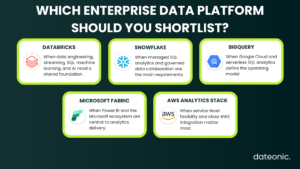
Start with Databricks when governed data engineering, streaming, SQL, machine learning, and AI need to share one platform foundation.
-
Start with Snowflake when managed SQL analytics and governed data collaboration are the primary requirements.
-
Start with BigQuery when Google Cloud is strategic and serverless SQL analytics is the preferred operating model.
-
Start with Microsoft Fabric when Power BI and the wider Microsoft ecosystem define how analytics is delivered.
-
Start with an AWS-native stack when service-level flexibility and close AWS integration matter more than having one integrated platform experience.
These are starting points, not rankings. Large organizations may use more than one platform, but every additional platform introduces another set of policies, skills, data movements, contracts, and cost controls.
The burden of a multi-platform design should be measured as carefully as its flexibility.
Frequently asked questions
What is the best enterprise data platform?
There is no universal best platform. Databricks, Snowflake, BigQuery, Microsoft Fabric, and AWS-native architectures optimize for different workloads and operating models.
The defensible choice is the option that meets documented service levels and control requirements at an acceptable total cost in a representative proof of concept.
Is Amazon S3 an enterprise data platform?
S3 is object storage and can be the foundation of an enterprise data platform. Analytics, catalog, governance, processing, and AI capabilities come from additional AWS services or third-party platforms.
Has Microsoft Fabric replaced Azure Synapse Analytics?
Microsoft provides active migration guidance from several Synapse components to Fabric, but migration is component-specific. Existing Synapse estates should be assessed rather than treated as automatically obsolete.
For new enterprise platform evaluations, Fabric is the more current Microsoft-wide option to compare.
Which platform is best for sensitive company data?
No vendor name makes sensitive data secure by default. The result depends on identity, network design, encryption and key management, access policies, auditing, data classification, retention, recovery, and operational processes.
Evaluate the exact cloud, region, edition, service, and configuration used in production.
How should enterprise data platform costs be compared?
Benchmark the same workloads and include compute, storage, data transfer, platform fees, support, engineering labor, and adjacent tools. A comparison based only on list prices or one successful query is not a total cost model.
Make the decision with workload evidence
An enterprise data platform decision should end with evidence from your workloads, not a generic market ranking.
The shortlist can be built from architecture and ecosystem fit, but performance, governance effort, reliability, and cost must be tested in the intended production context.
If Databricks is on your shortlist, Dateonic can help assess the workload, design a governed proof of concept, and turn the result into a production architecture. Learn more about Databricks consulting and implementation or contact Dateonic.