
Databricks is a unified data and AI platform that has revolutionized how organizations approach data engineering, analytics, and machine learning. By providing a collaborative environment built on a lakehouse architecture, Databricks empowers teams to accelerate innovation and derive more value from their data. However, unlocking the full potential of this powerful platform requires a well-structured implementation process.
In this guide, I will walk you through how to implement Databricks step by step, from initial strategy to production deployment. This comprehensive technical walkthrough is designed to be your pillar page for a successful Databricks implementation, ensuring you have a clear roadmap for every stage of the journey.
Whether you’re just starting or looking to optimize your existing environment, this guide will provide actionable insights and best practices.
Step 1: Developing Your Databricks Implementation Strategy
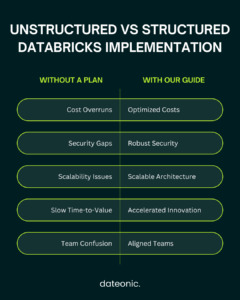
Before you write a single line of code, it’s crucial to develop a comprehensive implementation strategy. This initial planning phase will ensure that your Databricks environment is aligned with your organization’s goals and technical requirements.
- Assess Organizational Needs: Start by identifying your key business objectives. Are you looking to build scalable ETL pipelines, develop machine learning models, or enable real-time analytics? Clearly defining your use cases will guide your architectural decisions.
- Choose Your Cloud Provider: Databricks is available on AWS, Azure, and GCP. Your choice of cloud provider should be based on your existing infrastructure, team expertise, and specific service integrations you may need.
- Define Your Architecture: A well-defined architecture is the foundation of a successful Databricks implementation. This should include a plan for data governance using Unity Catalog to ensure a single source of truth for your data and AI assets.
- Identify Team Roles and Skills: A successful Databricks implementation requires a team with a diverse set of skills, including data engineering, data science, and platform administration. Identify the roles and responsibilities within your team and any skill gaps that need to be addressed.
Step 2: Setting Up Your Databricks Account and Workspace
With your strategy in place, the next step is to set up your Databricks account and workspace. This is where your team will collaborate on all of your data and AI projects.
- Sign Up for a Databricks Account: If you’re new to Databricks, you can start with a free trial to explore the platform’s features and capabilities.
- Create a Workspace: Once you have an account, you can create a workspace in your chosen cloud environment. This will serve as the central hub for your team’s Databricks activities.
- Configure Initial Settings: During the workspace setup, you’ll need to configure initial settings such as the region and compliance standards.
- Workspace Organization Best Practices: To ensure a scalable and maintainable environment, it’s important to establish best practices for workspace organization from the outset. This includes creating a logical folder structure for your notebooks, libraries, and other assets.
For more detailed instructions, refer to our guide on Creating and Configuring Databricks Workspaces.
Step 3: Configuring Clusters and Compute Resources
Databricks clusters provide the compute power for all of your data processing and analytics workloads. Proper cluster configuration is essential for optimizing both performance and cost.
- Create and Manage Clusters: Databricks offers different types of clusters to suit various workloads. Job clusters are ideal for running automated jobs, while all-purpose clusters are better suited for interactive analysis.
- Optimize Cluster Settings: To optimize for cost and performance, you can configure cluster settings such as autoscaling, which automatically adjusts the number of workers based on the workload, and select the appropriate instance types for your specific needs.
- Integrate with Git: For version control and collaboration, you can integrate your Databricks workspace with Git providers like GitHub, GitLab, and Azure DevOps.
- Security Configurations: Secure your clusters by configuring IAM roles, virtual private clouds (VPCs), and encryption to protect your data and resources.
| Cluster Type | Primary Use Case | Cost Model | Lifecycle |
|---|---|---|---|
| All-Purpose Cluster | Interactive analysis, data exploration, and collaborative notebook development. | Higher cost, billed per second while active. | Manually terminated or auto-terminates after inactivity period. |
| Job Cluster | Automated, scheduled data engineering or ML jobs. | Lower cost than All-Purpose clusters. | Automatically created for a job run and terminates when the job ends. |
| Photon Cluster | Performance-intensive SQL and DataFrame workloads. | Consumes DBUs at a higher rate but provides faster results. | Can be used for both All-Purpose and Job clusters. |
Learn more about cluster management best practices in our detailed article: Databricks Cluster Management Best Practices.
Step 4: Data Ingestion and Management
With your workspace and clusters set up, it’s time to start ingesting and managing your data. Databricks provides a variety of tools and connectors to make this process as seamless as possible.
- Ingest Data: You can ingest data into your Databricks environment from a wide range of sources, including cloud storage like Amazon S3 and Azure Blob Storage, using tools like Auto Loader for incremental data ingestion.
- Create Tables and Schemas in Unity Catalog: Use Unity Catalog to create and manage your tables and schemas, providing a centralized and governed repository for your data.
- Implement Data Pipelines with Delta Lake: Delta Lake, an open-source storage layer that brings reliability to data lakes, is the foundation of the Databricks lakehouse. Use Delta Lake to build robust and reliable data pipelines.
- Data Quality and Transformation: Implement data quality checks and transformations to ensure that your data is clean, accurate, and ready for analysis.
For a comprehensive guide on this topic, check out the article on Data Ingestion in Databricks: A Deep Dive.
Step 5: Building and Running Workflows
Databricks provides a collaborative environment for building and running data workflows using a variety of languages and tools.
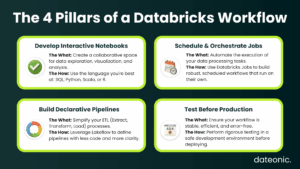
- Develop Notebooks: Databricks notebooks provide an interactive environment for data exploration, analysis, and visualization. You can develop notebooks in SQL, Python, Scala, or R.
- Schedule Jobs: Use Databricks Jobs to schedule and orchestrate your notebooks and other data processing tasks, creating automated and reliable workflows.
- Use Lakeflow for Declarative ETL Pipelines: Lakeflow simplifies the creation of ETL pipelines by allowing you to define them declaratively, reducing the amount of code you need to write.
- Testing Workflows: Before deploying your workflows to production, it’s essential to test them thoroughly in a development environment to ensure they are working as expected.
Step 6: Integrating Machine Learning and AI
Databricks provides a unified platform for the entire machine learning lifecycle, from data preparation to model deployment and monitoring.
- Train Models with MLflow: Use MLflow, an open-source platform for managing the ML lifecycle, to track experiments, package code into reproducible runs, and share and deploy models. You can also use Hyperopt for distributed hyperparameter tuning.
- Prototype AI Agents in the AI Playground: The AI Playground provides an interactive environment for prototyping and experimenting with AI agents and large language models (LLMs).
- Deploy Models to Production: Once your models are trained and validated, you can deploy them to production as real-time endpoints or for batch scoring.
- Best Practices for Scalable ML Operations: Follow best practices for MLOps to ensure that your machine learning workflows are scalable, reliable, and reproducible.
For more on this topic, explore our article on Top 5 Enterprise AI Platforms 2025.
Step 7: Testing, Security, and Compliance
As you move towards production, it’s crucial to have a robust testing, security, and compliance strategy in place.
- Perform Unit and Integration Testing: Implement unit and integration tests for your data pipelines and machine learning models to ensure their quality and reliability.
- Implement Access Controls and Auditing: Use Unity Catalog and other Databricks security features to implement fine-grained access controls for your data and other assets. Enable auditing to track all activities in your workspace.
- Ensure Compliance: Ensure that your Databricks environment is compliant with relevant industry standards and regulations, such as GDPR or HIPAA.
- Monitor for Issues: Set up monitoring and alerting to detect and respond to any issues that may arise in your staging environment before they impact production.
Our guide to Securing Your Databricks Environment provides more details on this important topic.
Step 8: Deploying to Production and Optimization
The final step is to deploy your workflows to production and continuously optimize them for performance and cost.
- Promote Workflows to Production: Use CI/CD tools like the Databricks SDK and Terraform to automate the promotion of your workflows from development to production.
- Set Up Monitoring and Alerting: Set up dashboards and alerts to monitor the performance and health of your production workloads.
- Optimize for Cost and Performance: Continuously monitor your cluster utilization and job performance to identify opportunities for optimization.
- Scale for Production Loads: As your data and workloads grow, you may need to scale your Databricks environment to meet the demand.
Learn more about production deployment strategies in our article: Databricks Production Deployment Strategies.
Conclusion
Implementing Databricks can be a transformative journey for any organization. By following this step-by-step guide, you can ensure a smooth and successful implementation that will empower your team to unlock the full potential of your data. Remember that a Databricks implementation is not a one-time project but an ongoing process of optimization and iteration.
For expert assistance with your Databricks implementation, contact Dateonic, a leading data and AI consultancy. Visit dateonic to learn more and get started.