
Databricks ships with a strong platform-level security baseline – but that baseline only goes so far. The moment you move a workload into production, the default settings leave significant gaps: open inbound ports on cluster nodes, permissive data-access grants, no IP restrictions, and credentials scattered across notebooks. Securing a Databricks workspace is a shared responsibility. Databricks secures the platform; you own the configuration.
This guide covers the workspace-level controls that actually matter – identity, network isolation, data encryption, governance, and ongoing monitoring – so you can move from “technically running” to genuinely hardened.
Summary of the 5 Security Pillars
| Security Pillar | Key Focus | Primary Tools & Features |
|---|---|---|
| 1. Identity & Access | Controlling who can enter the workspace | SSO, SCIM, OAuth Service Principals |
| 2. Network Isolation | Protecting network traffic and compute nodes | Private Link, Secure Cluster Connectivity |
| 3. Data Encryption | Protecting data at rest and credentials | Customer-Managed Keys (CMK), Secret Scopes |
| 4. Governance | Enforcing data-level access controls | Unity Catalog, Row Filters, Column Masks |
| 5. Monitoring | Tracking activity and configuration drift | Audit Logs, Security Analysis Tool (SAT) |
1. Identity & Access Controls
Weak identity configuration is the most common entry point for unauthorized access. Before any data moves, lock down who can reach the workspace and how.
- Restrict account admin roles to 2–3 named individuals – not teams, not shared accounts.
- Enable SSO via OIDC or SAML at the account level (mandatory on AWS; handled automatically on Azure and GCP).
- Enforce MFA at the identity provider level – not as an afterthought.
- Enable SCIM provisioning to keep users and groups in sync with your IdP automatically, eliminating manual offboarding risk.
- Set up identity federation to unify corporate identities across workspaces without duplicating user management.
- Replace Personal Access Tokens (PATs) for service workloads with service principals using OAuth or Azure AD tokens – while PATs now expire by default (maximum 730 days, or revoked after 90 days of inactivity), short-lived OAuth tokens are functionally superior and eliminate audit blind spots.
- Document and test emergency access / account recovery procedures before you need them.
Strong identity hygiene pairs directly with how you manage data permissions downstream. See the governance section for how Unity Catalog enforces access at the data layer.
2. Network Isolation & Connectivity
Every default Databricks Classic deployment exposes cluster nodes to inbound traffic. That needs to change before you go to production.
- Deploy the workspace in private subnets – no public inbound access to cluster nodes.
- Enable Secure Cluster Connectivity (SCC / No Public IP) to eliminate open inbound ports entirely; cluster nodes initiate outbound-only connections through a relay.
- If using Serverless Compute, remember that compute nodes run entirely within Databricks’ managed network perimeter. Secure these workloads by configuring Serverless Egress Controls and Private Link connections to your cloud storage.
- Configure IP Access Lists to restrict workspace UI and API access to trusted corporate network ranges.
- Deploy Private Link (AWS PrivateLink / Azure Private Link / GCP PSC) to keep control-plane traffic off the public internet.
- For Classic clusters, also configure back-end Private Link between the compute plane and the control plane.
- Use VPN or Direct Connect / ExpressRoute for on-premises connectivity – never route sensitive data over the public internet.
- Segment production and non-production into separate workspaces or VPCs to prevent lateral movement between environments.
If you’re unsure whether your workspace configuration differs between AWS and Azure, this breakdown of Databricks on Azure vs AWS covers the key network and deployment differences between the two clouds.
3. Data Encryption & Secrets Management
Encryption at rest protects data if storage is compromised. Secrets management prevents credentials from leaking through notebooks and job configs – a surprisingly common issue in real deployments.
- Enable Customer-Managed Keys (CMK) for managed services encryption. While this can technically be added retroactively on AWS and Azure (note: it will only encrypt new data, not existing data) and is strictly required at creation for GCP, it is highly recommended to enforce this at workspace creation via the API or Terraform across all clouds to ensure full coverage.
- Enable CMK for workspace root storage (DBFS) where applicable.
- On Azure: enable the storage firewall on the DBFS root storage account to block unauthorized access at the storage layer.
- Store all credentials in Databricks Secrets – never hardcode API keys, connection strings, or passwords in notebooks or job configs.
- Restrict secret scope access using ACLs scoped to specific users or groups, not workspace-wide.
- On Azure with compliance requirements: enable Virtual Network encryption via the Azure compliance security profile.
For teams working with AI models on sensitive internal data, this guide on running AI on internal data securely covers additional patterns for keeping data within your network boundary.
4. Governance & Data Access Controls
Data-level access controls are where security failures tend to cause the most visible damage – whether it’s a compliance audit failure or an actual data leak. Unity Catalog is the right layer for this.
- Enable and configure Unity Catalog as the single governance layer across all workspaces – it centralises permissions, lineage, and auditing in one place.
- Apply table- and column-level permissions explicitly – avoid wildcard grants like GRANT ALL ON CATALOG.
- Configure Row Filters and Column Masks for tables containing PII or regulated data, so sensitive fields are masked at query time without duplicating datasets.
- Enforce external location policies to prevent users from accessing storage paths outside approved locations.
- Disable direct DBFS access for end users and route all data access through Unity Catalog external locations.
- Use workspace-level egress controls to prevent data exfiltration to unauthorized storage accounts.
If you’re planning to migrate from Hive Metastore, the comparison of Unity Catalog vs Hive Metastore explains what changes and what you gain. For a structured implementation approach, see Dateonic’s Unity Catalog implementation service.
5. Monitoring, Auditing & Ongoing Posture
Security configuration drifts. Accounts accumulate. Permissions expand. Without continuous monitoring, your hardened baseline degrades over time without anyone noticing.
- Enable Diagnostic Logs / Audit Logs and route them to your SIEM or cloud-native monitoring (Azure Monitor, AWS CloudWatch) – these logs record every login, permission change, and data access event.
- Deploy Databricks’ Security Analysis Tool (SAT) to continuously assess workspace posture against Databricks best practices.
- Set up alerts for high-risk events: admin role changes, new PAT creation, and IP access list modifications.
- Enable Enhanced Security Monitoring (Azure Premium tier) for compliance-focused workspaces requiring deeper OS-level visibility.
- Enable Automatic Cluster Update to keep cluster runtime images patched against known vulnerabilities – this is an easy win that is frequently overlooked.
- Review SAT findings regularly – treat open findings with the same urgency as open CVEs in your application stack.
- For regulated industries: enable the Compliance Security Profile (HIPAA, PCI-DSS, HITRUST) – note this is a permanent workspace-level change that cannot be undone, so plan carefully.
Keeping clusters performant and cost-efficient is a related concern – this guide on optimizing Databricks clusters covers configuration patterns that also affect security posture (cluster policies, auto-termination, and access modes).
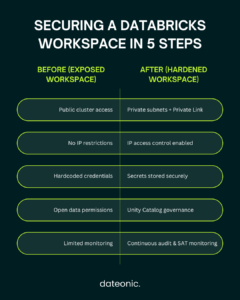
Bonus: Infrastructure-as-Code for Repeatable Security
One of the most practical things you can do is codify your security configuration. Provisioning workspaces manually – even from a checklist – creates configuration drift across environments. Terraform solves this.
Databricks maintains official hardened Terraform templates on GitHub for AWS, Azure, and GCP. These templates encode security-relevant defaults: private subnets, SCC, CMK configuration, Unity Catalog setup, and more.
Key reasons to use IaC for workspace security:
- Enforces early configuration: Some settings (like compliance profiles and full CMK coverage) are best applied at workspace creation – IaC enforces this by making creation the standard process.
- Prevents drift across dev, staging, and production workspaces.
- Auditable: Every change goes through version control and code review.
- Repeatable: Spinning up a new workspace for a new team or region inherits all security controls by default.
Getting These Configurations Right Across Multiple Workspaces
Running through this checklist once for a single workspace is manageable. Doing it consistently across a multi-workspace, multi-cloud environment – and keeping it that way as the platform evolves – is a different challenge entirely.
As an official Databricks implementation partner, Dateonic specialises in exactly this: workspace architecture, Unity Catalog governance, network hardening, and security posture assessment. Dateonic’s certified Databricks engineers have implemented these controls across production environments in fintech, healthcare, logistics, and other regulated industries.
Ready to harden your workspace?
Contact Dateonic to audit your current Databricks security posture.