
Enterprise data teams need to make data accessible without losing control over permissions, sensitive information, or downstream usage.
Historically, sharing data between teams or external organizations often meant exporting files, duplicating tables, or building additional pipelines. These approaches create operational overhead and make it harder to maintain consistent access policies, lineage, and data freshness.
Unity Catalog provides a centralized governance layer for data and AI assets in Databricks. Depending on who needs access and where they work, organizations can share data in Unity Catalog through standard privileges, workspace bindings, OpenSharing, or Databricks Clean Rooms.
This guide explains how to choose the appropriate sharing method, configure access, and avoid common security mistakes.
How to Share Data in Unity Catalog: Choose the Right Method
The correct approach depends on whether the recipient uses the same Unity Catalog metastore, a different Databricks environment, or a platform outside Databricks.
| Sharing scenario | Recommended method |
|---|---|
| Users in workspaces attached to the same metastore | Unity Catalog privileges and workspace bindings |
| Users in a different Unity Catalog metastore | Databricks-to-Databricks OpenSharing |
| External recipients without Databricks | Databricks-to-Open OpenSharing |
| Multiple organizations analyzing sensitive data together | Databricks Clean Rooms |
| Different users require different rows or columns | ABAC policies, row filters, column masks, or dynamic views |
When workspaces use the same Unity Catalog metastore, organizations generally do not need OpenSharing. The same governed objects can be made available through Unity Catalog permissions, provided the relevant catalogs are accessible from the recipient’s workspace.
OpenSharing is intended for sharing across metastores, Databricks accounts, clouds, or external platforms.
Understand the Unity Catalog Object Hierarchy
Before granting access, it is important to understand how Unity Catalog organizes data.
A Unity Catalog metastore is the top-level container assigned to one or more Databricks workspaces. Within the metastore, data assets use a three-level namespace:
catalog.schema.object
For example:
production.sales.transactions
The primary levels are:
| Object | Purpose |
|---|---|
| Metastore | Contains Unity Catalog securable objects and connects them to workspaces |
| Catalog | Usually represents a business domain, environment, or isolation boundary |
| Schema | Organizes related data and AI assets within a catalog |
| Object | A table, view, volume, function, model, or another governed asset |
Unity Catalog controls access through privileges granted on securable objects. Fine-grained controls such as ABAC policies, row filters, column masks, and workspace bindings can then add further restrictions.
Organizations migrating from older Databricks environments should also understand how Unity Catalog differs from the Hive Metastore, particularly in how metadata, permissions, and governance are managed across workspaces.
Share Data Between Workspaces Using the Same Metastore
Large organizations often use separate Databricks workspaces for engineering, analytics, machine learning, or production workloads.
When these workspaces are attached to the same Unity Catalog metastore, they can access the same catalogs and governed data assets. The organization does not need to copy the underlying tables or create a separate external share.
Grant the Required Privileges
To query a table, a user or group generally needs:
- USE CATALOG on the parent catalog;
- USE SCHEMA on the parent schema;
- SELECT on the table or view.
For example:
GRANT USE CATALOG
ON CATALOG production
TO `marketing_analysts`;
GRANT USE SCHEMA
ON SCHEMA production.sales
TO `marketing_analysts`;
GRANT SELECT
ON TABLE production.sales.transactions
TO `marketing_analysts`;
USE CATALOG and USE SCHEMA allow the principal to navigate the hierarchy, but they do not independently grant access to the data contained within it. The group still needs an object-level privilege such as SELECT.
For a more detailed explanation of privilege inheritance, ownership, SQL grants, and access reviews, see our guide to managing permissions in Databricks Unity Catalog.
Whenever possible, grant privileges to account-level groups rather than individual users. This makes access easier to review, revoke, and automate through identity management processes.
Control Access with Workspace-Catalog Bindings
By default, a catalog can be accessed from all workspaces attached to the same metastore. Permissions determine who can use it.
However, some organizations also need to control where the catalog can be accessed. For example, production data may need to remain available only from a restricted production workspace.
Workspace-catalog bindings allow administrators to associate a catalog with selected workspaces. A binding can override individual grants: even a user with SELECT cannot access a table from a workspace to which its catalog is not bound.
This creates two separate security checks:
- Who can access the data? Controlled through Unity Catalog privileges.
- From which workspace can they access it? Controlled through workspace bindings.
Workspace bindings are particularly useful when workspaces represent separate environments, business units, or regulatory boundaries. They should form part of a broader architecture covering identity, network access, compute policies, auditability, and other Databricks security best practices.
Share Data Across Databricks Environments with OpenSharing
When the provider and recipient use different Unity Catalog metastores, standard Unity Catalog grants are not sufficient.
OpenSharing provides governed, read-only access to data and AI assets without requiring the provider to create and maintain a separate copy for each recipient.
Databricks currently supports three OpenSharing models.
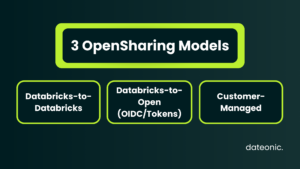
Databricks-to-Databricks OpenSharing
Use this option when the recipient has access to a Unity Catalog-enabled Databricks workspace.
The recipient provides a sharing identifier associated with their metastore. The provider then:
- Creates a share.
- Adds selected data or AI assets.
- Creates a recipient object using the sharing identifier.
- Grants the recipient access to the share.
The shared assets become discoverable in the recipient’s Databricks environment. No credential file needs to be manually exchanged.
Databricks-to-Open OpenSharing
Use Databricks-to-Open sharing when the recipient does not use Databricks or does not have access to a Unity Catalog-enabled workspace.
Recipients can consume supported shared data through tools such as:
- pandas;
- Apache Spark;
- Power BI;
- Tableau;
- compatible Iceberg clients.
Authentication can use either:
- OIDC federation with the recipient’s identity provider;
- a Databricks-issued bearer token and credential file.
OIDC federation uses short-lived tokens and can support identity-provider controls such as MFA. It is generally preferable when the recipient has a compatible identity provider and needs user-level or application-level authentication.
Bearer-token authentication remains available when OIDC federation is not practical.
Customer-Managed OpenSharing
Organizations can also operate a customer-managed implementation of the open-source sharing server.
This approach provides greater control but also creates additional operational responsibility. Most organizations already using Databricks and Unity Catalog will use the Databricks-managed sharing models instead.
Create an OpenSharing Share
An OpenSharing configuration uses three primary objects:
- Share: a governed container holding the assets being shared;
- Recipient: an object representing the organization or users receiving access;
- Provider: the organization making assets available.
The following simplified SQL example creates a share and adds a table:
CREATE SHARE IF NOT EXISTS marketing_share
COMMENT ‘Governed transaction data for an external marketing partner’;
ALTER SHARE marketing_share
ADD TABLE production.sales.transactions;
For a Databricks-to-Databricks recipient, create the recipient using the sharing identifier supplied by the other organization:
CREATE RECIPIENT IF NOT EXISTS marketing_partner
USING ID ‘<recipient-sharing-identifier>’
COMMENT ‘External marketing partner’;
Then grant the recipient read access to the share:
GRANT SELECT
ON SHARE marketing_share
TO RECIPIENT marketing_partner;
Access can later be removed without modifying the underlying table:
REVOKE SELECT
ON SHARE marketing_share
FROM RECIPIENT marketing_partner;
The owner of the share must retain the required permissions on the assets included in it. For a table, this generally includes USE CATALOG, USE SCHEMA, and SELECT. Losing the required privileges can make the asset unavailable through the share.
For production implementations, teams should also establish:
- a clear owner for every share;
- an expiration or review process for recipient access;
- separate recipients for separate organizations;
- secure authentication and credential rotation;
- monitoring for share and recipient activity.
Avoid Sharing More Data Than the Recipient Needs
Adding an entire schema to a share can simplify administration, but it also makes current and future supported assets in that schema available to recipients.
For tightly controlled external access, sharing individual tables, views, or selected partitions is usually safer.
OpenSharing supports partition-based sharing. Recipient properties can also be used to expose different partitions to different recipients through the same share.
For example:
ALTER SHARE partner_transactions
ADD TABLE production.sales.transactions
PARTITION (
country = CURRENT_RECIPIENT().country
);
This pattern can reduce the need to create separate physical tables or separate shares for every region or customer. However, recipient properties and partitioning rules should be carefully tested before production use.
Apply Fine-Grained Access Controls
Object-level privileges determine whether a principal can access a table. Enterprise governance often also requires controlling which rows or column values the principal can see.
Unity Catalog supports several complementary mechanisms.
Attribute-Based Access Control
Attribute-Based Access Control, or ABAC, uses governed tags and centrally managed policies.
For example, an organization could tag columns containing personal information and apply a masking policy to all tagged columns within a catalog or schema.
ABAC is appropriate when the same security rule needs to be applied consistently across many tables. Databricks recommends it for centralized, scalable row filtering and column masking.
Table-Level Row Filters
A row filter evaluates each query and restricts the records returned to a user.
Typical examples include:
- regional managers seeing only their assigned region;
- customers seeing only records associated with their tenant;
- business units seeing only their own cost centers.
Column Masks
A column mask modifies or hides values based on the identity or permissions of the querying user.
For example, an authorized compliance group could see complete email addresses while standard analysts receive masked values.
Dynamic Views
Dynamic views provide more flexible SQL-based logic when the returned dataset needs to change according to the querying principal.
They are useful when security requirements involve multiple joins, derived columns, or conditional transformations that are more complex than a single table-level filter.
Check Sharing Compatibility
Not every fine-grained control behaves identically through OpenSharing.
Tables with manually applied table-level row filters or column masks have sharing limitations. Depending on the scenario, teams may need to share an appropriately designed view or use ABAC-based controls with the required exemptions and ownership configuration.
These restrictions should be tested during architecture design rather than discovered after external access has already been promised.
Organizations implementing Unity Catalog across multiple teams and environments should establish these rules as part of a structured Unity Catalog implementation, rather than adding disconnected permissions after the platform is already in production.
Use Databricks Clean Rooms for Sensitive Collaboration
Some use cases require multiple organizations to analyze combined datasets without giving either party direct access to the other party’s underlying raw data.
Databricks Clean Rooms use OpenSharing and serverless compute to provide a controlled environment for this type of collaboration.
Common use cases include:
- joint campaign measurement;
- customer overlap analysis;
- fraud and risk analysis;
- research involving data from multiple organizations;
- privacy-sensitive data enrichment.
Clean Rooms should not be treated as an automatic guarantee that sensitive information can never be exposed.
Organizations still need to control:
- which notebooks and analyses are approved;
- which datasets can be used;
- what outputs participants can access;
- how results are reviewed;
- whether aggregated results could identify individual records.
Clean Rooms reduce the need to exchange raw datasets, but the privacy and compliance model still depends on properly designed policies and approved workloads.
Monitor Shared Data with Auditing and Lineage
Secure data sharing requires visibility after access has been granted.
Audit Logs
Databricks audit logs can be used to monitor account and workspace activity, including events related to data access and sharing configuration.
The audit log system table is available at:
system.access.audit
At the time of writing, the audit log system table is in Public Preview. Its availability and regional scope should therefore be considered when designing a long-term audit architecture.
Audit logs can help security and platform teams investigate:
- who created or modified a share;
- when a recipient was created;
- changes to permissions;
- unusual access patterns;
- activity associated with specific workspaces.
Audit logging supports governance and compliance processes, but logging alone does not make a platform compliant with GDPR, HIPAA, or another regulatory framework.
Data Lineage
Unity Catalog automatically captures lineage for supported queries executed through Databricks interfaces.
Lineage can show:
- which sources populate a table;
- which notebooks and jobs transform the data;
- which tables, dashboards, or models depend on it;
- how individual columns move through supported transformations.
This helps teams assess the impact of changing a shared dataset and investigate unexpected downstream results.
Lineage is strongest for assets and operations observed by Unity Catalog. External systems may require external lineage metadata or additional integration to create a complete end-to-end view.
Common Unity Catalog Data-Sharing Mistakes
Granting Access at Too High a Level
Granting broad privileges on an entire catalog can expose significantly more data than intended.
Apply the principle of least privilege and grant access at the narrowest practical level. Use group-based permissions and review inherited privileges before enabling external sharing.
Treating Workspaces as the Only Security Boundary
Separate workspaces do not automatically provide complete data isolation when they use the same metastore.
Use workspace bindings when selected catalogs must be available only from specific workspaces.
Sharing Entire Schemas Without Reviewing Future Exposure
Schema sharing can include assets added after the share is created.
Only share an entire schema when its purpose, ownership, and future contents are clearly controlled.
Using Long-Lived Credentials Without Rotation
Bearer-token credentials need secure distribution, expiration, monitoring, and rotation.
Use OIDC federation where it is supported and operationally appropriate.
Applying Filters Without Testing Recipient Behavior
Row filters, column masks, dynamic views, ABAC policies, and recipient properties have different requirements and sharing limitations.
Test the access model using representative identities before releasing data to a real recipient.
Bypassing Unity Catalog
Direct cloud-storage access, legacy mounts, and unmanaged exports can bypass centralized Unity Catalog controls.
Where possible, consumers should access governed tables, views, volumes, or shares rather than underlying storage paths.
Assuming Auditing Equals Compliance
Audit logs provide evidence and operational visibility. They do not replace retention policies, identity governance, legal review, incident response, or broader regulatory controls.
Unity Catalog Data-Sharing Checklist
Before sharing production data, confirm that:
- the correct sharing method has been selected;
- the source assets are registered in Unity Catalog;
- access is granted to groups rather than individual users where possible;
- USE CATALOG, USE SCHEMA, and object-level privileges follow least privilege;
- workspace bindings reflect the intended environment boundaries;
- only required tables, views, columns, rows, or partitions are exposed;
- ABAC policies, filters, masks, and dynamic views have been tested;
- external recipients have separate recipient objects;
- OIDC or bearer-token authentication has been selected deliberately;
- credential rotation and access reviews have owners;
- audit logs and lineage are available to the responsible teams;
- the process for revoking access has been tested.
Build a Governed Data-Sharing Architecture
Unity Catalog makes it possible to share governed data without building a new export pipeline for every team or external partner.
However, secure sharing depends on more than creating a share object. Organizations need a well-designed catalog hierarchy, group-based permissions, appropriate workspace boundaries, fine-grained data controls, secure recipient authentication, and operational monitoring.
Dateonic helps enterprise teams design and implement production-ready Databricks environments, including Unity Catalog adoption, data governance, OpenSharing, platform security, and cost optimization.
Explore our Databricks Consulting services to learn how we help organizations modernize fragmented data platforms and establish secure foundations for analytics and AI.
Ready to improve data governance in your Databricks environment? Talk to a Databricks expert.
Frequently Asked Questions
How do I share data in Unity Catalog?
For users in workspaces connected to the same metastore, grant the required USE CATALOG, USE SCHEMA, and object-level privileges.
For users in another Unity Catalog metastore, use Databricks-to-Databricks OpenSharing. For recipients outside Databricks, use Databricks-to-Open OpenSharing. Sensitive multi-party collaboration may require Databricks Clean Rooms.
Does an OpenSharing recipient need a Databricks account?
No. Databricks-to-Open OpenSharing allows recipients to access supported shared data without having a Databricks workspace.
They can authenticate through OIDC federation or bearer-token credentials and use supported external tools such as pandas, Spark, Power BI, or Tableau.
Can I share data across Databricks workspaces without copying it?
Yes. If both workspaces are attached to the same Unity Catalog metastore, they can use the same governed data assets through Unity Catalog privileges.
When workspaces use different metastores, Databricks-to-Databricks OpenSharing can provide access without maintaining a separate recipient-specific copy.
Can I share machine learning models through Unity Catalog?
Models registered in Unity Catalog can be governed and accessed across workspaces attached to the same metastore.
OpenSharing also supports sharing AI models in supported Databricks-to-Databricks scenarios. For the broader model lifecycle, see how to build and manage machine learning models in Databricks.
Verify the supported asset types before designing a workflow for recipients outside Databricks.
What is the difference between Unity Catalog and OpenSharing?
Unity Catalog is the governance layer that manages data and AI assets, permissions, ownership, lineage, auditing, and fine-grained access controls.
OpenSharing is the protocol and sharing model used to make selected Unity Catalog assets available across separate Databricks environments or to external platforms.
Is OpenSharing the same as Delta Sharing?
Current Databricks documentation uses the name OpenSharing for its governed data-sharing capabilities and protocols. Many older articles, integrations, and search queries still use the name Delta Sharing.
Content targeting Unity Catalog data sharing can mention both terms, but new implementation guidance should use the current OpenSharing terminology.