
Running data pipelines manually works fine in development. In production, it breaks fast – missed windows, stale data, and on-call engineers scrambling at 3 AM. If you want to schedule data pipelines in Databricks reliably at scale, automation isn’t optional; it’s the baseline.
Databricks addresses this with Lakeflow Jobs (formerly Databricks Jobs) – the platform’s native, fully managed orchestration layer that lets you define, schedule, and monitor multi-task pipelines without leaving the Lakehouse. In this guide you’ll learn:
- How Jobs, Tasks, and Triggers work together
- How to schedule a pipeline via the UI step by step
- How to automate deployments with the API, CLI, and Asset Bundles
- Production best practices for reliability and cost control
- Common scheduling patterns for ETL, streaming, and ML workloads
Understanding the Building Blocks of Databricks Pipeline Scheduling
Before you create your first schedule, it’s worth understanding the three core primitives.
Jobs are the primary resource for orchestrating work in Databricks. Each Job is visualized as a DAG (Directed Acyclic Graph) of tasks that can run sequentially, in parallel, or conditionally. Jobs hold all configuration: compute, schedule, notifications, and retry logic.
Tasks are the individual units of work inside a Job. Supported task types include:
- Notebook – interactive notebooks in Python, SQL, Scala, or R
- Python script – .py files stored in a repo or DBFS
- SQL – queries and dashboards via Databricks SQL
- Pipeline – Lakeflow Spark Declarative Pipelines (formerly Delta Live Tables)
- dbt – dbt Cloud or dbt Core jobs
- Spark JAR / Spark Submit – for JVM-based workloads
| Task Type | Best Used For | Typical Example |
|---|---|---|
| Notebook | Interactive workflows | PySpark ETL notebook |
| Python Script | Production Python jobs | Batch ingestion script |
| SQL | Analytics & transformations | Aggregation queries |
| Pipeline | Declarative data pipelines | Bronze → Silver processing |
| dbt | SQL transformation workflows | Data modeling |
| Spark JAR | JVM-based workloads | Scala processing jobs |
Triggers define when a Job runs. There are three main types:
- Time-based – a cron expression (e.g., 0 2 * * * for every day at 2 AM)
- Event-based – fires when new files arrive in a cloud storage location
- On-demand / API-triggered – invoked programmatically via REST API or CI/CD pipeline
Two limits worth knowing before you design at scale: Databricks supports up to 12,000 saved Jobs per workspace and up to 1,000 tasks per Job.
Step-by-Step: Schedule Data Pipelines in Databricks via the Jobs UI
The Jobs UI is the fastest way to get a scheduled pipeline running. Here’s the full walkthrough:
- Open the Jobs section
Navigate to Jobs & Pipelines in the left sidebar of your Databricks workspace. - Create a new Job
Click Create → Job, give it a descriptive name, and configure your first task – choose Notebook, Python script, or a Pipeline tile depending on your workload. - Set compute
Select Serverless compute where available. It requires no cluster setup, scales automatically, and charges only for active runtime – ideal for scheduled pipelines where cold-start overhead is acceptable. - Add a schedule trigger
Click Add trigger, then choose:
- Simple interval – e.g., every 6 hours
- Advanced cron – for precise timing using standard cron syntax
- File arrival – for event-driven ingestion patterns
- Chain tasks
Click Add task to add downstream steps. Set dependency rules:
- Sequential – task B only starts when task A succeeds
- Parallel – tasks B and C start simultaneously after task A
- Conditional – branch logic using if/else tasks
- Configure notifications
Set email or webhook alerts for:
- Job success
- Task failure
- Duration threshold exceeded (SLA breach)
- Save and activate
Click Save – the Job is now live and will run on its defined schedule.
💡 Quick start tip: You can also add a schedule directly from the Pipeline UI, which automatically creates a single-task Job. This is convenient for simple pipelines, but the Jobs UI gives you richer trigger options, task chaining, and dependency control.
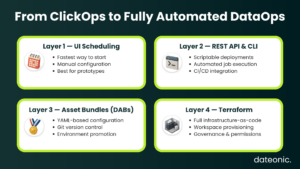
Beyond the UI – Automate Databricks Jobs with the API, CLI & Asset Bundles
For teams operating at scale, the UI is just the starting point. Production automation means code-defined, version-controlled, CI/CD-integrated pipelines.
There are four main approaches to programmatic automation:
Databricks Jobs REST API (v2.1)
The API gives you full CRUD control over Jobs. Key endpoints:
- POST /api/2.1/jobs/create – create a new job
- POST /api/2.1/jobs/update – partial update (add tasks, change schedule)
- POST /api/2.1/jobs/reset – full overwrite of job configuration
- POST /api/2.1/jobs/run-now – trigger an immediate run
- GET /api/2.1/jobs/runs/get – monitor run status
Databricks CLI
The CLI wraps the API in scriptable commands, making it easy to integrate job management into shell scripts, Makefiles, and CI/CD pipelines. It supports the same create/update/run lifecycle as the REST API.
Databricks Asset Bundles (DABs)
DABs are the current production standard for defining Jobs and pipeline configurations in YAML, versioned alongside your source code in Git. A DAB project captures:
- Job definitions (tasks, compute, schedule, notifications)
- Pipeline configurations
- Environment-specific variable overrides (dev/staging/prod)
This replaces older dbx-style deployments and makes promotion through environments deterministic and auditable. If you’re encountering challenges rolling this out, see Common Databricks Implementation Challenges for patterns that teams typically hit.
Infrastructure-as-Code with Terraform
Pair DABs with the Databricks Terraform Provider for full workspace-level provisioning – clusters, Jobs, Unity Catalog permissions, and access policies all defined as code.
External orchestrators
Apache Airflow and Azure Data Factory can trigger Databricks Jobs via the REST API when cross-platform orchestration is required – for example, coordinating Databricks pipelines with external database loads or SaaS API calls.
Production Best Practices for Scheduling and Automating Databricks Pipelines
Getting a pipeline scheduled is the easy part. Keeping it reliable in production requires deliberate configuration across several dimensions.
Retries and error handling
Configure automatic task retries with a max attempt count and delay interval. For more complex failure logic:
- Use if/else tasks to branch on success or failure outcomes
- Use for-each loops to iterate over a list of parameters (e.g., processing multiple date partitions)
- Set task-level timeout limits to prevent runaway jobs consuming resources
Parameterization
Hardcoded values in pipelines break environment portability. Use:
- Job Parameters – pass runtime values like proc_date, env, or source_table at run time
- Task Values – share computed outputs between tasks (e.g., a row count computed in task A checked in task B)
This pattern lets the same codebase run across dev, staging, and production without modification – a significant reduction in deployment risk.
Cluster strategy
For scheduled jobs, always prefer job clusters (ephemeral, created at run start, terminated at run end) over all-purpose clusters. Benefits:
- Right-sized compute per task, not one cluster for everything
- No resource contention with interactive workloads
- Lower cost – you only pay while the job runs
To go further on cost control, How to Reduce DBU Consumption in Databricks covers cluster sizing, Photon usage, and serverless trade-offs in detail.
Monitoring and observability
Production pipelines need more than a success/failure email:
- Set expected duration and maximum duration thresholds on each job to catch SLA drift
- Use Lakehouse Monitoring to track data quality metrics (null rates, row counts, schema drift) at the Delta table level
- Configure Databricks SQL Alerts for condition-based notifications – e.g., alert if a table hasn’t been updated in 4 hours
For teams looking to go deeper, Databricks Performance Tuning Services covers query optimization, cluster configuration, and observability patterns in production environments.
CI/CD integration
Gate all pipeline deployments through a structured promotion flow:
- Developer pushes changes to a feature branch
- GitHub Actions (or Azure DevOps) runs tests against a dev workspace using DABs
- A pull request merge triggers deployment to the staging environment
- After QA sign-off, production deployment runs automatically
This workflow ensures no untested code reaches production pipelines, and every deployment is reversible via Git history.
Real-World Scheduling Patterns for ETL, Streaming & ML Pipelines
Different workloads call for different scheduling strategies. Here are the most common patterns in production Databricks environments.
Nightly batch ETL
The most common pattern: a cron-triggered Job runs nightly, processing data through Bronze → Silver → Gold Delta Lake layers. Tasks are chained sequentially, with each layer depending on the successful completion of the previous one.
Event-driven ingestion
Use a file arrival trigger combined with Auto Loader to process files incrementally as they land in cloud storage (S3, ADLS, GCS). This eliminates polling, reduces latency, and handles late-arriving data gracefully.
Continuous streaming pipelines
For sub-minute latency requirements, configure a Lakeflow Spark Declarative Pipeline in continuous mode – it runs indefinitely without a cron trigger. Monitor stream health using backlog metrics and processing lag via the pipeline’s observability dashboard.
ML retraining pipelines
Scheduled Jobs that:
- Pull fresh training data from Delta tables
- Retrain the model and log parameters, metrics, and artifacts to MLflow
- Register the new model version in the MLflow Model Registry
- Optionally trigger a deployment step if validation metrics meet thresholds
For a detailed walkthrough of building and scheduling ML workflows, see How to Build Machine Learning Models in Databricks and Databricks MLflow Tutorial Step-by-Step.
Dashboard refresh
Schedule Databricks SQL Jobs to run aggregation queries and refresh materialized views on a defined cadence – keeping BI dashboards current with production data without manual intervention.
Ready to Run Production-Grade Pipelines on Databricks?
Lakeflow Jobs gives you everything you need to schedule data pipelines in Databricks reliably at scale:
- Time-based and event-based scheduling with standard cron syntax
- Multi-task DAGs with sequential, parallel, and conditional dependencies
- Automatic retries, parameterization, and runtime task values
- Full API, CLI, and Asset Bundle support for code-first deployments
- End-to-end observability from cluster metrics to data quality
Knowing the platform capabilities is step one. Architecting pipelines that are maintainable, cost-efficient, and resilient across environments – that’s where most teams need support.
If you want expert guidance on designing, automating, and optimizing your Databricks data pipelines, the team at Dateonic specializes in exactly that – from workflow architecture to CI/CD deployment.