
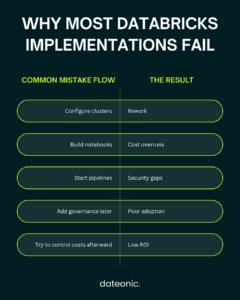
Most Databricks implementations don’t fail because of the platform – they fail because of the plan. Or rather, the lack of one. Teams dive into cluster configuration and notebook setup without first aligning on use cases, governance structure, or how success will be measured. The result is rework, cost overruns, and a platform that never delivers the value that justified the investment.
This Databricks implementation checklist is designed to change that. It covers every major phase of a Databricks rollout – from pre-implementation planning all the way through team enablement – in a format that data teams, IT managers, and non-specialists can actually use. Whether you’re starting fresh or trying to bring structure to a deployment already in progress, use this as your reference guide.
Pre-Implementation: Planning & Strategy
Before touching any technical setup, align Databricks with your business goals.
Skipping the planning phase is one of the most common Databricks implementation challenges teams face. Business alignment and use case scoping must come first – otherwise, you’re building without a blueprint.
- ☐ Define primary use cases (ETL pipelines, real-time analytics, ML/AI, fraud detection)
- ☐ Identify key stakeholders: data engineers, analysts, business owners
- ☐ Choose your cloud provider – AWS, Azure, or GCP – based on existing infrastructure
- ☐ Define clear success metrics: cost reduction, processing speed, time-to-insight, ROI
- ☐ Select 1–2 high-impact use cases to start – avoid trying to solve everything at once
Starting narrow and expanding deliberately is far more effective than attempting a full-scale rollout on day one. Stakeholder alignment at this stage prevents scope creep and conflicting priorities further down the road.
Architecture & Environment Setup
A well-defined architecture is the foundation of a successful Databricks implementation.
The architecture decisions made here will shape everything downstream – governance, pipeline design, cost structure, and team workflows. Getting this right early pays dividends across the entire project lifecycle.
- ☐ Choose Lakehouse architecture with Delta Lake as the primary storage layer
- ☐ Create separate workspaces for Dev, QA, and Production
- ☐ Configure workspace settings: region, compliance standards, folder structure
- ☐ Use Infrastructure as Code (Terraform or ARM templates) for repeatable provisioning
- ☐ Set up Unity Catalog from day one as the single governance layer (catalogs, schemas, tables)
Unity Catalog in particular should never be an afterthought. Retrofitting it into an existing environment after pipelines and permissions are already in place is significantly more disruptive than building it in from the start. See Dateonic’s dedicated guide to Databricks Unity Catalog implementation for a deeper look at setup best practices.
Security & Identity Management
Security is not a final step – it’s a design constraint.
Based on Databricks’ official security best practices, the following configuration items should be addressed during initial setup, not bolted on after go-live. For a full walkthrough of workspace security hardening, refer to Dateonic’s guide on how to secure Databricks workspaces.
- ☐ Assign account admin roles to 2–3 trusted individuals only
- ☐ Configure SSO with OIDC or SAML for centralized authentication
- ☐ Enable MFA at the identity provider level
- ☐ Set up SCIM provisioning for automated user and group synchronization
- ☐ Implement Role-Based Access Control (RBAC) across workspaces
- ☐ Apply row-level and column-level access controls for sensitive datasets
- ☐ Enable network segmentation: isolate production from non-production environments
The identity and access layer is where compliance failures tend to originate. Incorrect row-level access controls, missing deletion capabilities, and absent data lineage create GDPR and CCPA exposure that surfaces – at the worst possible time – during audits.
Data Ingestion & Pipeline Configuration
Reliable data in means reliable insights out.
Before any analytics or ML workload runs, the pipeline layer needs to be structurally sound. Data quality problems at ingestion compound through every downstream layer.
- ☐ Define a landing zone catalog for raw external data (e.g., Salesforce, HubSpot, S3)
- ☐ Implement Delta Live Tables for reliable, self-healing data pipelines
- ☐ Configure Auto Loader for incremental ingestion from cloud storage
- ☐ Apply data quality checks and transformation rules before loading to production
- ☐ Adopt the Medallion Architecture to organize data across layers:
| Layer | Purpose |
|---|---|
| Bronze | Raw, unprocessed data as ingested from source systems |
| Silver | Cleaned, validated, and conformed data |
| Gold | Aggregated, business-ready data for analytics and reporting |
The Medallion Architecture ensures descriptive analytics are reliable before any predictive or prescriptive workload is built on top. Teams that skip this layering often find themselves firefighting data quality issues rather than building new capabilities.
CI/CD & Development Workflow
Code that isn’t version-controlled is a liability.
A disciplined development workflow is what separates a production-ready Databricks environment from a collection of notebooks that only one engineer understands.
- ☐ Store all notebooks, scripts, IaC configs, and job definitions in Git
- ☐ Create feature branches for development; enforce no direct edits to QA or Production
- ☐ Use Databricks Asset Bundles (DAB) to deploy code, jobs, and infrastructure as a single unit
- ☐ Set up a CI/CD pipeline – GitHub Actions or Azure DevOps are common choices
- ☐ Add automated security scans (Checkov, Bandit, CodeQL) within the CI pipeline
- ☐ Implement automated rollback mechanisms for failed deployments
Databricks Asset Bundles are the current recommended approach for packaging and deploying Databricks projects. They allow teams to define notebooks, jobs, pipelines, and cluster configurations together – making environments reproducible and deployments consistent.
Monitoring, Cost Control & Optimization
You can’t manage what you can’t measure.
Cost overruns from cluster mismanagement are one of the most common and avoidable problems in DIY Databricks implementations. Clusters sized for peak load running near-idle during off-peak hours, autoscaling not configured, and Photon not enabled on the right workloads – these inefficiencies compound silently. For a detailed technical guide, see Dateonic’s architect’s guide to reducing DBU consumption.
- ☐ Enable cluster auto-scaling and auto-termination policies on all interactive and job clusters
- ☐ Enable the Photon engine for columnar, CPU-intensive workloads
- ☐ Use the Security Analysis Tool (SAT) for ongoing security posture monitoring
- ☐ Set up budget alerts and cloud cost dashboards (AWS Cost Explorer, Azure Cost Management)
- ☐ Review cluster utilization regularly and right-size compute per workload class
- ☐ Monitor pipeline performance and configure SLA alerts for data freshness
Photon is Databricks’ native vectorized query engine. Enabling it on the right workloads – particularly large-scale aggregations and joins – can dramatically reduce both runtime and DBU spend. For teams looking to go deeper on performance, Dateonic’s Databricks performance tuning services cover cluster optimization, query profiling, and workload-specific tuning.
Team Enablement & Governance Adoption
A platform no one understands is a platform no one trusts.
Technical implementation can be completed perfectly and still fail if the people who need to use it aren’t equipped to do so. Governance adoption is as much a people challenge as it is a technical one.
- ☐ Document data ownership and stewardship responsibilities clearly
- ☐ Train business users to access dashboards and Genie Spaces from the Production workspace only
- ☐ Run onboarding sessions for data engineers and analysts covering Unity Catalog, Delta Lake, and cluster usage
- ☐ Establish a regular cadence for audit log reviews to maintain compliance
- ☐ Build a data catalog with descriptions, owners, and lineage for all key datasets
The goal of this phase is to make governance self-sustaining rather than dependent on a handful of individuals. When data ownership is documented, audit logs are reviewed regularly, and users know where and how to access data, the platform operates as designed – rather than around its intended design.
Need Help Executing This Checklist?
Most teams that attempt a Databricks implementation without in-house platform expertise encounter the same set of problems: governance decisions made too late, clusters misconfigured from the start, pipelines that work in dev but fail in production, and costs that quietly exceed the original budget.
Dateonic is an official Databricks consulting partner with a fully certified team of data engineers. Their services span the full implementation lifecycle:
- Architecture design – Lakehouse structure, workspace topology, Delta Lake setup
- Workflow optimization – Pipeline performance, cluster right-sizing, DBU cost management
- Governance & Unity Catalog – Access controls, lineage, compliance configuration
- Training & support – Onboarding for engineers and business users, ongoing advisory
Dateonic works across logistics, fintech, retail, energy, and manufacturing – with a track record of implementations that deliver measurable business outcomes.
Contact Dateonic for a free consultation →
For a broader look at the partner landscape, see Top 5 Databricks Consultancy Companies.